Superb quality and spec AB-Com PULSe 4K SE. Crazy offer! Only £99! FREE UK DELIVERY! 4K UHD, Enigma 2, Multiboot 4 images & more!...
Superb quality and spec AB-Com PULSe 4K Rev II Twin Satellite tuner only £149! FREE UK DELIVERY! 4K UHD, Enigma 2, SATA HDD facility, Multiboot 4 images & more!...

[VU+ Solo2] Setup ViX Like Sky +HD (WIFE FRIENDLY)

tfi016304

New member
Joined
Jan 31, 2015
Messages
12
Reaction score
0
Points
0
Hi,

Forgive me for possibly asking a stupid question.

I purchased a VU+ SOLO2 with the HDD and ViX installed.

I have been trying to get things setup so that it works like SKY HD (Wife friendly or will be nagged to death) but I am struggling.

I got stuck with subtitles and was unable to remove them, then I somehow messed up the EPG, but I did manage to instal the MGcamd and when I installed the skin the box would not respond to the remote for about 15 seconds between presses.

I build computers so am not totally stupid, but this has got me lost. I have been trying to follow the guides but after hours and hours of pulling my hair out (now bald) have gave up.

Please help!!!!!!!!!
 
Hi,

Thank you for the information. I am at presently trying to setup the box and will let you know how things go.

Thanks again
tfi016304:thumbsup:
 
I use Vix image with bello 1080 skin. Run Auto Bouquet maker setting to your area. I find it to be much more user friendly than official box and you can customize it to your needs. My wife finds it easy to use. There are other skins which you may prefer. A bit of experimentation is required, but you will find it is nowhere near as daunting as you may think. Lots of help and advice on this forum

best wishes
 
Hi,

Need help with the EPG please.

I am trying to get the channels to display the same as sly with the numbers and icons, but only show the free HD channels ie BBC 1 HD and and the sly 1 and sports to be sd but in the correct place.

I have got the channel list in HD without the channel numbers, but can't figure out how to remove the encrypted HD and replace with SD.

Sorry to ask if it is simple, but I just can't figure it out.

Regards
tfi016304
:confused:
 
Hi,

Need help with the EPG please.

I am trying to get the channels to display the same as sly with the numbers and icons, but only show the free HD channels ie BBC 1 HD and and the sly 1 and sports to be sd but in the correct place.

I have got the channel list in HD without the channel numbers, but can't figure out how to remove the encrypted HD and replace with SD.

Sorry to ask if it is simple, but I just can't figure it out.

Regards
tfi016304
:confused:

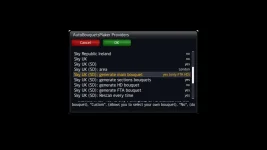
Menu/setup/service searchingautobouquetsMaker/providers/ scroll down to find Sky Uk SD press on that then set your area. I have got all the next headings set to YES ie '' generate main bouquet '' Green button to save
 
Hi,

Thank you to all who helped.

I have got everything working except that I can't get the epg to show channel numbers.:confused:
 
I would suggest that when using ABM, you do not say yes to creating the main bouquet. FTA HD or HD will be fine.
ABM first bouquet.webp

I hope you learn to stop calling channel/bouquet list "EPG". Unlike Sky, we and most of the world use EPG to mean Electronic Program Guide. Sky calls this Synopsis. I'm sure you will have questions about this soon, so best you are aware of the difference in terminology.

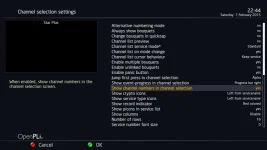
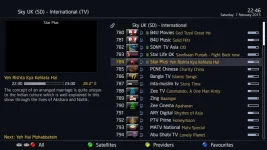
Anyway, if you want numbers to be next to the channel name, in the channel selection settings, toggle the feature to be on. Menu > System > Channel Selection Settings.
show channel number.webpnumbers next to chanenl names.webp
By default, this is the cumulative service/channel number. Hence reason for not saying yes to creating the main bouquet. If you enable alternate numbering, every bouquet (genre) will start at 1.

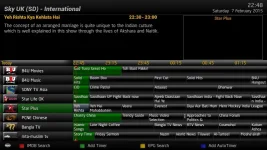
You won't be able to have numbers in the Graphical EPG. However, Lraizer's Autobouquets tags a number to the channel name, (this is optional). People assume this is a channel number, but in essence the number has been merged into the name.
no numbers in graphical epg.webp
 
Last edited:
Thank you to everyone for your help.

It has been appreciated that you have taken the time to help.

:thumbsup::thumbsup::thumbsup:
 

OpenViX Feeds Status

Back
Top