Superb quality and spec AB-Com PULSe 4K SE. Crazy offer! Only £99! FREE UK DELIVERY! 4K UHD, Enigma 2, Multiboot 4 images & more!...
Superb quality and spec AB-Com PULSe 4K Rev II Twin Satellite tuner only £149! FREE UK DELIVERY! 4K UHD, Enigma 2, SATA HDD facility, Multiboot 4 images & more!...

[VU+ Solo2] Softcam issue?

I have just done a little experiment that may (or may not) prove something.
I have restarted VIx 5.4.12 and disabled the softcam startup from the blue softcam menu.
I have stopped any oscams that were running.
I have restarted Oscam from the command prompt via telnet.
Oscam seems to work fine now. No long ecm times!

Also... Menu/information/memory seems to indicate that memory is no longer leaking as before (see my post #11)

Could it be the script that is starting the softcam that is causing the problem. Or am I out of my depth here? Help!
 
Last edited:
I have just done a little experiment that may (or may not) prove something.
I have restarted VIx 5.4.12 and disabled the softcam startup from the blue softcam menu.
I have stopped any oscams that were running.
I have restarted Oscam from the command prompt via telnet.
Oscam seems to work fine now. No long ecm times!
Also... Menu/information/memory seems to indicate that memory is no longer leaking as before (see my post #11)

Could it be the script that is starting the softcam that is causing the problem. Or am I out of my depth here? Help!

SoftcamManager sets the upperlimit in teh start command - I guess you just started the cam?
 
With
root@osmega:# /usr/softcams/oscam-latest -b &

If anyone else wants to try it
 
With
root@osmega:# /usr/softcams/oscam-latest -b &

If anyone else wants to try it

So looks like needs to be increased from 1024 - SoftcamManager uses :- ulimit -s 1024;/usr/softcams/" + startselectedcam + " -b
So maybe you could try this and see if OScam still works and then work your way up increasing the limit by 512 at a time
 
Thank you johnhoe for your effort, I am a novice, but sure it is not a oscam issue, and you have been trying hard to prove that it might be the vix img itself. on later updates.
 
My Mips ET10K has a default stack size of 8192.....

Code:
root@et10000:~# ulimit -a
core file size          (blocks, -c) 0
data seg size           (kbytes, -d) unlimited
scheduling priority             (-e) 0
file size               (blocks, -f) unlimited
pending signals                 (-i) 8747
max locked memory       (kbytes, -l) 64
max memory size         (kbytes, -m) unlimited
open files                      (-n) 16384
pipe size            (512 bytes, -p) 8
POSIX message queues     (bytes, -q) 819200
real-time priority              (-r) 0
[B]stack size              (kbytes, -s) 8192[/B]
cpu time               (seconds, -t) unlimited
max user processes              (-u) 8747
virtual memory          (kbytes, -v) unlimited
file locks                      (-x) unlimited
root@et10000:~#
 
SoftcamManager had a ulimit set to 512 way back in 2012, and was increased to 1024 in July 2020.

Ulimit prevents a user/process from grabbing too many resources.
 
Last edited:
Ok. So I have put the command line :-

root@osmega:# ulimit -s 1024; /usr/softcams/oscam-latest -b &

And Oscam starts perfectly and continues. Maybe its not ulimit after all as this is the value that softcam manager uses!
 
For those that want to test this:-

It is easier IMO to create a script with a text editor named "s56softcam.sh" as follows

#!/bin/sh
ulimit -s 1024;/usr/softcams/oscam-latest -b &

: exit 0


And place it in the directory /var/etc/rcS.d

I have also disabled Oscam startup in Softcam manager and under that menu also prevented a softcam check and restart.

This then gives an editable bootup script.
 
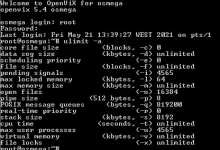
What does ulimit -a come up with while oscam is running ok?
 
.... so it's back to the default. I just wondered what the scope of ulimit was. Still no wiser. :)

EDIT: If you know the PID of the oscam process (nnnn),

cat /proc/nnnn/limits

will give its specific details.
 
Last edited:
So suspicions back to the softcam manager... but not apparently anything to do with ulimit...
 
.... so it's back to the default. I just wondered what the scope of ulimit was. Still no wiser.

EDIT: If you know the PID of the oscam process (nnnn),

cat /proc/nnnn/limits

will give its specific details.

Ok will show you what I see shortly.
 
So suspicions back to the softcam manager... but not apparently anything to do with ulimit...

Maybe run debug log for 30 minutes with softcammanager and without and see what is different. Also if you use the web interface to look at your card does it show anything interessting in the log
 
Image2.webp

Doesn't seem to like the cat/proc/nnnn/limits command
 
Here is an updated softcam manager with limit doubled. Goes in /usr/lib/enigma2/python/Plugins/SystemPlugins/ViX

Backup original .pyo file first
Transfer new one
Restart. A .pyo file will be craeted
Delete the .py you had transferred
 

Attachments

OpenViX Feeds Status

Back
Top