Superb quality and spec AB-Com PULSe 4K SE. Crazy offer! Only £99! FREE UK DELIVERY! 4K UHD, Enigma 2, Multiboot 4 images & more!...
Superb quality and spec AB-Com PULSe 4K Rev II Twin Satellite tuner only £149! FREE UK DELIVERY! 4K UHD, Enigma 2, SATA HDD facility, Multiboot 4 images & more!...

[Mut@nt HD2400] [SOLVED] Serious device mounting issues

maxben

Forum Supporter
Donated Member
Joined
Nov 10, 2014
Messages
352
Reaction score
0
Points
16
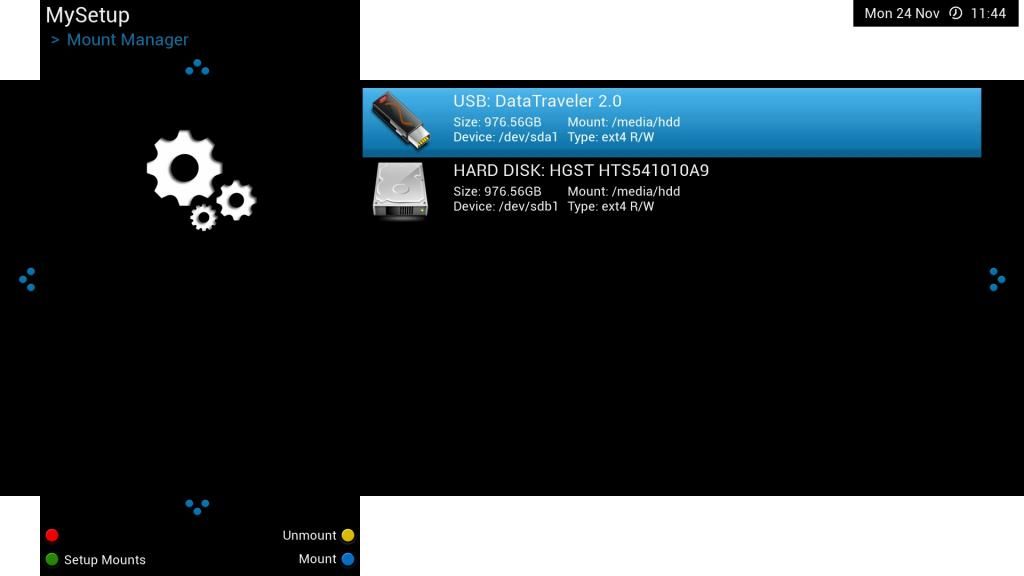
USB doesn't mount at boot correctly when setup using mount manager.

The USB mount only shows at all if I manually create /media/usb.

USB stick mounts correctly if plugged in after booting.

I think the info below will best illustrate the issue.
Code:
root@mutant2400:~# df -h
Filesystem                Size      Used Available Use% Mounted on
ubi0:rootfs             891.8M     79.7M    812.1M   9% /
devtmpfs                628.1M      4.0K    628.1M   0% /dev
tmpfs                    64.0K         0     64.0K   0% /media
/dev/sda1               931.3G    213.6G    716.7G  23% /media/hdd
/dev/sdb1               931.3G    213.6G    716.7G  23% /media/hdd
tmpfs                   628.2M    280.0K    628.0M   0% /var/volatile
/dev/sda1                14.8G     37.8M     14.0G   0% /media/usb

Code:
rootfs               /                    auto       defaults              1  1
proc                 /proc                proc       defaults              0  0
devpts               /dev/pts             devpts     mode=0620,gid=5       0  0
usbdevfs             /proc/bus/usb        usbdevfs   noauto                0  0
tmpfs                /var/volatile        tmpfs      defaults              0  0
usbfs                /proc/bus/usb        usbfs      defaults              0  0
UUID=c1afa39d-b34a-418d-8bdd-b2d2976d7575	/media/usb	auto	defaults	0 0
UUID=24c68c83-9df9-4191-a1cc-418a16f454b3	/media/hdd	auto	defaults	0 0


Attachments
  • mount.webp
    mount.webp
    13.1 KB · Views: 28
Last edited:
I seem to recall having this issue (can't be sure, though).

It tries to mount both as /media/hdd, which actually works, but you only get to see/use the last one (which is the hard-disk here).
IIRC I fixed it by using the mount manager to mount the USB stick as /media/usb, and it's been fine ever since.
 
Thanks both for answering

It turns out to be the fault of openmultiboot which I had installed, don't know if it's designed to work like that.

Uninstalling it put things back to how they should be.

Code:
Filesystem                Size      Used Available Use% Mounted on
ubi0:rootfs             891.8M     79.6M    812.2M   9% /
devtmpfs                628.1M      4.0K    628.1M   0% /dev
tmpfs                    64.0K         0     64.0K   0% /media
/dev/sda1                14.8G     37.8M     14.0G   0% /media/usb
tmpfs                   628.2M    344.0K    627.9M   0% /var/volatile
/dev/sdb1               931.3G    213.8G    716.5G  23% /media/hdd
 
Rob, maybe not for this particular machine, and maybe I´m reading it wrong, but, as it says in the changelogs:

openvix: build 081
[GigaBlue] Add MACHINE_FEATURES "omb" (openMultiboot), modify openmips.feeds.bb accordingly
[entwopia] ew7362 update drivers
Add openmultiboot to oe-alliance-feeds if machine.conf contains MACHINE_FEATURES "omb" NOTE: Do not add MACHINE_FEATURES "omb" to machine.conf if you have not tested openmultiboot from a local build for that type of machine.
 
Last edited:
Rob, maybe not for this particular machine, and maybe I´m reading it wrong, but, as it says in the changelogs:

openvix: build 081
[GigaBlue] Add MACHINE_FEATURES "omb" (openMultiboot), modify openmips.feeds.bb accordingly
[entwopia] ew7362 update drivers
Add openmultiboot to oe-alliance-feeds if machine.conf contains MACHINE_FEATURES "omb" NOTE: Do not add MACHINE_FEATURES "omb" to machine.conf if you have not tested openmultiboot from a local build for that type of machine.


vix havent done anything with openmultiboot
other teams have added it to the machines and then it ends up on the feeds for vix image,
 
Rob and Rossi, thanks for the explanation.
From the changelog I understood it to be an addition to VIX, sorry.
 

OpenViX Feeds Status

Back
Top