Superb quality and spec AB-Com PULSe 4K SE. Crazy offer! Only £99! FREE UK DELIVERY! 4K UHD, Enigma 2, Multiboot 4 images & more!...
Superb quality and spec AB-Com PULSe 4K Rev II Twin Satellite tuner only £149! FREE UK DELIVERY! 4K UHD, Enigma 2, SATA HDD facility, Multiboot 4 images & more!...

Herman's issue

HeRmAN

Member
Joined
Jul 9, 2010
Messages
48
Reaction score
0
Points
6
Location
Middle of Sweden
Hi

I have a strange behaviour with my mounts and I hope this is the correct thread to post it in.

Background:
A week ago I reinstalled my Duo bought in July 2010 from scratch including the latest bootloader and Apollo 109
My previous VIX 3.0 build 808 think and I upgraded because it had become painful with VIX spinner and mor and more frequent hangings that required a power cycling.
At one point it refused to boot at all so I replaced the C807 a second time and it was quick and working fine with the Apollo image (I replaced the C807 a couple of years ago)
And since the unit was very hot I suspected the HDD (2TB HDS722020ALA330 FROM Feb. 2010) to be responsible for much of the heat so I removed it while testing and later on replaced it with a new Seagate 1TB disk because of the age on the old disk and that I have a lot of recordings I wish to keep.

New issue:
The issue I have now is that the mounting points seams to be faulty, mapping both the USB stick and the Hard drive as /media/hdd with a lot of strange behaviours and reboots as assumed secondary issues.
I discovered this 2 days ago and corrected it but now the mounts are faulty again.
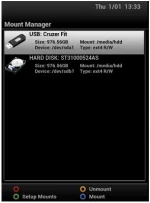
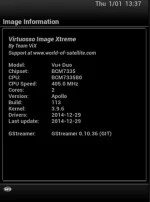
mount_manager.webpimage_information.webp

Code:
root@vuduo:/# mount
rootfs on / type rootfs (rw)
ubi0:rootfs on / type ubifs (rw,sync,relatime)
devtmpfs on /dev type devtmpfs (rw,relatime,size=65568k,nr_inodes=16392,mode=755)
proc on /proc type proc (rw,relatime)
sysfs on /sys type sysfs (rw,relatime)
tmpfs on /media type tmpfs (rw,relatime,size=64k)
/dev/sda1 on /media/hdd type ext4 (rw,relatime,data=ordered)
/dev/sdb1 on /media/hdd type ext4 (rw,relatime,data=ordered)
tmpfs on /var/volatile type tmpfs (rw,relatime)
devpts on /dev/pts type devpts (rw,relatime,gid=5,mode=620)
root@vuduo:/# df -h
Filesystem                Size      Used Available Use% Mounted on
ubi0:rootfs             101.1M     92.4M      8.7M  91% /
devtmpfs                 64.0M      8.0K     64.0M   0% /dev
tmpfs                    64.0K         0     64.0K   0% /media
/dev/sda1               931.3G      3.3G    928.0G   0% /media/hdd
/dev/sdb1               931.3G      3.3G    928.0G   0% /media/hdd
tmpfs                    64.2M    112.0K     64.0M   0% /var/volatile
root@vuduo:/# free
             total       used       free     shared    buffers     cached
Mem:        131396     105868      25528          0       8216      32200
-/+ buffers/cache:      65452      65944
Swap:            0          0          0
root@vuduo:/#
After the installation with release 109 I have done upgrades from the box directly when available, at the moment 113 is in use but I think it was 115 shortly.

Bug or bad configuration?
 
If you use the yellow button to un-mount the USB stick here & then green to set-up the mount again, this time as /media/usb & restart E2, does it fix the issue?
 
Thanks, yesterday I tried to unmount and remount them correct but I was denied since they claimed to be in use even if I disabled swap and used internal flash for EPG.

Then I did it in the console instead and that corrected the issue even it should be done via the menus on the box, GUI

Here's what i did
Code:
root@vuduo:/# mount
rootfs on / type rootfs (rw)
ubi0:rootfs on / type ubifs (rw,sync,relatime)
devtmpfs on /dev type devtmpfs (rw,relatime,size=65568k,nr_inodes=16392,mode=755)
proc on /proc type proc (rw,relatime)
sysfs on /sys type sysfs (rw,relatime)
tmpfs on /media type tmpfs (rw,relatime,size=64k)
tmpfs on /var/volatile type tmpfs (rw,relatime)
devpts on /dev/pts type devpts (rw,relatime,gid=5,mode=620)
/etc/auto.network on /media/autofs type autofs (rw,relatime,fd=6,pgrp=450,timeout=5,minproto=5,maxproto=5,indirect)
/dev/sdb1 on /media/hdd type ext4 (rw,relatime,data=ordered)
/dev/sdb1 on /media/sdb1 type ext4 (rw,relatime,data=ordered)
root@vuduo:/# umount /media/sdb1
root@vuduo:/# mount
rootfs on / type rootfs (rw)
ubi0:rootfs on / type ubifs (rw,sync,relatime)
devtmpfs on /dev type devtmpfs (rw,relatime,size=65568k,nr_inodes=16392,mode=755)
proc on /proc type proc (rw,relatime)
sysfs on /sys type sysfs (rw,relatime)
tmpfs on /media type tmpfs (rw,relatime,size=64k)
tmpfs on /var/volatile type tmpfs (rw,relatime)
devpts on /dev/pts type devpts (rw,relatime,gid=5,mode=620)
/etc/auto.network on /media/autofs type autofs (rw,relatime,fd=6,pgrp=450,timeout=5,minproto=5,maxproto=5,indirect)
/dev/sdb1 on /media/hdd type ext4 (rw,relatime,data=ordered)
root@vuduo:/# 
root@vuduo:/# 
root@vuduo:/# 
root@vuduo:/# mount | grep /media
tmpfs on /media type tmpfs (rw,relatime,size=64k)
/etc/auto.network on /media/autofs type autofs (rw,relatime,fd=6,pgrp=450,timeout=5,minproto=5,maxproto=5,indirect)
/dev/sdb1 on /media/hdd type ext4 (rw,relatime,data=ordered)
root@vuduo:/# df -h
Filesystem                Size      Used Available Use% Mounted on
ubi0:rootfs             101.1M     92.4M      8.8M  91% /
devtmpfs                 64.0M      8.0K     64.0M   0% /dev
tmpfs                    64.0K         0     64.0K   0% /media
tmpfs                    64.2M    116.0K     64.0M   0% /var/volatile
/dev/sdb1               931.3G      3.3G    928.0G   0% /media/hdd
root@vuduo:/# reboot

Broadcast message from root@vuduo (pts/0) (Wed Dec 31 22:02:29 2014):

The system is going down for reboot NOW!
root@vuduo:~# 
root@vuduo:~# 
root@vuduo:~# mount
rootfs on / type rootfs (rw)
ubi0:rootfs on / type ubifs (rw,sync,relatime)
devtmpfs on /dev type devtmpfs (rw,relatime,size=65568k,nr_inodes=16392,mode=755)
proc on /proc type proc (rw,relatime)
sysfs on /sys type sysfs (rw,relatime)
tmpfs on /media type tmpfs (rw,relatime,size=64k)
/dev/sda1 on /media/hdd type ext4 (rw,relatime,data=ordered)
/dev/sdb1 on /media/usb type ext4 (rw,relatime,data=ordered)
tmpfs on /var/volatile type tmpfs (rw,relatime)
devpts on /dev/pts type devpts (rw,relatime,gid=5,mode=620)
/etc/auto.network on /media/autofs type autofs (rw,relatime,fd=6,pgrp=434,timeout=5,minproto=5,maxproto=5,indirect)
root@vuduo:~# df -h
Filesystem                Size      Used Available Use% Mounted on
ubi0:rootfs             101.1M     93.4M      7.7M  92% /
devtmpfs                 64.0M      8.0K     64.0M   0% /dev
tmpfs                    64.0K         0     64.0K   0% /media
/dev/sda1               931.3G      3.3G    928.0G   0% /media/hdd
/dev/sdb1                 3.6G    119.5M      3.5G   3% /media/usb
tmpfs                    64.2M    108.0K     64.1M   0% /var/volatile
root@vuduo:~#

And after posting my first post today I checked for any software updates and the 115 was back and when it was applied the mounts was back to normal.
I also started an instant recording and that is working fine.

Yesterday before I manually changed the mounting points I was not able to record a tv program "Disk full" and it was the reason for me investigate.
After I changed it I also did some recordings and it worked find and I programmed the box via the EPG to record the program I missed yesterday this morning but when I got home nothing was recorded and the box was in a strange state. It responed to pings but the telnet console was down and the display on the box lit the red LED + "Starting..." forever and I was forced to cycle the power.

Even if the upgrade to the 115 release solved the issue for now I will keep a close eye on it the following days.
And the first time it happened I didn't change anything by the console hence why I suspect a possible bug I thing it better to report it early if other users has seen the same behaviour.
Then it up to you to decide it it is a bug or not.

Now the mount are as follows and I use the usb for EPC and swap
Code:
root@vuduo:~# mount
rootfs on / type rootfs (rw)
ubi0:rootfs on / type ubifs (rw,sync,relatime)
devtmpfs on /dev type devtmpfs (rw,relatime,size=65568k,nr_inodes=16392,mode=755)
proc on /proc type proc (rw,relatime)
sysfs on /sys type sysfs (rw,relatime)
tmpfs on /media type tmpfs (rw,relatime,size=64k)
/dev/sda1 on /media/hdd type ext4 (rw,relatime,data=ordered)
/dev/sdb1 on /media/usb type ext4 (rw,relatime,data=ordered)
tmpfs on /var/volatile type tmpfs (rw,relatime)
devpts on /dev/pts type devpts (rw,relatime,gid=5,mode=620)
/etc/auto.network on /media/autofs type autofs (rw,relatime,fd=6,pgrp=435,timeout=5,minproto=5,maxproto=5,indirect)
root@vuduo:~#

I do suspect that heat may have an impact on the above.
One other thing that has crossed my mind is the fact that I have been forced to change the C807 capacitor since they fail by age caused by high temperature in the box.
- If C807 is aged and overheated, I guess many of the other need to be replaced to (But I will write about that in a another tread about the issue. This or this
- Setting the box in standby will turn of the fan and the box will be even hotter.
- Configuring the box to use a server storage instead of the internal HDD will move some the heat out of the box.
 
2 weeks has passed and I have done a couple of recordings and used the box normally and it has behaved well and no further issue with bad mounting points.
I consider this a a no issue and the case can be closed. I'll post in the same thread it is happens again.
 

OpenViX Feeds Status

Back
Top