Superb quality and spec AB-Com PULSe 4K SE. Crazy offer! Only £129! FREE UK DELIVERY! 4K UHD, Enigma 2, Multiboot 4 images & more!...
Superb quality and spec AB-Com PULSe 4K Rev II Twin Satellite tuner only £179! FREE UK DELIVERY! 4K UHD, Enigma 2, SATA HDD facility, Multiboot 4 images & more!...

[ViX_Misc] Specific png format for graphics used in skins (HD-Magic-Night)?

zappahey

New member
Joined
Apr 21, 2010
Messages
101
Reaction score
0
Points
0
I'm using the Magic-HD-Night skin and I'm mostly very happy with it but decided that I'd like to make a few tweaks.

I have created a skin_user.xml file to move the volume control to the right of the screen and to change the volume slider graphic to one that I pinched from somewhere on the www.

I edited the graphic in Gimp to make it the same size as the original and saved it as a .png file, however the slider just shows as a white bar.

Is there something specific I should be doing with the graphic to be compatible with the skin.

Thanks,

J
 
Not specific with this skin, but with the image in general. To be honest, I keep forgetting the required specifications, so best look at the specs (bit depth etc) of the existing png's.
 
Got it. It was in RGB mode and needed to be indexed. I'm not going to pretend that I know what the latter means ;-)
 
Hehe, nor do I. That's why I keep forgetting the prerequisites.....
Anyway: sorted now?
And if you have a better looking mute- & volume-png than I set in Magic-HD, please post it here so I can have a look.
 
Yes. got it, thanks.

I'm not going to say it's better, just different.

The biggest issue I had was that, while waiting to move house, the TV is in an awkward spot and I couldn't see the volume slider on the left of the screen. I decided to move it to the right and figured I would make it blue at the same time.

I'm now on the wrong PC to upload but I can later if you like.
 
Yes. got it, thanks.

I'm not going to say it's better, just different.

The biggest issue I had was that, while waiting to move house, the TV is in an awkward spot and I couldn't see the volume slider on the left of the screen. I decided to move it to the right and figured I would make it blue at the same time.

I'm now on the wrong PC to upload but I can later if you like.

We always welcome those with the drive to do things for them selves so you are more than welcome to upload a few screenshots of your modifications and the finnished article it self for others to enjoy.
 
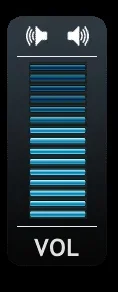
Well, here's "my" volume control. The background is from the Elgato-HD skin and I found a blue volume bar through Google images. I have zero artistic talent, so it was a case of finding something I liked and adjusting. I have a blue picon set, so thought this fitted better.

Now, I'm tweaking the colours of the Graphical EPG as I struggle with Rob's colours. There doesn't seem to be enough contrast for me at times.

Rob, can you recall which value refers to the background colour for timer entries in the graphical EPG? It's a sort of mustard green colour and I'm a traditionalist so want to make it red :-)

Cheers,
J

volume.webp
 
Now, I'm tweaking the colours of the Graphical EPG as I struggle with Rob's colours. There doesn't seem to be enough contrast for me at times.
I hear that more often.On all my telly's they show just fine as they are atm :confused:


Rob, can you recall which value refers to the background colour for timer entries in the graphical EPG? It's a sort of mustard green colour and I'm a traditionalist so want to make it red :-)
Nope, sorry: I'm absolutely no graphical specialist; for me it was just trial & error (especially the latter :D )
 

OpenViX Feeds Status

Back
Top