Superb quality and spec AB-Com PULSe 4K SE. Crazy offer! Only £99! FREE UK DELIVERY! 4K UHD, Enigma 2, Multiboot 4 images & more!...
Superb quality and spec AB-Com PULSe 4K Rev II Twin Satellite tuner only £149! FREE UK DELIVERY! 4K UHD, Enigma 2, SATA HDD facility, Multiboot 4 images & more!...

[GiGaBlue UHD QUAD 4K] Strange Tuner Settings Entries and Tuner B Crashes

goo

Member
Joined
Apr 12, 2022
Messages
44
Reaction score
0
Points
6
After updating Gigablue Quad 4K from OpenVIX 6.1.003 to OpenVIX 6.1.004 I had ‘Software error, receiver will now restart’ (or something similar) crashes on some fta Astra 19.2 channels. Removing plugins I had installed didn’t help, so I re-flashed a clean OpenVIX 6.1.004 image with settings restored (though it didn't seem to restore any), then flashed without restore. I couldn’t tuner B to scan and noticed some odd satellites shown in the Tuner Setup screen, shown below. 19.4E isn't even in the list of satellites. The same sort of thing happened with the 2 DVB-T2 tuners I and J. Iset them both to T, but the main Tuner Setup screen showed one of them as set to both DVD-T and DVCC-C.
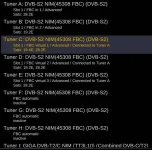
Tuner_Setup.webp
But if I opened them the settings looked ok.
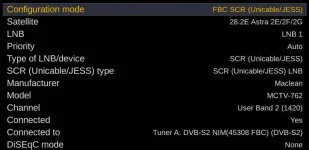
Setup_Tuner_C.webp

The first 2 attached crash logs are when trying full satellite scan, the latest is from a failed ABM scan, I think.

Re-flashed OpenVIX 6.1.003, the Tuner Setup pages seemed ok, and Tuner B scanned ok.
 

Attachments

Just a thought, could this issue of resurfaced?

@goo, does your settings file look correct?
 
Last edited:
Duplicate post by me.

Mod, please delete.
 
Openvix-6.1.004 still crashed on some fta 19.2E channels and had strange stuff in the tuner seetings, even after I re-flashed slot 1 with a clean image. Ibooted to openatv 7.1 in slot 2 and reflashed slot 1 with openvix-6.1.004.release-gbquad4k_usb.zip that I had copied onto the internal HDD, then set up everything from scratch. I thought it may havve had something to do with the plugins I had tried.
Did the same again with openvix-6.1.003.release-gbquad4k_usb.zip, and the strange stuff stopped.
 
If you are restoring a back up you are just restoring the junk that is causing the crash. Set up from scratch. No restore.
 
If there is an issue with satellite names, your satellites.xml is the issue. Some channel/settings/bouquets packs include this. They sometimes add a user file (which has higher priority) and sometimes replace the system file.
 
In reply to Huevos, "If you are restoring a back up you are just restoring the junk that is causing the crash. Set up from scratch. No restore", that is exactly what I did. I flashed slot 1 with 'openvix-6.1.004.release-gbquad4k_usb.zip', downloaded from https://www.openvix.co.uk/index.php/downloads/gigablue-images/gigablue-uhd-quad-4k/. I DID NOT RESTORE A BACKUP. I then went through the setup procedure again WITHOUT RESTORING ANYTHING.

In replay to abu baniaz. Doesn't flashing a new image (without restoring anything) completely wipe everything (including satellites.xml) in that slot before installing the new image?
I previously edited Pontop Pike channels in the terrestrial.xml files to get the DVD-T2 tuners to scan, before I found the ABM frequency finder, but wouldn't these get wiped when flashing a clean image?
 
Code:
<  2345.4544> 11:05:19.0385 Traceback (most recent call last):
<  2345.4545> 11:05:19.0386   File "/usr/lib/enigma2/python/Components/ActionMap.py", line 58, in action
<  2345.4549> 11:05:19.0391   File "/usr/lib/enigma2/python/Components/ConfigList.py", line 352, in keyRight
<  2345.4553> 11:05:19.0394   File "/usr/lib/enigma2/python/Components/ConfigList.py", line 47, in handleKey
<  2345.4556> 11:05:19.0397   File "/usr/lib/enigma2/python/Components/config.py", line 496, in handleKey
<  2345.4559> 11:05:19.0400   File "/usr/lib/enigma2/python/Screens/ScanSetup.py", line 887, in newConfig
<  2345.4562> 11:05:19.0404   File "/usr/lib/enigma2/python/Screens/ScanSetup.py", line 834, in createSetup
<  2345.4565> 11:05:19.0406   File "/usr/lib/enigma2/python/Screens/ScanSetup.py", line 1602, in predefinedTerrTranspondersList
<  2345.4567> 11:05:19.0409   File "/usr/lib/enigma2/python/Components/NimManager.py", line 777, in getTranspondersTerrestrial
<  2345.4571> 11:05:19.0412 KeyError: ''
<  2345.4572> 11:05:19.0413 [ePyObject]

Something is wrong with the setup of the terrestrial tuner or terrestrial.xml.
 
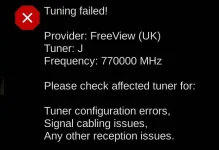
That is probably from the ABM scan I tried using Pontop Pike Freeview.

ABM_Tuning_Failed.webp

I thought ABM used the same terrestrial.xml file I had edited. Obviously it doesn't.
I have since used DVB-T frequency finder's North East terrestrial.
This doesn't explain why 6.1.004 had these crashes but 6.1.003 doesn't.
 
Definitely can't have a frequency of 770000 MHz. Frequencies for Pontop Pike are 562Mhz, 578MHz, 586MHz, 618Mhz, 642MHz, 666Mhz, 746MHz and 754Mhz according to
Code:
ukfree.tv
. Are you sure your settings are not missing a decimal point? 791-862MHz (old UHF channels 61-69) are no longer in use as they have been cleared for 4G.
 
I tried out frequency finder earlier today and it worked as expected.
 
Just for info - terrestrial.xml contains entries for UHF CH 58 (770000000 Hz) and UHF CH 59 (778000000 Hz) which may be no longer valid according to my search on Pontop Pike transmitter. There is something wrong with the display in post #11 which seems to have mixed up the units. 770Mhz is 770,000,000Hz.


The terrestrial_uk_freeview.xml which I assume is used for ABM has 770000000 as the "configuration" entry for Pontop Pike. It also has the following entries:
Code:
<customtransponder key="pontop_pike________" frequency="570000000" transport_stream_id="a000" system="1"/>
<customtransponder key="pontop_pike________" frequency="578000000" transport_stream_id="b000" system="1"/>
<customtransponder key="pontop_pike________" frequency="698000000" transport_stream_id="4089" system="1"/>

I'm not sure of the significance of the entries as I don't have access to Freeview, but they don't seem to match the published entries for Pontop Pike, but I'm aware that there may be secondary transmitters which are being catered for.
 
Last edited:
Definitely can't have a frequency of 770000 MHz. Frequencies for Pontop Pike are 562Mhz, 578MHz, 586MHz, 618Mhz, 642MHz, 666Mhz, 746MHz and 754Mhz according to
Code:
ukfree.tv
. Are you sure your settings are not missing a decimal point? 791-862MHz (old UHF channels 61-69) are no longer in use as they have been cleared for 4G.
MHz was hard coded by this commit, https://github.com/oe-alliance/Auto...0590873dcc97f7c379f0f0bc015e42aaa972800d7R463 but should say kHz for terrestrial.
 
ukfree.tv is a often bit out of date.
I recommend the bottom part of this (input a postcode and house number and click on check):
Code:
https://www.freeview.co.uk/corporate/detailed-transmitter-information
To get from the freqency channel to the frequency in MHz multiply by 8 and then add 306.
 
Pontop Pike...

Code:
https://ukfree.tv/transmitters/tv/Pontop_Pike
 

OpenViX Feeds Status

Back
Top