Superb quality and spec AB-Com PULSe 4K SE. Crazy offer! Only £99! FREE UK DELIVERY! 4K UHD, Enigma 2, Multiboot 4 images & more!...
Superb quality and spec AB-Com PULSe 4K Rev II Twin Satellite tuner only £149! FREE UK DELIVERY! 4K UHD, Enigma 2, SATA HDD facility, Multiboot 4 images & more!...

[ABM-DVB-S/S2] Timeout for tuner lock

  • Thread starter Thread starter bigcoops
  • Start date Start date
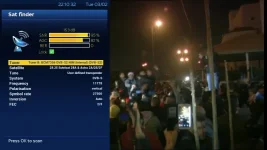
Within Satfinder, with settings as in picture, what is your SNR?
Satfinder_11778.webp

I get same around same SNR (95%) on both Tuner A & B (obviously make sure your not trying to record anything).

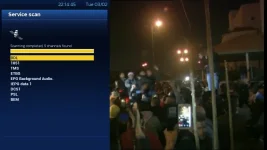
Using those settings I get 9 channels found as in below picture on both Tuner A & B
Satfinder_11778_pic2.webp

What is your SNR% when trying to scan using SatFinder with those exact transponder settings?

I noticed on KingOfSat this transponder is listed as belonging to Astra 2A which is co-located at 28.9oE
 
SNR % is 0 on both tuner A/B , AGC % is also 0 and no tick in the lock box either.

Scan settings as per your screenshots.
 
You have two cables and two tuners. You should have four results.

Cable 1 in tuner A
Cable 1 in tuner B

Cable 2 in tuner A
Cable 2 in tuner B
 
All four results are the same 0%, I now seem to have lost the 9 channels that I had before .
 
Have you double checked your F-plugs are connected properly onto cables?
Are you able to test if the Sky receiver works using these cables?
 
Sky receiver was working on these cables, I've just swapped it over with the technomate box. Sky receiver now upstairs working ok on the other set of cables.
 
Just to clarify, you have connected the Sky receiver to the same cables that the TM does not work with. The Sky receiver works fine with these cables that you had used unsuccesfully with the TM?

If that is the case, contact your seller and arrange for a replacement. He may ask as a last test for you to connect the TM to where the Sky receiver was.
 
I can swap the boxes and try the technomate upstairs, are you thinking that maybe the box is faulty.
 
Yes I connected the technomate receiver to the same cables that the sky receiver was working ok with.
 
Going by your reponses

Previously
Cable 1 on tuner A worked before.
Cable 2 did not work on tuner B

Situation now is
Cable 1 does not work on tuner A or B
Cable 2 does not work on tuner A or B

Cable 1 and 2 are fine on Sky receiver


Deduction based on bold statement, which I presume to be present tense rather than before Sky receiver was moved upstairs, is that the receiver is faulty. You can test TM upstairs as a final check. You have been patient When you explain all the tests you have done, your retailer will sort out a repalcement for you.
 
Thankyou for all your help, I will try the TM upstairs as one last test before I contact WOS which is were I purchased the box from.
Thanks again for your help.
 
Serious headache reading this thread & many others recently.
Exact setup, proper screenshots = issues resolved a lot faster without users thinking they need to return 'faulty' boxes.
 
What are your thoughts on my problem, have we come to the correct conclusion do you think.
 
Good idea, a friend of mine has sattelite installed i'll see if he'll allow me to test my box on his system.
 
To test to a manual single satellite scan on each tuner. Ensure to connect to Satellite feeds and not the Hybrid tuner.

Menu > Setup > Service Searching > Manual Scan.

1) Set tuner at top using left/right buttons.
2) Set 'Type of Scan' to 'Single Satellite'.

Leave other settings as default, run the manual scan on each tuner.
 
To test to a manual single satellite scan on each tuner. Ensure to connect to Satellite feeds and not the Hybrid tuner.

Menu > Setup > Service Searching > Manual Scan


1) Set tuner at top using left/right buttons.
2) Set 'Type of Scan' to 'Single Satellite'.

Leave other settings as default, run the manual scan on each tuner.


Is this another test on my system or what i should do to test on my friends system.
 

OpenViX Feeds Status

Back
Top