Superb quality and spec AB-Com PULSe 4K SE. Crazy offer! Only £99! FREE UK DELIVERY! 4K UHD, Enigma 2, Multiboot 4 images & more!...
Superb quality and spec AB-Com PULSe 4K Rev II Twin Satellite tuner only £149! FREE UK DELIVERY! 4K UHD, Enigma 2, SATA HDD facility, Multiboot 4 images & more!...

[VU+ Solo2] Timeshift / recording problems

  • Thread starter Thread starter Fabvrs
  • Start date Start date
F

Fabvrs

Guest
Hi guys, I am a noob with the whole linux receivers. I've had my vu solo2 box for a couple of weeks now and am doing quite well with it. I do however have a question regarding Timeshift. I have my Timeshift set to 2 seconds, when I'm watching a program and press the instant record button it only records from the moment I pressed the button. I've tried opening the EPG and selecting add timer and this only records from the moment I added the timer. With my old Sly box it would record back to the moment the channel was selected / beginning of the event. I have also tried selecting option 5 from the record menu, Timeshift save recording (stop after current event), this option then prevents a channel change. Is there a way around this problem??

many thanks.
 
I don't mean if i've missed something but if i'm watching something that she doesn't want to and want to continue watching it another time.
 
Timeshift will only record from a set time on channel for a set length of time say 15 minutes

The instant record will only record from the moment you press it until you stop it
Sky boxes are same only record from when u went to the channel but may have the limit of record set to longer say 30 mins hence why it may catch start of events


Sent from my iPad using Tapatalk
 
No need to hit record. Once you have permanent time shift turned on, do this to record when changing...

1. Pause the channel
ImageUploadedByTapatalk1393362681.688984.webp
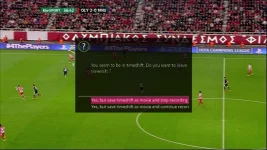
2. Now change the channel. You will now get options to continue recording, or discard, etc.
ImageUploadedByTapatalk1393362704.160609.webp


Sent from my iPad using Tapatalk
 
Timeshift will only record from a set time on channel for a set length of time say 15 minutes
nonsense...
No need to hit record. Once you have permanent time shift turned on, do this to record when changing...

1. Pause the channel

again, no need for this...

What the OP is trying to do should just work (and does here on all my boxes) once PTS is enabled.

@Fabvrs where are you saving PTS to?
 
nonsense...


again, no need for this...

What the OP is trying to do should just work (and does here on all my boxes) once PTS is enabled.

Read post #3. He wants it to record. Permanent time shift doesn't save when changing channel unless it is 'off sync' with real time. He wants to watch later. So my steps will work for this situation...
 
Read post #3. He wants it to record. Permanent time shift doesn't save when changing channel unless it is 'off sync' with real time. He wants to watch later. So my steps will work for this situation...

That's what the record button is for though, no need to pause anything first.
 
From the moment timeshift kicked in, if you choose that option.
 
nonsense...


again, no need for this...

What the OP is trying to do should just work (and does here on all my boxes) once PTS is enabled.

@Fabvrs where are you saving PTS to?


It's savin to a 1tb internal hard drive
 
When i press pause and the zap channels, no record message is coming up. I'm wondering if its a setting I don't have enabled.
 
Yeah a setting in time shift menu should be an enabled to prompt you to save or delete I think

I have mine set to off


Sent from my iPhone using Tapatalk
 
I have a development, I can now get the option to save timeshift as movie and continue recording. I have tried using this a couple of times and i find that I get 2 recordings in the recording menu. It saves the timeshift and the rest of the program as separate files.
 
Was there a resolution to this? I have the same issue that I can't seem to get it to record my timeshift and to the end of the event
 

OpenViX Feeds Status

Back
Top