

Hi,
I am trying to enable a 32gb USB stick for Timeshift and Recordings.
The stick has been initalised and mounted.
In the Timeshift menu I clicked 'ok' and the following screen popped up but I do not know what I have to do in it to reach my objective. I did look in the Vix manual but it did not have the answer in it.
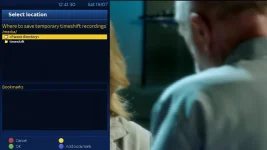
In the Recording Settings screen I got a little further. First I FTP'd the box and created a folder called 'movie' on the USB stick. Then I managed to change the default movie location to /media/usb/movie I then clicked the Blue Button and added the 'movie' folder on the USB stick to 'Bookmarks'. See screen below:
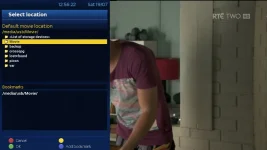
But when I attempted to record, the box started recording (the ON button started flashing purple) but when I went to Plugins/Media Scanner and searched on the USB stick (Cruzer Force /media/USB) it said no dislayable files on this.
So I am stuck, maybe there is something that should be changed on this screen:
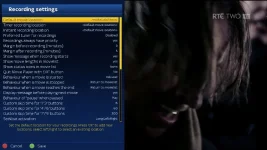
I hope what I have said makes sense and any help would be appreciated.
Thanks
I am trying to enable a 32gb USB stick for Timeshift and Recordings.
The stick has been initalised and mounted.
In the Timeshift menu I clicked 'ok' and the following screen popped up but I do not know what I have to do in it to reach my objective. I did look in the Vix manual but it did not have the answer in it.
In the Recording Settings screen I got a little further. First I FTP'd the box and created a folder called 'movie' on the USB stick. Then I managed to change the default movie location to /media/usb/movie I then clicked the Blue Button and added the 'movie' folder on the USB stick to 'Bookmarks'. See screen below:
But when I attempted to record, the box started recording (the ON button started flashing purple) but when I went to Plugins/Media Scanner and searched on the USB stick (Cruzer Force /media/USB) it said no dislayable files on this.
So I am stuck, maybe there is something that should be changed on this screen:
I hope what I have said makes sense and any help would be appreciated.
Thanks


