


josweet
New member
- Joined
- Dec 9, 2010
- Messages
- 138
- Reaction score
- 0
- Points
- 0
- Age
- 54
Ok, here is a step by step guide on how to install and use Transmission.
Installation and connection
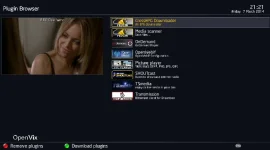
1) Go into the Vix feeds via "plugins" find Transmission and install it. Once installed, you should see the plugin listed below.
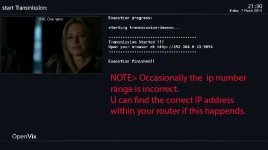
2) Now click on Transmission to start it and it will give you an IP address and port number.
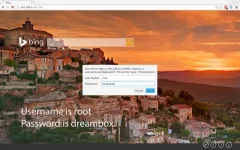
3) Using your laptop/PC, open up your browser and type in the address shown on your TV screen in the top URL field bar, press return and if by magic, a box shall appear !
Username is root
Password is dreambox
Setting up
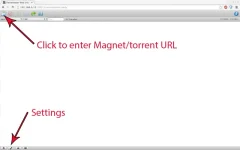
4) At the bottom left of the Transmission screen will be a spanner, click to enter in your settings. I recommend reducing your upload speed as this will not only strongly effect your download speed within Transmission, but also the internet speed of all other devices on your network.
5) I recommend at this point to FTP to your Sat receiver, and make a folder within the recordings directory naming it something like "Downloads" A good free FPT app is here > https://filezilla-project.org/
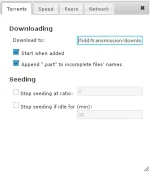
6) In the "torrents" tab, add the new folder you just added via FTP into the "Download to" box
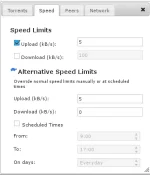
Now change the speed, for this example i have selected 5kbs as the upload as anymore than that some ISP service can get laggy.
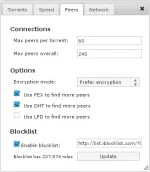
In the "peers" tab make your selection and add the following line to the block list & update.http://list.iblocklist.com/?list=bt_level1&fileformat=p2p&archiveformat=gz
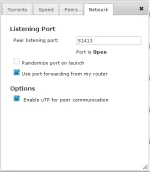
NOW, in the "Network tab" note what port your using and "port forward" that same port in your router. Once succesful, it should say "open" as in screenshot below.
Downloading!
OK, this is as easy 1, 2, 3.
First open up a new tab in your browser.
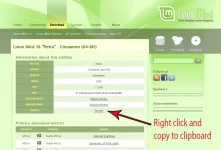
Find the torrent you want to download. For this will will download Linux mint! http://www.linuxmint.com/edition.php?id=144
Firefox right click on the torrent & choose "Copy link location"
Crome right click on the torrent & choose "Copy link address"
Internet explorer err why! use a decent browser "
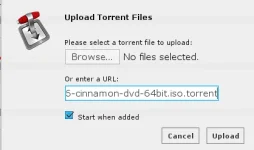
Now clicking the folder to the top left of the transmission screen, (see screenshot step4) paste in the address, click "upload" and your download will begin.
Thats it.. got questions about port forwading or FTP, then ask below.
Thanks is always appreciated
I
Installation and connection
1) Go into the Vix feeds via "plugins" find Transmission and install it. Once installed, you should see the plugin listed below.
2) Now click on Transmission to start it and it will give you an IP address and port number.
3) Using your laptop/PC, open up your browser and type in the address shown on your TV screen in the top URL field bar, press return and if by magic, a box shall appear !
Username is root
Password is dreambox
Setting up
4) At the bottom left of the Transmission screen will be a spanner, click to enter in your settings. I recommend reducing your upload speed as this will not only strongly effect your download speed within Transmission, but also the internet speed of all other devices on your network.
5) I recommend at this point to FTP to your Sat receiver, and make a folder within the recordings directory naming it something like "Downloads" A good free FPT app is here > https://filezilla-project.org/
6) In the "torrents" tab, add the new folder you just added via FTP into the "Download to" box
Now change the speed, for this example i have selected 5kbs as the upload as anymore than that some ISP service can get laggy.
In the "peers" tab make your selection and add the following line to the block list & update.http://list.iblocklist.com/?list=bt_level1&fileformat=p2p&archiveformat=gz
NOW, in the "Network tab" note what port your using and "port forward" that same port in your router. Once succesful, it should say "open" as in screenshot below.
Downloading!
OK, this is as easy 1, 2, 3.
First open up a new tab in your browser.
Find the torrent you want to download. For this will will download Linux mint! http://www.linuxmint.com/edition.php?id=144
Firefox right click on the torrent & choose "Copy link location"
Crome right click on the torrent & choose "Copy link address"
Internet explorer err why! use a decent browser "
Now clicking the folder to the top left of the transmission screen, (see screenshot step4) paste in the address, click "upload" and your download will begin.
Thats it.. got questions about port forwading or FTP, then ask below.
Thanks is always appreciated
I
Last edited:


