


Hi
Ok will do this post properly because i really want to get it resolved.
So on my current version 4.2.010 accessing remote works perfectly. I only want to do this occasionally to set and edit timers when outside of the house. So currently when i want to access my receiver i go to my dynamic DNS which i have made. Eg ?????????.asuscomm.com. I then open the relevant ports. After i do this, i open my app which is shown in the pic
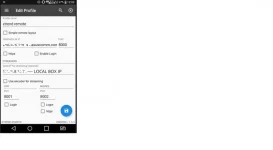
. This is the current settings that i have entered in the app and this works perfectely fine. I can access timers and edit recordings. My current openwib if page is also attatched

Now i know it is not wise to open ports and the security issues surrounding it. But it is only for a few seconds and once i have finished, I ALWAYS LOG back in to my settings and CLOSE the ports. So it is not always open and once closed, there should not be a problem.
The only issue is when i update to the latest image, this feature does not work anymore. I log in to open the relevant ports and i can not get access remotely using the app or my laptop where i was able to type ??????.asuscomm.com/8000
Can someone please direct me to how to get it working on the latest image?
I hope i have provided enough relevant information
ps i have erased certain information which could be dangerous to post on public
Ok will do this post properly because i really want to get it resolved.
So on my current version 4.2.010 accessing remote works perfectly. I only want to do this occasionally to set and edit timers when outside of the house. So currently when i want to access my receiver i go to my dynamic DNS which i have made. Eg ?????????.asuscomm.com. I then open the relevant ports. After i do this, i open my app which is shown in the pic
. This is the current settings that i have entered in the app and this works perfectely fine. I can access timers and edit recordings. My current openwib if page is also attatched
Now i know it is not wise to open ports and the security issues surrounding it. But it is only for a few seconds and once i have finished, I ALWAYS LOG back in to my settings and CLOSE the ports. So it is not always open and once closed, there should not be a problem.
The only issue is when i update to the latest image, this feature does not work anymore. I log in to open the relevant ports and i can not get access remotely using the app or my laptop where i was able to type ??????.asuscomm.com/8000
Can someone please direct me to how to get it working on the latest image?
I hope i have provided enough relevant information
ps i have erased certain information which could be dangerous to post on public


