Superb quality and spec AB-Com PULSe 4K SE. Crazy offer! Only £129! FREE UK DELIVERY! 4K UHD, Enigma 2, Multiboot 4 images & more!...
Superb quality and spec AB-Com PULSe 4K Rev II Twin Satellite tuner only £179! FREE UK DELIVERY! 4K UHD, Enigma 2, SATA HDD facility, Multiboot 4 images & more!...

[ViX_Misc] TVGuideGB application by Leshay

Hi

Changes made:
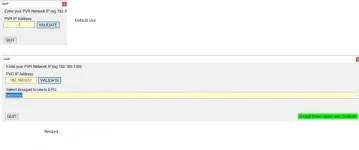
Initial IP setup window now resizable and Bouquet list widened and follows window width
Changed some of the mouse over hints (probably many others yetto find)

Seems the One Drive link is working after all: I have upped the latest and the link in first post gets it OK.

Still thinking about version control - maybe just add to file name ??? Latest still doesn't have it though.
 
Working, thanks. Can you make default window size bigger? At moment, you start with some text chopped. Yes I know you can resize.
 

Attachments

  • Untitled.webp
    Untitled.webp
    8.8 KB · Views: 20
Last edited:
Working, thanks. Can you make default window size bigger? At moment, you start with some text chopped. Yes I know you can resize.

+1
On my machine the "Get IP" window is too small and by default the green continue button is completely hidden. A first time user may not understand that to continue the window needs to be re-sized to see the button in order to proceed further. Also, for the first time user/ first use do away with the first "PVR cannot connect" error window and directly go to the Get IP window. The first error window/report gives the impression that something has gone wrong rather than the software not being configured for the correct IP address.

The problem that I was having when entering my IP for the first time and getting an error was down to my firewall. When first validating the IP the software tries to communicate with my ET10000 but is blocked by the firewall. My firewall asks if I want to allow the software to connect but by the time i have manually pressed the OK button the GuideGB software has already decided that it cannot communicate and errors. The second time of starting the software the firewall is now set up to accept the communication and everything works. Anyone else using a similar firewall is likely to be experiencing "errors" with the software on first use. Perhaps a much longer timeout or retry strategy or a hint in an error message about checking firewall settings?
 
+1
On my machine the "Get IP" window is too small and by default the green continue button is completely hidden. A first time user may not understand that to continue the window needs to be re-sized to see the button in order to proceed further. Also, for the first time user/ first use do away with the first "PVR cannot connect" error window and directly go to the Get IP window. The first error window/report gives the impression that something has gone wrong rather than the software not being configured for the correct IP address.

The problem that I was having when entering my IP for the first time and getting an error was down to my firewall. When first validating the IP the software tries to communicate with my ET10000 but is blocked by the firewall. My firewall asks if I want to allow the software to connect but by the time i have manually pressed the OK button the GuideGB software has already decided that it cannot communicate and errors. The second time of starting the software the firewall is now set up to accept the communication and everything works. Anyone else using a similar firewall is likely to be experiencing "errors" with the software on first use. Perhaps a much longer timeout or retry strategy or a hint in an error message about checking firewall settings?

Hi

OK, that first Network pop up has gone.
Resized the default GetIP window - see if that is better

I wouldn't know how to avoid the Firewall stuff - can't think of a workaround - maybe a hint in the ReadMe ?

Version 2 posted.

Note to self: REMEMBER TO REMOVE THE DEBUG SETTING!!!!!!!!!
 

OpenViX Feeds Status

Back
Top