Superb quality and spec AB-Com PULSe 4K SE. Crazy offer! Only £99! FREE UK DELIVERY! 4K UHD, Enigma 2, Multiboot 4 images & more!...
Superb quality and spec AB-Com PULSe 4K Rev II Twin Satellite tuner only £149! FREE UK DELIVERY! 4K UHD, Enigma 2, SATA HDD facility, Multiboot 4 images & more!...

UKCvS AutoBouquets E2 by LraiZer BETA.

Can i ask what the differences are in this one over the built in one in vix(i know they are different builds)

Thanks

Robert
 
This one populates the Irish channels e.g. setanta sports, as well as UK in one scan only and incorporates in the sports bouquet in approx 50 seconds, the built in one doesn't do it one scan. That I'm aware of.

Sent from my GT-I9100 using Tapatalk 2
 
Can i ask what the differences are in this one over the built in one in vix(i know they are different builds)

Thanks

Robert
Flexibility
In my view (:) ) ABM does what it says on the can, great, easy set up for most users that typically watch SKY.
lraizer,s provides the ability to customise the output.
 
The UKCVS one is more customisable. The OE one does other providers from other sats too. You can use both together if you want to, don't enable 28.2 on the OE one.

Both are great plugins.
 
Can i ask what the differences are in this one over the built in one in vix(i know they are different builds)

Thanks

Robert

i find the plugin better then the inbuilt one, firstly can get channel number for channel in list, gets satanta sports in sports section, no need to create a Ireland one just to get them 2 channels and then hide rest of the bouquets for Ireland , also in entertainment for bbc etc swap for HD channels, with inbuilt they are SD versions in entertainment bouquet, but not with plugin they are all HD
 
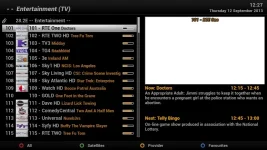
Hi, not sure what I am doing wrong, I have selected Republic of Ireland HD but it is showing BBC1 etc as 101, how do I get the Irish channels first on the EPG ie RTE 1 101, RTE 2 HD 102 etc. I really do not understand how to edit the channel list and I am afraid I will mess something up. Thanks for any help.
 
I suspect you have custom swap enabled.

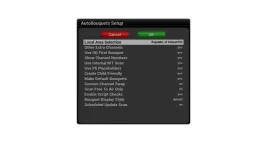
Try with the following settings which should work fine for you.
 

Attachments

  • bouquet2.webp
    bouquet2.webp
    11.2 KB · Views: 58
  • bouquet1.webp
    bouquet1.webp
    40.8 KB · Views: 59
The builtin ABM on the VIX image is great and straight forward to setup, but I must admit, it lacks the ability to have the channel numbers on the bouquet to align or correspond with the Sly UK ones. This is something the wife really misses. Perhaps an update to this release will have this feature built in. :confused:
 
The builtin ABM on the VIX image is great and straight forward to setup, but I must admit, it lacks the ability to have the channel numbers on the bouquet to align or correspond with the Sly UK ones. This is something the wife really misses. Perhaps an update to this release will have this feature built in. :confused:

ABM has had this feature since day one almost. in fact all of my boxes using ABM perfectly follow sky uk's channel numbers for my region.
 
@zzwonderkidzz
Post in the relevant thread with your issuesas well as with what your settings are and it should be addressed. (This thread is the UKCVS AutoBouuqtes 28.2)

You probably have not configured it correctly. Using OE ABM, you must have Sky UK as well as Freesat selected. You must also put Sky higher in the list of providers. It functions as Pheonix has said.
 
Just looking at autobouquet and have a question.
The first bouquet I have is called "28.2E UK Bouquets (TV)".
How is this populated and can I edit or add programs here.
There seems to be 100 spaces available which would be nice for common channels we use and still update them if the frequency changes.
Would be nice if this was a file that I just add in the channels I need in a list.
 
anything you manually add to generated bouquets will be overwritten by next scan, only edited favorites bouquet or previously installed bouquets do not get overwritten. you can use the custom_swap.txt and supplement.txt files that you can find in the autobouquets plugin folder to automatically edit the bouquets during scan process.

the 100 spaces only show in first bouquet if you have not selected the HD First option in settings. if you enable HD First option in settings, all the placeholders from first bouquet are moved into the main bouquet categories and if using latest pli based images, these placeholders can be hidden using the pli placeholder option in the autobouquets settings menu.

there are plans to add more support for creating custom bouquets in next versions, although this can already be done to a small extent using current custom_swap.txt and supplement.txt files.
 
Can someone help.

I downloaded the file, unzipped it ,using filezilla i went to var/tmp, then i selected the bouquets and added them to tmp.
In my dm 800 i went to tspanel etc and downloaded the plugin, then i went to plugins and selected my regiom etc.

The bouquets are on my dm 800, but when i select say sport all channels are in grey and when i select a channel it say channel unavailable and to check tuner configuration.
 
There are no bouquets to transfer. You install the plugin, set your area and run it.

It then scans and creates 28.2 bouquets for you.
 
The plugin is installed, its in plugins, i set my area, run the plugin.
I get a message execution process, download bouquets working, it finishes and notting comes up.
At it all day, cant figure it out. I am using nemasis plugin, could that be a problem.
 
The plugin is installed, its in plugins, i set my area, run the plugin.
I get a message execution process, download bouquets working, it finishes and notting comes up.
At it all day, cant figure it out. I am using nemasis plugin, could that be a problem.
 
if channels generated by the plugin are all greyed out, make sure your turner is actually configured for position 282 in your satellites.xml. some images may say 28.2E in their satellite name when configuring the turner, but they can actually be pointing to position 284 in their satellites.xml resulting in generated channels being greyed out.

make sure your satellites.xml points to position 282. if not, download a new one and reconfigure your tuner again to 28.2E.
Code:
<sat name="28.2E Eutelsat 28A..Astra 1N/2A/2B/2F" flags="1" [COLOR="#FF0000"]position="282"[/COLOR]>
 

OpenViX Feeds Status

Back
Top