Superb quality and spec AB-Com PULSe 4K SE. Crazy offer! Only £99! FREE UK DELIVERY! 4K UHD, Enigma 2, Multiboot 4 images & more!...
Superb quality and spec AB-Com PULSe 4K Rev II Twin Satellite tuner only £149! FREE UK DELIVERY! 4K UHD, Enigma 2, SATA HDD facility, Multiboot 4 images & more!...

UKCvS AutoBouquets E2 by LraiZer BETA.

if channels generated by the plugin are all greyed out, make sure your turner is actually configured for position 282 in your satellites.xml. some images may say 28.2E in their satellite name when configuring the turner, but they can actually be pointing to position 284 in their satellites.xml resulting in generated channels being greyed out.

make sure your satellites.xml points to position 282. if not, download a new one and reconfigure your tuner again to 28.2E.
Code:
<sat name="28.2E Eutelsat 28A..Astra 1N/2A/2B/2F" flags="1" [COLOR="#FF0000"]position="282"[/COLOR]>

Thanks for your help.

I am receiving all channels on 28.2e
If i select the satellite list 28.2e all channels are not greyed out,but when i select bouquets they are.

Sorry im new to dm 800, only used a dm 500 before.
How do i upload new satellites.xml to mt 800.
 
got it thanks ftp new sat list and all is working.
These bouquets are just brilliant.
 
Need help please.

I changed my image from nemesis 2.4 to nemesis 2.6.
I had the autobouquets working on 2.4.

I sent the file to tmp on db, when i go into ts panel, file manager, tmp, autobouquets file is there, but when i press ok to install it i get a message saying- bouquets found, but incompatable with architectures configured.

Anyone know what this means
 
hi, does anyone do a 13e autobouquet? if so, can someone post a link to it. thanks in advance for any response.
 
hi, does anyone do a 13e autobouquet? if so, can someone post a link to it. thanks in advance for any response.
ABM on OE alliance images does.

Lraizer did do a 13e version a long time ago, was script based instead of reader.
 
LraiZer, Excellent Plugin.
One question though. If I add a swap in custom_swap.txt below 100 it doesn't work, is fine above 100. Is this correct.
If I want to add channels between 78 and 100 can this be done in custom_swap.txt. (Say 79=121).

Nice to see there are big plans for the plugin, where will be the best place to keep uptodate with the new releases and info...

anything you manually add to generated bouquets will be overwritten by next scan, only edited favorites bouquet or previously installed bouquets do not get overwritten. you can use the custom_swap.txt and supplement.txt files that you can find in the autobouquets plugin folder to automatically edit the bouquets during scan process.

the 100 spaces only show in first bouquet if you have not selected the HD First option in settings. if you enable HD First option in settings, all the placeholders from first bouquet are moved into the main bouquet categories and if using latest pli based images, these placeholders can be hidden using the pli placeholder option in the autobouquets settings menu.

there are plans to add more support for creating custom bouquets in next versions, although this can already be done to a small extent using current custom_swap.txt and supplement.txt files.
 
LraiZer, Excellent Plugin.
One question though. If I add a swap in custom_swap.txt below 100 it doesn't work, is fine above 100. Is this correct.
If I want to add channels between 78 and 100 can this be done in custom_swap.txt. (Say 79=121).
Nice to see there are big plans for the plugin, where will be the best place to keep uptodate with the new releases and info...

Have you got HD swap enabled?
 
Apologies.

Disable HDfirst. This should allow you to swap below 100. You can swap SD with HD channels by editing your custom swap accordingly.
 
Thanks, I did that but it changes all the other bouquets to crazy numbers.
I like that the channels in the bouquets have logical numbers BBC1 in Entertainment is 101, Sky Sports 1 is 401 etc.
Id like to be able to make the 1-100 in the first bouquet set to my channels of choice.
D
 
# swap local SD with HD
101=141
102=142
103=178
104=230
105=171
520=561

# swap STV HD
#103=1114

78=121
I added this one to see if I could replace Sky 2 with HD Retail info

Post contents of swap file here.
 
I have just started using this great plug-in and have a question about swapping channels. I have it set up to create Republic of Ireland HD Bouquets. When I open the autobouquets.csv file I notice that two channels are numbered 102... BBC 2 England and RTE 2 HD. In my Free-to-Air Bouquet I have...
..
..
102 140-4seven
103 141-BBC One HD
104 142-BBC Two HD
105 143-BBC2 NI
106 145-Challenge
..
..
BBC 2 England ends up in the Other Bouquet in the Extra Channels section. What changes do I need to make to custom_swap.txt and/or supplement.txt so I can swap BBC2 England with BBC2 NI?

Cheers,

Flex
 
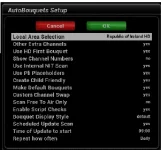
If you want to use channel swap then enable "Custom Channel Swap" in the plugins settings (press menu while in the plugin).
Then open the custom_swap.txt in Notepad +++.
Then on the TV find the channels you want to swap.
I Swapped Discovery HD with Discovery SD in the Documentaries (TV) Bouquet with this.
78=121

If you are swapping BBC/ITV etc also consider whether you have Use HD First Bouquet Enabled as well as these are not swappable yet (I think)...
 
Thanks for the response dfdream however maybe I haven't made myself clear enough. I know how to swap two channels.

If you ask Autobouquets to create a Republic of Ireland bouquet (HD or SD) it will give channel number 102 to TWO different channels... RTE 2 HD AND BBC 2 England. I want to do a swap involving BBC 2 England and it doesn't seem to work right I think because it gets confused with the fact that there are two channels numbered 102.

I'm using the Alien 2 and for now my solution is to create my own favourites category for those Irish channels that I can receive anyway through the terrestrial tuner.

I wonder could I use the supplement.txt file to delete say BBC 2 England and re-add it with an unused channel number in the 'Other' bouquet and then do the swap?

Flex
 

OpenViX Feeds Status

Back
Top