
Superb quality and spec AB-Com PULSe 4K SE. Crazy offer! Only £99! FREE UK DELIVERY! 4K UHD, Enigma 2, Multiboot 4 images & more!...
Superb quality and spec AB-Com PULSe 4K Rev II Twin Satellite tuner only £149! FREE UK DELIVERY! 4K UHD, Enigma 2, SATA HDD facility, Multiboot 4 images & more!...
You are using an out of date browser. It may not display this or other websites correctly.
You should upgrade or use an alternative browser.
You should upgrade or use an alternative browser.
UKCvS AutoBouquets E2 by LraiZer BETA.
- Thread starter abu baniaz
- Start date


skratch
Forum Supporter

- Joined
- Aug 3, 2013
- Messages
- 364
- Reaction score
- 0
- Points
- 16
Skratch
Rob was going to re-add it but maybe it slipped his mind. I would just nab a copy from the first post and ftp
Will do cheers for the advice mate.
Sent from my GT-I9300 using Tapatalk

abu baniaz
Moderator
You have to enable custom swap to swap the channels around. The swapping of SD channles with HD ones is a default written by deafult in custom.txt. I'm pretty sure that
With reagrds to naming the ITV regions, the problem is that the data on the stream does not have the local area suffix except for Wales and one other. Have a read of the section about supplement.txt in teh readme and actual file. Their epg ID will always be unique, so it can be done provided that the channel numbers are the same, otherwise (according to my understanding) it won't work. I tried for two regions, but oly one worked for me.
Have a look from post 657 at UKCVS.
EDIT: Also, if you enable other channels and use Ocrams's picons or any other with region names on the ITVs, you can quickly work out which is which fairly easily.
With reagrds to naming the ITV regions, the problem is that the data on the stream does not have the local area suffix except for Wales and one other. Have a read of the section about supplement.txt in teh readme and actual file. Their epg ID will always be unique, so it can be done provided that the channel numbers are the same, otherwise (according to my understanding) it won't work. I tried for two regions, but oly one worked for me.
Have a look from post 657 at UKCVS.
EDIT: Also, if you enable other channels and use Ocrams's picons or any other with region names on the ITVs, you can quickly work out which is which fairly easily.
Last edited:
skratch
Forum Supporter
- Joined
- Aug 3, 2013
- Messages
- 364
- Reaction score
- 0
- Points
- 16
You have to enable custom swap to swap the channels around. The swapping of SD channles with HD ones is a default written by deafult in custom.txt. I'm pretty sure that
With reagrds to naming the ITV regions, the problem is that the data on the stream does not have the local area suffix except for Wales and one other. Have a read of the section about supplement.txt in teh readme and actual file. Their epg ID will always be unique, so it can be done provided that the channel numbers are the same, otherwise (according to my understanding) it won't work. I tried for two regions, but oly one worked for me.
Have a look from post 657 at UKCVS.
EDIT: Also, if you enable other channels and use Ocrams's picons or any other with region names on the ITVs, you can quickly work out which is which fairly easily.
Hi Abu I have enabled that but still no regional channel's on 1,2,3 as for the itv channels if you can see my bouquet of local channel's they are named if that helps.
Sent from my GT-I9300 using Tapatalk
abu baniaz
Moderator
I'm pretty sure, what you are asking (if I understand correctly) is not possible at the moment, someting about HD chanenls and Place holders. Sure answer was posted before.
With reagrds to naming:
I will have to consult Einstein regarding HD ones, it should be possible.
For time being, enable Other Extra channels. Add the following lines to the end of supplement.txt. If correct, may be added as default in future. Would be grateful for feedback for other regions. (when editing, best to use linux compatible editor such as notepad++)
Others should feel free to add details. The csv file has data to work off.
With reagrds to naming:
I will have to consult Einstein regarding HD ones, it should be possible.
For time being, enable Other Extra channels. Add the following lines to the end of supplement.txt. If correct, may be added as default in future. Would be grateful for feedback for other regions. (when editing, best to use linux compatible editor such as notepad++)
Code:
973:6000:::::::ITV London
103:6000:::::::ITV London

71:6010:::::::ITV Central South
103:6010:::::::ITV Central South

73:6030:::::::ITV West
103:6030:::::::ITV West

74:6040:::::::ITV West Country
103:6040:::::::ITV West Country

75:6381:::::::ITV Anglia West
103:6381:::::::ITV Anglia West

78:6130:::::::ITV Granada
103:6130:::::::ITV Granada

79:6140:::::::ITV Meridian South
103:6140:::::::ITV Meridian South

80:6390:::::::ITV Tyne Tees
103:6390:::::::ITV Tyne Tees

81:6160:::::::ITV Yorkshire West
103:6160:::::::ITV Yorkshire West

82:6200:::::::ITV Channel Isles
103:6200:::::::ITV Channel Isles

86:6300:::::::ITV Central
103:6300:::::::ITV Central

87:6011:::::::ITV Central East
103:6011:::::::ITV Central East

88:6089:::::::ITV Anglia East
103:6089:::::::ITV Anglia East

90:6142:::::::ITV Meridian East
103:6142:::::::ITV Meridian East

91:6143:::::::ITV Meridian North
103:6143:::::::ITV Meridian North

93:6161:::::::ITV Yorkshire East
103:6161:::::::ITV Yorkshire East


61:6012:::::::ITV +1 Wales

62:6125:::::::ITV +1 West Country
131:6125:::::::ITV +1 West Country

63:6126:::::::ITV +1 Tyne Tees
131:6126:::::::ITV +1 Tyne Tees

64:6127:::::::ITV +1 West
131:6127:::::::ITV +1 West

65:6128:::::::ITV +1 Anglia
131:6128:::::::ITV +1 Anglia

66:6145:::::::ITV +1 Central
131:6145:::::::ITV +1 Central

67:6355:::::::ITV +1 Granada
131:6355:::::::ITV +1 Granada

68:6365:::::::ITV +1 Meridian
131:6365:::::::ITV +1 Meridian

70:6065:::::::ITV +1 Yorkshire
131:6065:::::::ITV +1 Yorkshire
Others should feel free to add details. The csv file has data to work off.
Attachments
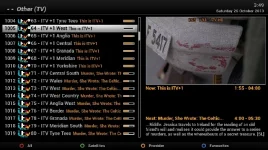
Last edited:
Rob on 767 and this plugin doesn't seem to be in the downloads...
Added yesterday, so should be available.
But I seem to remember that we had this problem on every single version of this plugin (not build for the feeds for reasons unknown).

Rob van der Does
ViX Beta Tester
Yeah, hence my response .....Rob on 767 and this plugin doesn't seem to be in the downloads...
skratch
Forum Supporter
- Joined
- Aug 3, 2013
- Messages
- 364
- Reaction score
- 0
- Points
- 16
I'm pretty sure, what you are asking (if I understand correctly) is not possible at the moment, someting about HD chanenls and Place holders. Sure answer was posted before.
With reagrds to naming:
I will have to consult Einstein regarding HD ones, it should be possible.
For time being, enable Other Extra channels. Add the following lines to the end of supplement.txt. If correct, may be added as default in future. Would be grateful for feedback for other regions. (when editing, best to use linux compatible editor such as notepad++)
Code:973:6000:::::::ITV London 103:6000:::::::ITV London 71:6010:::::::ITV Central South 103:6010:::::::ITV Central South 73:6030:::::::ITV West 103:6030:::::::ITV West 74:6040:::::::ITV West Country 103:6040:::::::ITV West Country 75:6381:::::::ITV Anglia West 103:6381:::::::ITV Anglia West 78:6130:::::::ITV Granada 103:6130:::::::ITV Granada 79:6140:::::::ITV Meridian South 103:6140:::::::ITV Meridian South 80:6390:::::::ITV Tyne Tees 103:6390:::::::ITV Tyne Tees 81:6160:::::::ITV Yorkshire West 103:6160:::::::ITV Yorkshire West 82:6200:::::::ITV Channel Isles 103:6200:::::::ITV Channel Isles 86:6300:::::::ITV Central 103:6300:::::::ITV Central 87:6011:::::::ITV Central East 103:6011:::::::ITV Central East 88:6089:::::::ITV Anglia East 103:6089:::::::ITV Anglia East 90:6142:::::::ITV Meridian East 103:6142:::::::ITV Meridian East 91:6143:::::::ITV Meridian North 103:6143:::::::ITV Meridian North 93:6161:::::::ITV Yorkshire East 103:6161:::::::ITV Yorkshire East 61:6012:::::::ITV +1 Wales 62:6125:::::::ITV +1 West Country 131:6125:::::::ITV +1 West Country 63:6126:::::::ITV +1 Tyne Tees 131:6126:::::::ITV +1 Tyne Tees 64:6127:::::::ITV +1 West 131:6127:::::::ITV +1 West 65:6128:::::::ITV +1 Anglia 131:6128:::::::ITV +1 Anglia 66:6145:::::::ITV +1 Central 131:6145:::::::ITV +1 Central 67:6355:::::::ITV +1 Granada 131:6355:::::::ITV +1 Granada 68:6365:::::::ITV +1 Meridian 131:6365:::::::ITV +1 Meridian 70:6065:::::::ITV +1 Yorkshire 131:6065:::::::ITV +1 Yorkshire
Others should feel free to add details. The csv file has data to work off.
Thanks Abu but i have no idea where the supplement.txt file is? i have googled it but still no luck.
skratch
Forum Supporter
- Joined
- Aug 3, 2013
- Messages
- 364
- Reaction score
- 0
- Points
- 16
Thanks Abu but i have no idea where the supplement.txt file is? i have googled it but still no luck.
Nevermind i found it, for those that don't know
usr/lib/enigma2/python/plugins/extensions/autobouquets
Thanks Rob...
Anyone have an IPK of the latest install...
Downloaded the RAR file but there doesn't seem to be instructions in the OP on how to install it...
Anyone have an IPK of the latest install...
Downloaded the RAR file but there doesn't seem to be instructions in the OP on how to install it...
Yeah, hence my response .....
Rahat786786
New member
- Joined
- Apr 8, 2012
- Messages
- 369
- Reaction score
- 0
- Points
- 0
Thanks Rob...
Anyone have an IPK of the latest install...
Downloaded the RAR file but there doesn't seem to be instructions in the OP on how to install it...
Download the latest October RAR version and extract it. There are a few IPKs but with the Vu boxes ftp the mipsel.ipk version to tmp and install plugin from local extentions from the box GUI.

Larry-G
V.I.P ,
- Joined
- May 19, 2010
- Messages
- 32,540
- Reaction score
- 405
- Points
- 0
- Age
- 48
Rob on 767 and this plugin doesn't seem to be in the downloads...
Andy has looked into this and has said that the ipk installer posted in this thread is not being built correctly, this in turn means that when the image is being built it cant read the control file so bypasses it.
abu baniaz
Moderator
The ipks install fine. Either mipsel or mipsel32.
Transfer to /tmp/ directory. Blue button, vix, install local extension.
Transfer to /tmp/ directory. Blue button, vix, install local extension.
Rob van der Does
ViX Beta Tester
Yes, it does, but please read what Pheonix wrote.The ipks install fine.
Local installing is not the same as building feeds.Andy has looked into this and has said that the ipk installer posted in this thread is not being built correctly, this in turn means that when the image is being built it cant read the control file so bypasses it.
Larry-G
V.I.P ,
- Joined
- May 19, 2010
- Messages
- 32,540
- Reaction score
- 405
- Points
- 0
- Age
- 48
The ipks install fine. Either mipsel or mipsel32.
Transfer to /tmp/ directory. Blue button, vix, install local extension.
As rob said installing them locally your self is not the problem, but they are not being built into the feeds because the image can not read the control file included with the .ipk file so that needs fixing from the authors end.
OK.
So no other file in the RAR is needed only enigma2-plugin-extensions-autobouquets-e2_201310201900-r1_mipsel.ipk
Maybe a note in the first post might be a help on what files are for what and what to do with them....
Thanks
So no other file in the RAR is needed only enigma2-plugin-extensions-autobouquets-e2_201310201900-r1_mipsel.ipk
Maybe a note in the first post might be a help on what files are for what and what to do with them....
Thanks
Download the latest October RAR version and extract it. There are a few IPKs but with the Vu boxes ftp the mipsel.ipk version to tmp and install plugin from local extentions from the box GUI.
skratch
Forum Supporter
- Joined
- Aug 3, 2013
- Messages
- 364
- Reaction score
- 0
- Points
- 16
Ok so I have put my local channel's as 1,2,3 and so on but I had to edit it via idreamx for mac but now all my channel numbers have gone? So I rebuilt the bouquets again and now got channel numbers back but it deleted my channel's I had added to the bouquets.
Sent from my GT-I9300 using Tapatalk
Sent from my GT-I9300 using Tapatalk
Rob van der Does
ViX Beta Tester
I unpacked the IPK and repacked it again: now it shows fine on the feeds.
So apparently the author doesn't create his IPK's correct.
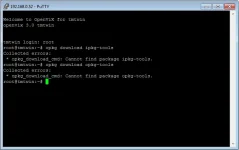
There is a very simple tool for this: the ipkg-tools, that are available as plugin from our feeds. Works always fine.
So apparently the author doesn't create his IPK's correct.
There is a very simple tool for this: the ipkg-tools, that are available as plugin from our feeds. Works always fine.
abu baniaz
Moderator
Similar threads
F
- Replies
- 1
- Views
- 7K


- Replies
- 29
- Views
- 56K

- Locked
- Replies
- 197
- Views
- 60K

- Replies
- 6
- Views
- 3K