

Superb quality and spec AB-Com PULSe 4K SE. Crazy offer! Only £99! FREE UK DELIVERY! 4K UHD, Enigma 2, Multiboot 4 images & more!...
Superb quality and spec AB-Com PULSe 4K Rev II Twin Satellite tuner only £149! FREE UK DELIVERY! 4K UHD, Enigma 2, SATA HDD facility, Multiboot 4 images & more!...
You are using an out of date browser. It may not display this or other websites correctly.
You should upgrade or use an alternative browser.
You should upgrade or use an alternative browser.
UKCvS AutoBouquets E2 by LraiZer BETA.
- Thread starter abu baniaz
- Start date

G
givecredit
Guest
Does it populate without swap? It is for me in the other bouquet.
Apologies, It does work on vix, Its on my dreambox 800hd using Openpli 3 that i have the problem. The same swaps as on my Duo and Giga Quad will not populate on dreambox. The epg does not fill before or after the swap.
The dreambox is running 25th August version. Would this be the problem?
abu baniaz
Moderator
25/08/2013 is old version. Please update to 201310201900-r1
U
unibiggle
Guest
ive installed this but when i scan it says start NIT scan and i press ok but it exits too quick and doest create the bouquets, any ideas what i'm doing wrong?
Im using latest vix and latest autobouquets
Im using latest vix and latest autobouquets

ive installed this but when i scan it says start NIT scan and i press ok but it exits too quick and doest create the bouquets, any ideas what i'm doing wrong?
Im using latest vix and latest autobouquets
Disable script check
N
neilcri
Guest
Hi hope someone can help me on here when I install autobouqets i set up the menu but when I press start my box keeps crashing I have tried it on black hole and on vix.

Larry-G
V.I.P ,
- Joined
- May 19, 2010
- Messages
- 32,540
- Reaction score
- 405
- Points
- 0
- Age
- 48
Hi hope someone can help me on here when I install autobouqets i set up the menu but when I press start my box keeps crashing I have tried it on black hole and on vix.
we would need to see some of the crash logs that correlate to these incidents ( for the ViX image not BH ), before we could offer any real help, otherwise were just guessing.
R
rizla13
Guest
hi,
Does this work on blackhole 2.0.5 (OE 2) running on vu+ Uno?
If it does which version do i install? mipsel? or mipsel32?
Thanks
Does this work on blackhole 2.0.5 (OE 2) running on vu+ Uno?
If it does which version do i install? mipsel? or mipsel32?
Thanks
Last edited by a moderator:
abu baniaz
Moderator
Oe 2.0 images use mipsel32 ipks as far as I am aware.
D
Drsayus
Guest
Hi im new to this. My listings on my vu duo all seem to say 'ep.1458 one on one'. Would anyone know why this is?!
I now cant tell what is on the channel unless i select it. I have turned box on/off. Done a auto scan. Done crossepg. Downloaded bouquets. Yet nothing seems to fix it. Has done this now for past few days.
Any help to a novice will be great thanks!!
Its the 28.2e uk bouquets as well, if that helps?!
I now cant tell what is on the channel unless i select it. I have turned box on/off. Done a auto scan. Done crossepg. Downloaded bouquets. Yet nothing seems to fix it. Has done this now for past few days.
Any help to a novice will be great thanks!!
Its the 28.2e uk bouquets as well, if that helps?!
Just updated to latest vix (789) and installed plugin.
All went fine did initial scan no problem.
Took 1 1/2 mins.
Thin is that I cant do a scan since.
I say yes to NIT scan and it changes to demand info channels and then strat away goes to reloading bouquets, No delay.
But nothing is updated. I deleted a bouquet to see and it was not re-created (Make default Bouquets set to yes).
Where is there a log stored to see what is going wrong ?
I removed plugin rebooted and re-installed and it didn't help.
Actually settings were kept after re-install, where are these stored if the AutoBouquets folder is gone....
All went fine did initial scan no problem.
Took 1 1/2 mins.
Thin is that I cant do a scan since.
I say yes to NIT scan and it changes to demand info channels and then strat away goes to reloading bouquets, No delay.
But nothing is updated. I deleted a bouquet to see and it was not re-created (Make default Bouquets set to yes).
Where is there a log stored to see what is going wrong ?
I removed plugin rebooted and re-installed and it didn't help.
Actually settings were kept after re-install, where are these stored if the AutoBouquets folder is gone....
abu baniaz
Moderator
Log file is located in the plugin folder
/usr/lib/enigma2/python/Plugins/Extensions/AutoBouquets
Settings are written onto the settings file located at /etc/enigma2/ This file stores settings for other receiver functions, so do not delete the whole file.
Things to try:
Double check your tuner config.
Disable script check in the plugin.
If you are using picon links, what device and what format is it in?
Screenshot of settings would be handy
Did you install from feeds or from the ipk in this thread?
/usr/lib/enigma2/python/Plugins/Extensions/AutoBouquets
Settings are written onto the settings file located at /etc/enigma2/ This file stores settings for other receiver functions, so do not delete the whole file.
Things to try:
Double check your tuner config.
Disable script check in the plugin.
If you are using picon links, what device and what format is it in?
Screenshot of settings would be handy
Did you install from feeds or from the ipk in this thread?
Things to try:
Double check your tuner config. - ALL OK
Disable script check in the plugin. - Did this and it works 100% now..
If you are using picon links, what device and what format is it in? - Not using this... What does it do...
Screenshot of settings would be handy - You still want this now ?
What does script check do and do I need it. Wonder whats going wrong ?
Double check your tuner config. - ALL OK
Disable script check in the plugin. - Did this and it works 100% now..
If you are using picon links, what device and what format is it in? - Not using this... What does it do...
Screenshot of settings would be handy - You still want this now ?
What does script check do and do I need it. Wonder whats going wrong ?
Also I installed DVB-T2 tuner and set up main channels with Alternatives on both SAT and DVB-T.
All works fine but when I rescan autobouquets the link to the alternatives gets broken.
Have to add alternative again. It seems to keep both entries but I need to save them for it to work....
Any Ideas.
Any idea if there are any features / improvements being worked on with this plugin...
These are the important ones I see...
- ICONS that show program recordings and autotimers.
- Maintain "Alternatives" channels after re-scan.
- Being able to personalise the channels from 1-100..
Keep up the good work....
All works fine but when I rescan autobouquets the link to the alternatives gets broken.
Have to add alternative again. It seems to keep both entries but I need to save them for it to work....
Any Ideas.
Any idea if there are any features / improvements being worked on with this plugin...
These are the important ones I see...
- ICONS that show program recordings and autotimers.
- Maintain "Alternatives" channels after re-scan.
- Being able to personalise the channels from 1-100..
Keep up the good work....
I have a strange issue that I had last week aswell as today.
I setup autobouquets to scan each morning at 6.35am and its been ok for the last few days, but this morning after the scan the only available bouquet is Favourite. I tried running the plugin manually, restarting the box but still no bouquets.
To fix it I ran the inbuilt vix version, rebooted then ran this plugin and it works.
Anyone else had this?
I setup autobouquets to scan each morning at 6.35am and its been ok for the last few days, but this morning after the scan the only available bouquet is Favourite. I tried running the plugin manually, restarting the box but still no bouquets.
To fix it I ran the inbuilt vix version, rebooted then ran this plugin and it works.
Anyone else had this?

abu baniaz
Moderator
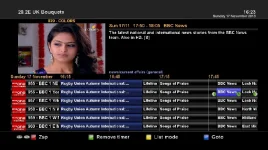
I think we need to add clarity here. There is no issue with created with timers. The issue is the timer being displayed on the epg screen.
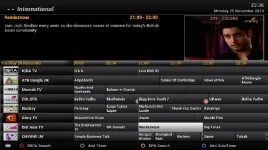
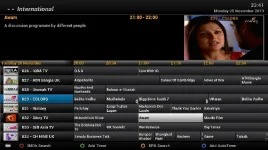
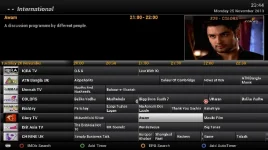
As explained on the other thread, the epg screen is looking at the channel name before displaying the icon. The number and dash obviously makes it different to teh service ID and throws this out. Timer still works. As you can see from the attached screen shots, without the number the icon is displayed. Messed around without and with numbers to demonstrate change. I even tried it with the PLI HD skin and the same happened. Now to confuse the matter, if you look at the last picture on a dm800se using pli 4, the icon is displayed even with the numbers.
I doubt that any changes will be made to the skin/image to accomodate a third party plugin. The change required is to make timer icons based on the service ID instead of displayed name. A few months back, there was discussion about showing the channel number on the graphical epg, that got rejected.
The timers are created by the image, not AB 28.2. A check is made for clashes before the timers are written. The timers can be viewed in the timer menu, but granted on the epg is a lot easier. It is the numbers that are causing the issue. Easiest thing to do is to not show the numbers in the plugin menu, you can toggle them to be on in the bouquet list (Image based menu). Do you really need to see them in the epg?
Lraizer does not have a machine for which the build script for Vix functions even if he wanted to play with it.
As explained on the other thread, the epg screen is looking at the channel name before displaying the icon. The number and dash obviously makes it different to teh service ID and throws this out. Timer still works. As you can see from the attached screen shots, without the number the icon is displayed. Messed around without and with numbers to demonstrate change. I even tried it with the PLI HD skin and the same happened. Now to confuse the matter, if you look at the last picture on a dm800se using pli 4, the icon is displayed even with the numbers.
I doubt that any changes will be made to the skin/image to accomodate a third party plugin. The change required is to make timer icons based on the service ID instead of displayed name. A few months back, there was discussion about showing the channel number on the graphical epg, that got rejected.
The timers are created by the image, not AB 28.2. A check is made for clashes before the timers are written. The timers can be viewed in the timer menu, but granted on the epg is a lot easier. It is the numbers that are causing the issue. Easiest thing to do is to not show the numbers in the plugin menu, you can toggle them to be on in the bouquet list (Image based menu). Do you really need to see them in the epg?
Lraizer does not have a machine for which the build script for Vix functions even if he wanted to play with it.
Attachments
Last edited:
Larry-G
V.I.P ,
- Joined
- May 19, 2010
- Messages
- 32,540
- Reaction score
- 405
- Points
- 0
- Age
- 48
As has been said before, this method of showing the channel number in the EPG is a poor solution and not one were going to adapt the image to accommodate for. we or rather Andy spent a lot of time coding the image to show the numbers properly by user request this plugin does not do that.
abu baniaz
Moderator
It would be great if he could code to put the chanenl number in the epg too. (for those who want it)

andyblac
Administrator ,
- Joined
- Apr 21, 2010
- Messages
- 12,698
- Reaction score
- 96
- Points
- 0
- Age
- 52
I think we need to add clarity here. There is no issue with created with timers. The issue is the timer being displayed on the epg screen.
As explained on the other thread, the epg screen is looking at the channel name before displaying the icon. The number and dash obviously makes it different to teh service ID and throws this out. Timer still works. As you can see from the attached screen shots, without the number the icon is displayed. Messed around without and with numbers to demonstrate change. I even tried it with the PLI HD skin and the same happened. Now to confuse the matter, if you look at the last picture on a dm800se using pli 4, the icon is displayed even with the numbers.
I doubt that any changes will be made to the skin/image to accomodate a third party plugin. The change required is to make timer icons based on the service ID instead of displayed name. A few months back, there was discussion about showing the channel number on the graphical epg, that got rejected.
The timers are created by the image, not AB 28.2. A check is made for clashes before the timers are written. The timers can be viewed in the timer menu, but granted on the epg is a lot easier. It is the numbers that are causing the issue. Easiest thing to do is to not show the numbers in the plugin menu, you can toggle them to be on in the bouquet list (Image based menu). Do you really need to see them in the epg?
Lraizer does not have a machine for which the build script for Vix functions even if he wanted to play with it.
timer icons in EPG have NOTHING to do with service names, they use 'eventid, begin time, duration, serviceid'
post your timer.xml and your bouquets, and i'll try to see what the issue is, as you can see the 'pre timer' icon is working for both, and the post timer icon is show using lazers buqouets, the correct service is detected. it is just not seeing the event as a full timer.
Similar threads
F
- Replies
- 1
- Views
- 7K


- Replies
- 29
- Views
- 56K

- Locked
- Replies
- 197
- Views
- 60K

- Replies
- 6
- Views
- 3K