


Having read about another forum member having problems with mounting their internal HDD, I thought I would check my internal HDD via the "Filesystem check" available from the menus (Menu > Setup > System > Storage devices).
However, when I tried this I got error message, "umount: can't forcibly umount /media/hdd: Device or resource busy".
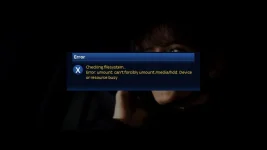
I tried restarting box and ensuring I had no recording taking place and tried again but got exactly the same error.
I then thought I would try and re-initialise the internal HDD via menu option 'Initialisation' and yet again I got same error.
Now I admit I've not tried to either check disk or even re-initialise my internal HDD since Hades was released but I know it works on Apollo series (not sure what version I did it on).
Now apart from this error message, I've had no cause to use this feature as my HDD appears to be working fine because I have my EPG saved to HDD and can record/playback without problems and using df-h I get:
Attached is my debug log for this:-
View attachment Enigma2-01-01-1970_01-00-15.log
My setup consists of Solo2 flashed with Apollo 010 via USB with no restore of settings.
Is anyone else finding this problem when using the "Filesystem check" facility from the menus?
However, when I tried this I got error message, "umount: can't forcibly umount /media/hdd: Device or resource busy".
I tried restarting box and ensuring I had no recording taking place and tried again but got exactly the same error.
I then thought I would try and re-initialise the internal HDD via menu option 'Initialisation' and yet again I got same error.
Now I admit I've not tried to either check disk or even re-initialise my internal HDD since Hades was released but I know it works on Apollo series (not sure what version I did it on).
Now apart from this error message, I've had no cause to use this feature as my HDD appears to be working fine because I have my EPG saved to HDD and can record/playback without problems and using df-h I get:
Code:
Filesystem                Size      Used Available Use% Mounted on
ubi0:rootfs             194.8M     94.1M    100.6M  48% /
devtmpfs                279.4M      8.0K    279.4M   0% /dev
tmpfs                    64.0K         0     64.0K   0% /media
/dev/sda1               297.9G     14.8G    282.1G   5% /media/hdd
tmpfs                   279.6M    136.0K    279.4M   0% /var/volatile
Attached is my debug log for this:-
View attachment Enigma2-01-01-1970_01-00-15.log
My setup consists of Solo2 flashed with Apollo 010 via USB with no restore of settings.
Is anyone else finding this problem when using the "Filesystem check" facility from the menus?
