Superb quality and spec AB-Com PULSe 4K SE. Crazy offer! Only £99! FREE UK DELIVERY! 4K UHD, Enigma 2, Multiboot 4 images & more!...
Superb quality and spec AB-Com PULSe 4K Rev II Twin Satellite tuner only £149! FREE UK DELIVERY! 4K UHD, Enigma 2, SATA HDD facility, Multiboot 4 images & more!...

[Zgemma H9S SE] Unable to find micro sd card on GUI

abu baniaz

Moderator
Joined
Sep 16, 2010
Messages
24,112
Reaction score
178
Points
63
Location
East London
What type of support thread are you creating?
Possible bug
What OpenViX Image build number are you using?
6.7 010
Have you tried re-flashing WITHOUT settings restore?
NO
Have you tried re-flashing WITH a settings restore?
YES
My Zgemma H9S SE is no longer finding the micro SD card after last few updates. Any contsrusctive solution/advice will be greatly appreciated.


On the command line it is found
/dev/mmcblk1p1 ext4 937.5M 736.5M 185.0M 80% /media/hdd

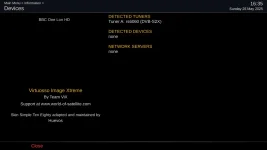
It is not found in the list of devices as pictured


Thanks in advance
 

Attachments

  • h9 se devices.webp
    h9 se devices.webp
    26 KB · Views: 10
@abu baniaz - I need the debug log
I use it as the root device….. I assume you use it for storage?
 
@abu baniaz - can you call Mountmanager and then give me the debug log.
Can you telnet box and do a cat /proc/mounts and tell me whats there.
It certainly finds the device and recognises where it is installed…mountpoint /media/hdd so should be your hdd device

16:41:49.6430 [Harddisk][bus] portDescription:Rear MicroSD
16:41:49.6434 [Harddisk][Init] Device 'mmcblk1' (Rear MicroSD - SU01G) -> '/dev/mmcblk1' -> '/dev/mmcblk1'.
16:41:49.6435 [Harddisk][getUserfriendlyDeviceName] device:mmcblk1p1 physicalDevice:/sys/devices/platform/soc/f9820000.himciv200.SD/mmc_host/mmc1/mmc1:e624
16:41:49.6435 [Harddisk][splitDeviceName] devName = 'mmcblk1p1', device = 'mmcblk1', partition = '1'
16:41:49.6445 [Harddisk][enumerateBlockDevices]### Found partition 'mmcblk1p1', description='SU01G (Partition 1)', device='/sys/devices/platform/soc/f9820000.himciv200.SD/mmc_host/mmc1/mmc1:e624' mountpoint='/media/hdd/.
 
On remote, blue button, select ViX and then mountmanager
Also re read above and do a cat /proc/mounts
 
root@zgemmah9sse:~# cat /proc/mounts
/dev/mmcblk0p23 / ext4 rw,relatime,data=ordered 0 0
proc /proc proc rw,relatime 0 0
sysfs /sys sysfs rw,relatime 0 0
debugfs /sys/kernel/debug debugfs rw,relatime 0 0
configfs /sys/kernel/config configfs rw,relatime 0 0
devtmpfs /dev devtmpfs rw,relatime,size=431484k,nr_inodes=107871,mode=755 0 0
tmpfs /media tmpfs rw,relatime,size=64k,nr_inodes=107940 0 0
/dev/mmcblk0p4 /boot vfat rw,relatime,fmask=0022,dmask=0022,codepage=437,iocharset=iso8859-1,shortname=mixed,errors=remount-ro 0 0
tmpfs /var/volatile tmpfs rw,relatime,size=431760k,nr_inodes=107940 0 0
/dev/mmcblk1p1 /media/hdd ext4 rw,relatime,data=ordered 0 0
devpts /dev/pts devpts rw,relatime,gid=5,mode=620 0 0
fusectl /sys/fs/fuse/connections fusectl rw,relatime 0 0
/etc/auto.network /media/autofs autofs rw,relatime,fd=7,pgrp=2193,timeout=5,minproto=5,maxproto=5,indirect 0 0
root@zgemmah9sse:~#
 

Attachments

Thanks, so its mounted as your hdd device in proc/mounts
/dev/mmcblk1p1 /media/hdd ext4 rw,relatime,data=ordered 0 0
 
What do you mean not showing up in devices? …..its mounted as hdd
 
When you go in devices, it is not found. There is a screenshot on post 1 which shows this.

Menu > Information > Devices
 
@abu baniaz - can you unzip attachment & copy to /usr/lib/enigma2/python/Screens.
Restart and try Menu/Information/devices
 

Attachments

OpenViX Feeds Status

Back
Top