Superb quality and spec AB-Com PULSe 4K SE. Crazy offer! Only £99! FREE UK DELIVERY! 4K UHD, Enigma 2, Multiboot 4 images & more!...
Superb quality and spec AB-Com PULSe 4K Rev II Twin Satellite tuner only £149! FREE UK DELIVERY! 4K UHD, Enigma 2, SATA HDD facility, Multiboot 4 images & more!...

Unicable tune fail error

thedoc11

Forum Supporter ,
Joined
Mar 6, 2011
Messages
93
Reaction score
0
Points
0
Location
Bolton
Happy New year to you all.

Wondering if anyone can shed light on this for me please
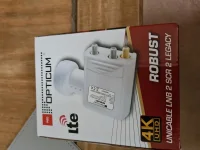
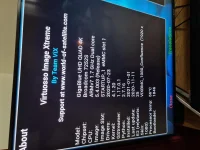
i have a opticum red robust unicable LNB 2 legacy, Giggablue quad 4k STB . using VIX image 5.4 latest
when i switch the STB on i get a tune failed error and then after approx 3-4 mins on some occasions the channel will appear.
There are other times where the channel will not come on at all and have to turn the STB off for sometime and try again. Yesterday the STB was set on record I left it the STB on standby and when i came back the tune failed error was displayed and the channels did not record there were 2 recordings that failed to record both at the same time. Seem to me when the box ws placed in standby the power to the LNB also was cut off ??
Is there a workaround or am i doing something wrong ??

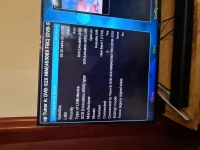
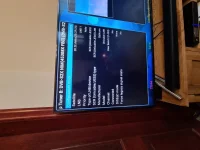
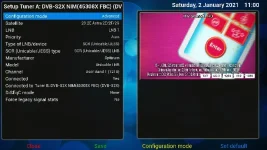
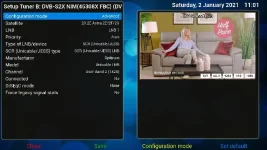
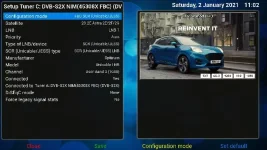
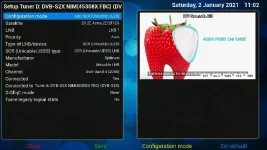
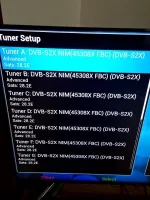
Ive attached the images for tuner A and B the setting for the rest of the tuner C - H are the same except the user band is changed to from 3 through to 8
 

Attachments

  • 20210101_110509_01.webp
    20210101_110509_01.webp
    42.5 KB · Views: 26
  • 20210101_111325.webp
    20210101_111325.webp
    48.5 KB · Views: 30
  • 20210101_111358.webp
    20210101_111358.webp
    44.8 KB · Views: 25
  • 20210101_105711.webp
    20210101_105711.webp
    36.4 KB · Views: 21
  • 20210101_112631.webp
    20210101_112631.webp
    54.8 KB · Views: 18
Have you read the sticky about tune failed messages at the top of this forum? You do have the SEC plugin installed and correctly set up, right?
 
Not sure why you didn‘t connect to input A and then coonnect everything off A, but anyway.....
I have the same LNB on one of my GBUHD4K and the connected tuners all have configuration mode FBC SCR (Unicable/JESS)
 
Yes I have read this sticky and installed, so finally i have now got the tune failed error eradicated the next issue is if i record 5 channels simultaneously i get a tune failed is my setup correct ?? as per the images attached ??
 
yes not sure i guess cam a bit of a novice and have corrected this thank you
 
I have 1 stb with my unicable attached to a splitter and tuner A and tuner B both have a cable connected from the splitter or is this incorrect ??
 
The LNB only has 8 SCR‘s so just connect direct to input A and setup with Tuners B through H connected to tuner A, there is no need for a splitter
 
Done exactly what you said but i can only record 2 programs and watch 1 program is this correct ??
 
The LNB only has 8 SCR‘s so just connect direct to input A and setup with Tuners B through H connected to tuner A, there is no need for a splitter
I'd connect both. In some situations this is an advantage. E.g. you can run ABM without a blackout.
 
So i have connected tuners A,C,D, E to tuner A and Tuners B,F,G,H to tuner B ??
 
Please post a screen grab of each tune setup page.
 
I'd connect both. In some situations this is an advantage. E.g. you can run ABM without a blackout.
Both outputs from the splitter or both the unicable output from the LNB and one of the legacy outputs from the LNB?
 
Both outputs from the splitter or both the unicable output from the LNB and one of the legacy outputs from the LNB?
If you have legacy ports, either option will do. But tuner configuration must match your choice.

Setting the tuner connected to universal port of LNB as unicable is wrong. It should be set as simple, single, 28.2 (as an example)
 
Both outputs from the splitter or both the unicable output from the LNB and one of the legacy outputs from the LNB?
As Abu says, both will do the job, but my answer is about setting up a Unicable system.
 
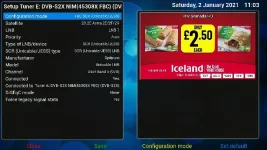
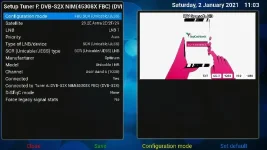
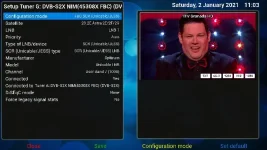
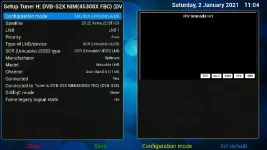
Please see the attached screen shots
 

Attachments

  • TUNER A.webp
    TUNER A.webp
    37.6 KB · Views: 32
  • TUNER B.webp
    TUNER B.webp
    35.6 KB · Views: 29
  • TUNER C .webp
    TUNER C .webp
    39.9 KB · Views: 28
  • TUNER D.webp
    TUNER D.webp
    34.2 KB · Views: 23
  • TUNER E.webp
    TUNER E.webp
    37.8 KB · Views: 21
  • TUNER F.webp
    TUNER F.webp
    28.9 KB · Views: 17
  • TUNER G.webp
    TUNER G.webp
    33.8 KB · Views: 16
  • TUNER H.webp
    TUNER H.webp
    25.3 KB · Views: 18
Thats what am trying to do Huevos I have noting connected to the legacy inputs only the unicable input via a splitter

so unicable from the dish to the splitter then from the splitter one cable to to tuner A and One cable to Tuner B and then as per screen shot below as requested
 
Tuner A is not connected to Tuner B both are separate inputs as you have used the splitter to inputs A
& B
 
Last edited:
So cables from splitter to socket A and socket B.

Both tuner A and tuner B must be "Connected: no".

All other tuners connect to tuner A, as in the screen grabs.
 

OpenViX Feeds Status

Back
Top