Superb quality and spec AB-Com PULSe 4K SE. Crazy offer! Only £99! FREE UK DELIVERY! 4K UHD, Enigma 2, Multiboot 4 images & more!...
Superb quality and spec AB-Com PULSe 4K Rev II Twin Satellite tuner only £149! FREE UK DELIVERY! 4K UHD, Enigma 2, SATA HDD facility, Multiboot 4 images & more!...

[VU+ Duo2] Updating software

Oh Crap

New member
Joined
Feb 11, 2014
Messages
26
Reaction score
0
Points
0
Hi....I'm confused (read useless)
Trying to update software and keep getting "feeds are down for maintenance"
Reading up I find I have update stuff....
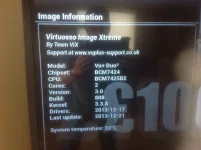
Attached is picture of info
What exactly do I do.
I have downloaded file to usb
I have taken a screenshot of my tuner setup
Not worried about losing channel as I can rescan them
But do I need to download a new boot loader as well or just new image
All started when I couldn't rewind live tv or use some features I could before.
Help please
Glenn
 

Attachments

  • image.webp
    image.webp
    35.9 KB · Views: 50
You can't use the online software update process with your vey old image.

Load the latest image onto a USB stick and load the latest image from that.
 
Vix 3-808 became Obsolete over 12 month ago their have been massive updates since then as Vix has evolved through 4 builds since that one

and like timofee suggests you will have to do a complete fresh install using a USB stick
 
Unfortunately your current image is so old that you can not update online nor can you use a settings backup from it on a modern image. So if you want to update its going to have to be a full blown fresh setup. Make a full image backup of your current image though just in case.


Sent from my iPad Air using Tapatalk
 
Ok
So I download latest image and unzip to usb
Plug in usb turn off machine at back... Turn on and hope For the best...
Set up tuners as before and rescan channels
Is that it?
 
There is a full flashing tutorial for your receiver on our download site at www.openvix.co.uk that will show you how to reflash the receiver, then go from there.
 
There is a full flashing tutorial for your receiver on our download site at www.openvix.co.uk that will show you how to reflash the receiver, then go from there.

Thanks for the quick help
Is that the PDF file u put together?
Also is appollo 132 the download I need
Usb stick has been formatted already today
Apologies I am nieve in this area
 
yes it's one of the .pdf documents I created.
The latest version of the image on the download site is Apollo build 132 so use that one.
 
All done and working...just need to setup timers again..��
 
Hello everyone,
I have this problem too. I want to install pluging but feeds are down for maintrance .
image build 137
version Apollo
Your web site is filtering in my country and i used vpn connection to connect to ur site for updating . Plz someone help me . Thanks.
 
Last edited by a moderator:
The plugin feeds are currently down while we rebuild the Apollo image build server, it may take a few days until they return.
 
Just get the finger out

It took a whole day just to trash the feeds, then they have to be rebuilt for over 30 plus receivers so it will take as long as it takes.
 
wouldn't it be better to set the status to red instead of keeping green ? Everyone updating will have problems now.
 

OpenViX Feeds Status

Back
Top