Superb quality and spec AB-Com PULSe 4K SE. Crazy offer! Only £129! FREE UK DELIVERY! 4K UHD, Enigma 2, Multiboot 4 images & more!...
Superb quality and spec AB-Com PULSe 4K Rev II Twin Satellite tuner only £179! FREE UK DELIVERY! 4K UHD, Enigma 2, SATA HDD facility, Multiboot 4 images & more!...

Using simple Ten Eighty skin but playback bar at top OF SCREEN can I move it to bottom- How?

bmitie

Forum Supporter
Donated Member
Joined
Aug 10, 2010
Messages
458
Reaction score
16
Points
18
I'm having a play with the Simple Ten Eighty but I have noticed the playback bar for recordings is at top of screen and I dont if it is something I did but can it be moved to bottom and what do I do??

Help
 
Perfect, that did the trick. Was it something I did or is that the default?

happy new year:thumbsup:
 
I wonder if the playback bar position could be made configurable in menu - e.g. top / bottom? I find that sometimes the bar obscures info at the top of the screen. Presumably it's at the top by default so it doesn't obscure subtitles for those who use them?
 
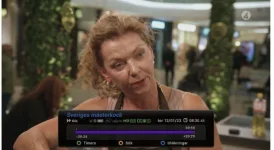
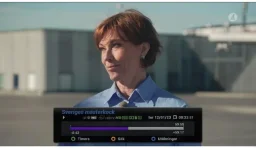
Hello, I have another problem, on zgemma 9s, and 6.3.001 version, the progressbar starts somewhere in the middle, and when it comes to end, I still have some minutes left of video. No big problem, so take it as info, I use the vix-night skin. No problem on zgemma 7
Skärmklipp2.webp
 

Attachments

  • Skärmklipp.webp
    Skärmklipp.webp
    19.9 KB · Views: 14
In S1080 the reason the playback slider is near the top is so it doesn't interfere with infobar which displays simultaneously.
 
Thanks @Huevos. I just find that the playback slider occasionally obscures broadcast info at the top of the screen, depending on the event, like football / rugby if I'm jogging the slider backwards and forwards to locate when a point is scored.
 

OpenViX Feeds Status

Back
Top