Superb quality and spec AB-Com PULSe 4K SE. Crazy offer! Only £129! FREE UK DELIVERY! 4K UHD, Enigma 2, Multiboot 4 images & more!...
Superb quality and spec AB-Com PULSe 4K Rev II Twin Satellite tuner only £179! FREE UK DELIVERY! 4K UHD, Enigma 2, SATA HDD facility, Multiboot 4 images & more!...

[VU+ Duo] VIX 2.4 v134 not seeing updates

init 4 enigma goes to sleep && opkg update the image looks to see if updates are available && opkg upgrade if updates are found they are downloaded && init 6 not sure about that one but i would guess it reboots the receiver.
 
so if ater many hours the DUO remains "freezed" it means that it hasn't done anything. Right?
 
so if ater many hours the DUO remains "freezed" it means that it hasn't done anything. Right?
Correct: 'init 6' should have rebooted the box once the upgrade was ready. Normally the complete process should be done within 10 minutes.
As you did the process via telnet, you should also have been able to see the output. This includes the sending of the init 6 command.
Are you sure you typed the command exactly as it was given (did you use copy & past)?

So there are at least two problems: the download problem and the box doesn't respond to the 'init 6' command in the upgrade sequence.
I know you don't want to hear this, but the only thing I can think of is to do a reflash without settings-restore.

BTW: are you using a WiFi-connection? If so I would try a wired connection first.
 
Hi Rob
yes I copy pasted the command, and on the telnet session I had no verbose output.

As stated on post 18 I actually use a wired connection. Just for testing purpose I did try to use a wifi adapter to check the beahviour.


What makes me angry is that the two DUOs I own have the very some settings configuration the same plugin installed (tskpanel and aspectratioswitch) the only difference is that the DUO actually affected by this issue is serving as CCcam and and on OpenVPN. (The second Duo has not enabled OpenVPN service).
 
Last edited:
Do an experiment please
Can you take a full image backup from both receivers and flash the non working one with the image from the working one and vice versa and see if the problem moves over. This will determine if you have a hardware problem with the non working box and show if it is software problem if it doesnt work on the second box
 
Last edited:
mmm, I do understand your testing intention but, actually I'm sure it's not hardware related but more likely something on the OS got corrupted.
I'm sure about this since network functionality is working. CCCam sharing is ok both on LAN and over WAN.
As stated pinging wan adresses via telnet is ok.
It's just a matter of wget error and GUI not seeing onair updates.

So, which could be a correct telnet command to first remove and then reinstall wget?
 
The reason
Code:
init 4 && opkg update && opkg upgrade && init 6
never reboots is because the "&&" in the comand sequence means continue only if the previous command ended successfully - and the "opkg update" command failed - therefore it never reaches "init 6".

But what about trying to disable/uninstall OpenVPN ?
 
The reason
Code:
init 4 && opkg update && opkg upgrade && init 6
never reboots is because the "&&" in the comand sequence means continue only if the previous command ended successfully - and the "opkg update" command failed - therefore it never reaches "init 6".

But what about trying to disable/uninstall OpenVPN ?

Have tried disabling openvpn, but no luck still same wget error.
It seemed to me a Good suggestion indeed.
Any other tip Before flashing?
 
It might be interesting to see, if wget form other sites is working, eg:
Code:
root@et9x00:/var/volatile/tmp# [B]wget http://www.google.com[/B]
Connecting to www.google.com (173.194.69.103:80)
Connecting to www.google.dk (173.194.69.94:80)
root@et9x00:/var/volatile/tmp# ls -l index.html
-rw-r--r--    1 root     root         12836 Jun 16 20:56 index.html
Not sure what this proves :rolleyes: as wget is part of busybox, so no easy way to exchange.
 
For sure something has gone bad: after many hours of up time ( or standby) it's not possible to access duo via telnet nor via ftp. Only a full reboot reenable both connections.
Could this mean anything?
 
Just flash the box with a fresh image already...
anything could be corrupt & impossible for us to know.
 
Did you check your DNS setting. You can ping but looks like can't resolve names ..
 
For sure something has gone bad: after many hours of up time ( or standby) it's not possible to access duo via telnet nor via ftp. Only a full reboot reenable both connections.
Could this mean anything?

I had that previously when I used to use a dm800. iirc, the problem was caused when using an e-sata hdd. As soon as I swapped over to an internal data hdd, all worked well...
 
Dns in use are the same on the second DUO. And on 3 Macs on the same LAN. So they are ok.
Anyhow I've tried with different ones with no luck.

It seems interesting the tip about hdd. My not workin duo is indeed using an external USB hdd. But what to do just try and disconnect it?
 
It might be interesting to see, if wget form other sites is working, eg:
Code:
root@et9x00:/var/volatile/tmp# [B]wget http://www.google.com[/B]
Connecting to www.google.com (173.194.69.103:80)
Connecting to www.google.dk (173.194.69.94:80)
root@et9x00:/var/volatile/tmp# ls -l index.html
-rw-r--r--    1 root     root         12836 Jun 16 20:56 index.html
Not sure what this proves :rolleyes: as wget is part of busybox, so no easy way to exchange.

That's really interesting. Look what happens issuing wget:

wget http://www.google.com
-sh: wget: not found

what the hell? Can I try and reinstall wget?
As previously posted I tried to remove and reinstall wget follwing this procedure that did not work:
Code:
opkg remove wget
No packages removed.
opkg install wget
Unknown package 'wget'.
what shoul I try to reinstall correctly wget?
 
That's really interesting. Look what happens issuing wget:

wget http://www.google.com
-sh: wget: not found

what the hell? Can I try and reinstall wget?
As previously posted I tried to remove and reinstall wget follwing this procedure that did not work:
Code:
opkg remove wget
No packages removed.
opkg install wget
Unknown package 'wget'.
what shoul I try to reinstall correctly wget?
You can't! wget is part of busybox:
Code:
root@et9x00:~# which wget
/usr/bin/wget
root@et9x00:~# ls -l /usr/bin/wget
lrwxrwxrwx    1 root     root            17 May 26 22:00 /usr/bin/wget -> ../../bin/busybox
root@et9x00:~# ls -l /bin/busybox
-rwsr-xr-x    1 root     root        650632 May 25 18:07 /bin/busybox
Looks like a reflash is your only option.
 
just the last oddity before going for a reflash:
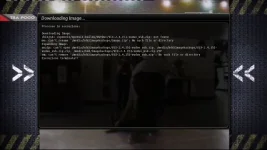
I went in VIX menu/Image Manager/Downloads
and tried to download the latest 151 build.
And got the following error:
Code:
Downloading Image.
/bin/sh: /openvix/openvix-buildsVu+Duo/ViX-2.4.151-vuduo_usb.zip: not found
mv: can't rename '/media/hdd/imagebackups/image.zip': No such file or directory
Expanding Image.
unzip: can't open /media/hdd/imagebackups/ViX-2.4.151-vuduo_usb.zip, /media/hdd/imagebackups/ViX-2.4.151-vuduo_usb.zip.zip, /media/hdd/imagebackups/ViX-2.4.151-vuduo_usb.zip.ZIP
rm: can't remove '/media/hdd/imagebackups/ViX-2.4.151-vuduo_usb.zip': No such file or directory
Esecuzione terminata!!  (in italian it means [I]end of process[/I])

If you are wondering: I have an external USB drive used in HDD replacement mode.
And yes recording are working fine.

image-download.webp
 
Ok mates. I'm gettin crazy.
Since my last post I did a clean flash from built 151.
Formated USB flash drive. Reconnected the external USB HDD too.
Then just installed AFP, OpenVPN, and CCcam 2.3.0.
After about a week the DUO is again not seeing online update for the latest 155 build. While the second duo is.

And again neither telnet opkg update is working cause I get the usual wget error 255
 
Do an experiment please
Can you take a full image backup from both receivers and flash the non working one with the image from the working one and vice versa and see if the problem moves over. This will determine if you have a hardware problem with the non working box and show if it is software problem if it doesnt work on the second box

Did you try this and see if the problem transfers to the other box - it will prove if a software problem or not
 

OpenViX Feeds Status

Back
Top