Superb quality and spec AB-Com PULSe 4K SE. Crazy offer! Only £129! FREE UK DELIVERY! 4K UHD, Enigma 2, Multiboot 4 images & more!...
Superb quality and spec AB-Com PULSe 4K Rev II Twin Satellite tuner only £179! FREE UK DELIVERY! 4K UHD, Enigma 2, SATA HDD facility, Multiboot 4 images & more!...

Vix image not fitting on screen?

antmills

New member
Joined
Feb 10, 2011
Messages
9
Reaction score
0
Points
1
I use the Vix image, but on my TV it does not fit. Part of the image disappears off the left hand side of the screen. It's as if the VIX image is too wide for my TV screen. I have tried everything I can think of to get the image to display fully on my TV, but without success.

Does anyone else have this problem and can anyone suggest how I can make the image fit my screen.

Thanks.
 
Also, wot tv u got? My old tv (px60) had picture perfect straight from install. With my st30, the menus etc were too far to the right, as I had an overscan option on the tv which was disabled.

In the vix settings (or display, can't remember off top of head), there is an overscan amount. On px60, the default 32 was perfect. On st30, I need it set to 0...

Have a look for overscan settings on tv, if not, then alter in the box settings...

Sent with Tapatalk
 
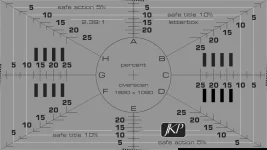
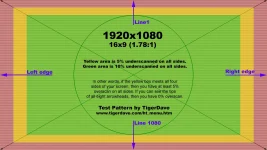
Your TV is definitely set to "overscan": display the attached pictures (using the pictureplayer) to see how much you are missing.
"Overscan" can have all kinds of different names on TV's, or even be absent at all. If you can't turn it of, use e.g. the skin Magic-HD: it allows for 5.5% overscan. Using the skin ViX-HD the overscan can be set in the box-menu.
 

Attachments

  • Overscan-2.webp
    Overscan-2.webp
    58 KB · Views: 84
  • Overscan-1.webp
    Overscan-1.webp
    131 KB · Views: 64
I found only how to set "Menu overscan" with ViX-HD skin, not the overscan of the tv picture.
Even so, something is very wrong with Help button - the mouse cursor is badly out of sync with the buttons on the drawing of the remote.
Actually, I see this with ET-9000 connected via hdmi to a 1920x1080 TV, 1080i mode set on ET-9000.
On Vu+ I still have a very old Open PLi image, but I will test eventually on Vu+ as well.
 
I found only how to set "Menu overscan" with ViX-HD skin, not the overscan of the tv picture.
That is correct: the TV-picture is presented as it is transmitted by the channel. And it is you TV that has to be set to not using overscan.
What was the result of displaying the overscan pictures? How much % does your TV not show?
 
I have the same problem on my LG TV, using the original vix skin.
I hope this will be fixed in next update.
 
I have the same problem on my LG TV, using the original vix skin.
I hope this will be fixed in next update.
In the next version there will be even extra options in this area.

But I'm very curious: why don't you switch off the overscan of your TV?
After all what the point of watching HD TV and having all pixels being re-rendered and expanded by a factor 1.05 or so?
And having it switched of, you can really tell the difference.

BTW: did you use the above picture to see how much picture your TV denies you to see?
 
no overscan in my TV. searched in all menus.
instead of 32 I entered 40 and now they menu screen moved right, so it will look better then not seeing the left line of the menu box.
 
In some TV-Menu's Overscan has all kind of fancy names, such as "real", "+1" and many others. Very often a search on the internet, specifying your exact type of TV reveals a lot of info.
Or just ask the manufcturer. Sometimes a firmware-upgrade is the answer to your problem

After all: you won't accept a HD-TV that doesn't actually provide a HD-picture, would you?

Did you look at the above pictures so you can tell exactly how much the overscan actually is?
 
I cant get in to my LG Expert Menu. Wrong Password.
I tried 8741,0000,7777.
can someone help.
 
I have LG 37LC2R cant find the password on the net.
 
Try These

* means SETUP (or star shaped key)

*-018 - Service Menu A
*-019 - Service Menu B
 

OpenViX Feeds Status

Back
Top