Superb quality and spec AB-Com PULSe 4K SE. Crazy offer! Only £99! FREE UK DELIVERY! 4K UHD, Enigma 2, Multiboot 4 images & more!...
Superb quality and spec AB-Com PULSe 4K Rev II Twin Satellite tuner only £149! FREE UK DELIVERY! 4K UHD, Enigma 2, SATA HDD facility, Multiboot 4 images & more!...

VIX Team Vu+ Duo Image v1.3 - 05/12/2010

Status
Not open for further replies.
EPG button + Ghost skin = green death
4th green death with
skin.SkinError: {ghost_hd/skin.xml}: pixmap file /usr/lib/enigma2/python/Plugins/Extensions/CoolTVGuide/timeline-now.png not found!
please fix it.
 
Last edited by a moderator:
EPG button + Ghost skin = green death
4th green death with
skin.SkinError: {ghost_hd/skin.xml}: pixmap file /usr/lib/enigma2/python/Plugins/Extensions/CoolTVGuide/timeline-now.png not found!
please fix it.

yes its a bug and its known

the new vix epg doesn't like the old 3rd party skins.

fixing skins it not a priority
the fuctioanlity is
the defaut skin works perfectly

please use that in the mean time or by all means give fixing a shot your self
 
hi
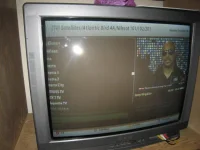
When showing the all servces list...the first and second letters of the channels are not visible....they are shifted to the left.

Shifting the list location to the right will help...how to do that please?

This is in VU_HD_Plus skin.

Also, the font size is too small.

My TV is crt...
 
@ cbr900: Adjust overscan in VIX menu. Restart GUI.
 
How comes the updates are always done with X-Factor in the background! lol

Great job guys.

Now just got to get to the TV so I can update!! :)

Because I am an avid xfactor fan!!!!

By the way, that's not true, don't even watch the program, just use that as it always seems to be a Saturday night when we're creating the release screenies, and I always ITV HD as a standard... We were even joking about it always being xfactor :p

Next time, gonna be using my favourite program for the screenshots, here's a sample ;):

AutoStandby.png
 
I normaly only have 1 softcam installed. I set up that special test just to be sure the system was restarting. I set up 1 softcam as active and then setup a different softcam to restart should the system think my softcam stopped. And the fact that the receiver ends up with both softcams as active proves it restarted the second one, believing the first one froze or stopped working

The reason why it proved it was starting the second one, is because what happens is that the autostart cam is always checked if it's running every 30 minutes (as you have selected to have that one auto start). If it's not running, it will start it. The fact that you then have the first cam running is causing a conflict in the system.

This should work perfectly if you just set 1 cam as autostartcam, then restart the box...
 
Because I am an avid xfactor fan!!!!
By the way, that's not true, don't even watch the program...

People who fall under this category are the first to 'disappear' when I become King of Europe.
 
Thanks for yet another great image VIX Team.
Just having a bit of a play with the EPG and I can't find the option to change bouquets whilst in the EPG.
I know you could in CoolEPG in VIX 1.2.

Am I missing something here or isn't it possible in VIXEPG. If not could this feature be added as an online update at some point please ?


Once again fellas, thanks for this great image.
it is Channel +/-

andy
 
EPG button + Ghost skin = green death
4th green death with
skin.SkinError: {ghost_hd/skin.xml}: pixmap file /usr/lib/enigma2/python/Plugins/Extensions/CoolTVGuide/timeline-now.png not found!
please fix it.

please do a software update ,that has been fixed :)
 
People who fall under this category are the first to 'disappear' when I become King of Europe.

I'll join you as a servent in helping to rid them :D My worst fear, is that we will only have about 10% of the population left :p hehe
 
@ cbr900: Adjust overscan in VIX menu. Restart GUI.

I did all the online updates....

Adjusting the overscan value in vix settings does not have any effect on all services list...it only affects vix menu...

please help
 
I did all the online updates....

Adjusting the overscan value in vix settings does not have any effect on all services list...it only affects vix menu...

please help
can you post a photo (taken with camera) of what you get ?, it should be no worse then other skins
 
can you post a photo (taken with camera) of what you get ?, it should be no worse then other skins

here the picture....hope it is ok
 

Attachments

  • 034.webp
    034.webp
    29.2 KB · Views: 49
hello friends

I love the new image, but unfortunately I could not put my TNT card to work.
I tried several times but could not put her to work

but with the same settings it works in D-Elite

I wanted to change, I would appreciate your help!

thanks
 
Whilst in EPG, press the top left button under the mute button and you can input wherever you want to view in the EPG instantly for upto 7 days.

Hope this helps

Thanks for that - never knew that function was mapped to that button. You can also use the < and > buttons (right and left of the 0 button) to move 24 hours forward/back at a time.
 
hello friends

I love the new image, but unfortunately I could not put my TNT card to work.
I tried several times but could not put her to work

but with the same settings it works in D-Elite

I wanted to change, I would appreciate your help!

thanks

what softcam are you trying to use ?
 
hello friends

I love the new image, but unfortunately I could not put my TNT card to work.
I tried several times but could not put her to work

but with the same settings it works in D-Elite

I wanted to change, I would appreciate your help!

thanks

As andy says, which softcam... As long as you have the aes keys for the tntsat card, it should work...
 
Status
Not open for further replies.

OpenViX Feeds Status

Back
Top