Superb quality and spec AB-Com PULSe 4K SE. Crazy offer! Only £99! FREE UK DELIVERY! 4K UHD, Enigma 2, Multiboot 4 images & more!...
Superb quality and spec AB-Com PULSe 4K Rev II Twin Satellite tuner only £149! FREE UK DELIVERY! 4K UHD, Enigma 2, SATA HDD facility, Multiboot 4 images & more!...

VIX Team Vu+ Duo Image v2.0 - 09/02/2011

I'm also having trouble getting any of my softcams to start.
WHen I go to run them from telnet session I get
Code:
root@vuduo:/usr/softcams# ls -lsa
   0 drwx------    2 root     root            0 Feb 11 00:58 .
   0 drwxr-xr-x   15 root     root            0 Feb  9 17:49 ..
 679 -rwxr-xr-x    1 root     root       695272 Feb 11 00:12 MGcamd
 933 -rwxr-xr-x    1 root     root       955508 Feb 11 00:35 Oscam
root@vuduo:/usr/softcams# Oscam
-sh: Oscam: not found
root@vuduo:/usr/softcams# MGcamd
-sh: MGcamd: not found
root@vuduo:/usr/softcams#
Is there something I'm missing here??
I've tried renaming the files to something else chmod is 755, anything else I'm missing?
I don't know why it always -sh ?????: not found.

If you are going to start an app from telnet and your are in the /usr/softcams directory, you have to prefix the command with ./ so the command will look like this..:

./Oscam

This is because the current directory is not usually included in the path on a Linux system...


BTJ
 
I'm also having trouble getting any of my softcams to start.
WHen I go to run them from telnet session I get
Code:
root@vuduo:/usr/softcams# ls -lsa
   0 drwx------    2 root     root            0 Feb 11 00:58 .
   0 drwxr-xr-x   15 root     root            0 Feb  9 17:49 ..
 679 -rwxr-xr-x    1 root     root       695272 Feb 11 00:12 MGcamd
 933 -rwxr-xr-x    1 root     root       955508 Feb 11 00:35 Oscam
root@vuduo:/usr/softcams# Oscam
-sh: Oscam: not found
root@vuduo:/usr/softcams# MGcamd
-sh: MGcamd: not found
root@vuduo:/usr/softcams#
Is there something I'm missing here??
I've tried renaming the files to something else chmod is 755, anything else I'm missing?
I don't know why it always -sh ?????: not found.

As someone mentioned earlier, you need to prefix with ./:

Code:
root@vuduo:/usr/softcams# ls -l
-rwxr-xr-x    1 root     root      1249704 Nov 22 16:48 CCcam.2.2.1
root@vuduo:/usr/softcams# CCcam.2.2.1
-sh: CCcam.2.2.1: not found
root@vuduo:/usr/softcams# ./CCcam.2.2.1
root@vuduo:/usr/softcams#

As you can see, I get not found without the ./, with it, it runs fine ;)
 
I've tested 7.2 but it seems that it not work properly. If I choose Neutrino (classic) one should be able to use OK button to bring up program list. But nothing happens. And when I try to uninstall the system loops in enigma restarts and cannot be halted. Is there a way to make Pauli compatible?
 
Autotimer crashes for me on the 2nd ok you have to press

I've uninstalled autotimer and reinstalled

Still the same

Can anyone give me some help

Can you post some crash logs from /media/hdd??? Or the file under /home/root with the time/date it crashed if you have enabled the detailed crash log within the vix menu :)
 
Sorry, only just spotted this reply/question now.
I put them on HDD. Had the exact same issue, they worked on the info bar but not in VIX EPG.
Disabling them in VIX EPG, saving the settings, exit EPG. Enter EPG, enable them again worked for me.

thanks for the reply - i have tried what you suggested and they still do not show :(
 
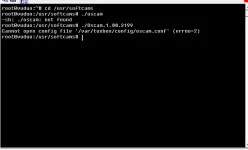
This is what you get when you start oscam:

attachment.php


The same happens with OpenPLi 2.0 but when you start oscam using their softcam manager it works!!
In VIX 2.0 it doesnt work, even when using VIX softcam manager.

Please fix or return old softcam manager (openpli 2.0) where oscam works.


I am also atttaching two crash logs which are not related to softcams. I am using magic sd skin.
Maybe they are relevant, maybe not...
 

Attachments

  • crash_logs.rar
    crash_logs.rar
    7.8 KB · Views: 0
  • untitled.webp
    untitled.webp
    10.6 KB · Views: 193
Last edited:
This is what you get when you start oscam:

attachment.php

By the looks of it, it's trying to load it from the wrong location... afaik, oscam looks in /etc/tuxbox/config/ I would guess that the PLi softcam told oscam to look there rather than the default of where PLi makes it look (not sure why it would be looking there :confused:).
 
Vix 2

Firstly I would like to thank all those involved with this great image. Have to say this in the fastest upgrade for me so far. Did have some concerns with installing CCcam, but everything went like clockwork and all is working 100%

Thanks guys.
 
As someone mentioned earlier, you need to prefix with ./:

Code:
root@vuduo:/usr/softcams# ls -l
-rwxr-xr-x    1 root     root      1249704 Nov 22 16:48 CCcam.2.2.1
root@vuduo:/usr/softcams# CCcam.2.2.1
-sh: CCcam.2.2.1: not found
root@vuduo:/usr/softcams# ./CCcam.2.2.1
root@vuduo:/usr/softcams#

As you can see, I get not found without the ./, with it, it runs fine ;)
When I run it like that it looks like it's trying to find all the config files in the wrong place, which I presume why it's not running.

Code:
root@vuduo:/usr/softcams# ./Oscam.1.00.3199
Cannot open config file '/var/tuxbox/config/oscam.conf' (errno=2)
root@vuduo:/usr/softcams#

Is there a way to make a symlink to /etc/tuxbox/config

Or do I need to look at something else?
 
No picons in EPG FIXED!!

removed picon set from plugin manager and manually copied a set of picons via FTP and they worked like a charm.

Now have picons in info bar and EPG.

Thank you everyone for your help.
 
./oscam -c /etc/tuxbox/config -b

I tried this and now it works. Now we just need to edit startup scrip. Where is located?
In openPli 2.0 scripts are located in normal location etc/init.d, but here i cant find it...
 
./oscam -c /etc/tuxbox/config -b

I tried this and now it works. Now we just need to edit startup scrip. Where is located?
In openPli 2.0 scripts are located in normal location etc/init.d, but here i cant find it...

i'll make the change in image, there is no script to change., i'll post update soon
 
Hi, Im having similar problems.

Installed 2.0 last night had all working great except i could not access plugin server or update server, so i re flashed 1.2, which is working perfect, i checked my network setting to see if i was making a mistake but all is the same.
Again tonight i retried 2.0 now no network connection. So now im back to 1.2 again perfect.:confused:
Is there a way to back up network settings then re load to 2.0

Vinnie

Anyone any ideas on this. I would love to use my Nova T.
 
i have a strange problem i have vix 1.3 on now all working good i have used the usb version of vix 2.0 and have now installed it from a usb stick np but when the image loads the screen turns pink after load its ok wile booting eg logos and so on but when the image is up and running its pink all the time i have set the right display setting as before i have noticed that i cannot change the brightness and contrast setting and that's what i think it is every thing else on the image is working fine just pink can anyone shed some light on this problem as im lost

thanks

cozmo

right looks like this problem is to do with openpli 2.0 i have downloaded the lastest one from there site and when i install it i get the same problem all pink i have changed all the av settings and they make no diff at all only dose this on openpli 2.0 and vix 2.0 so guess the something in the base that dose not like my setup on component all other images work fine without this problem is just this base that i have the problem with so looks like i will have to stay with vix 1.3

thanks

Cozmo
 

OpenViX Feeds Status

Back
Top