Superb quality and spec AB-Com PULSe 4K SE. Crazy offer! Only £99! FREE UK DELIVERY! 4K UHD, Enigma 2, Multiboot 4 images & more!...
Superb quality and spec AB-Com PULSe 4K Rev II Twin Satellite tuner only £149! FREE UK DELIVERY! 4K UHD, Enigma 2, SATA HDD facility, Multiboot 4 images & more!...

VPS geht nicht

Anyway, back to why there is no VPS option in one-off timers.

Part of the problem had been tracked down.

I'm working on a solution - which is 1 line in Vix (but where it would be "out of place") and somewhat more than that in the plugin (which is the place that has caused the requirement).
 
I'm working on a solution.
I think I have one. ("It works for me")
You'll need to wait until later today to find out what it is - it's getting late...

EDIT: Working on instant records too.
 
Last edited:
Here is the "fixed" code.

View attachment Modifications.py

(goes in /usr/lib/enigma2/python/Plugins/SystemPlugins/vps)

I'd be grateful if others could check it.
In particular I'd like it to be checked on OpenATV - as that still uses the original createSetup() call and so has no TimerBaseEntry.
 
The Explanation

The problem was that the "[(Power)TimerEntry] Refactor to use common base classes" change added a TimerBaseEntry class whose createConfig() needs to be called before Setup.__init__() is called.

But the VPS plugin ends up intercepting the createConfig() call in TimerEntry and expects self.session to have been set after it calls the original code - but it no longer is.
Not only that, the createConfig() call doesn't actually have access to the session parameter, so can't fudge it in.

The 1-line solution I mentioned was to modify Vix enigma2 code to set self.session in TimerEntryBase.__init__(), but that is rather messy as Vix has no reason at all to do that - it's already calling the correct code to set things correctly for Vix.

The solution is to check whether TimerEntryBase exists (if it doesn't, which is the case on OpenATV, the original code still works) and if so, intercept the TimerEntryBase.__init__() call and set self.session there.
Which puts the setting where it is needed - in the plugin.
 
I've had a quick try with default vps settings, add timer epg/green still not remembering enable vps=yes, using 5.4.007.009

The vps.xml file gets created, but hasn't been updated since the first attempt.
 
I've had a quick try with default vps settings, add timer epg/green still not remembering enable vps=yes, using 5.4.007.009

The vps.xml file gets created, but hasn't been updated since the first attempt.
True.

But at least the option was available in a one-off timer for you to get this far, so still progress.
 
True.

But at least the option was available in a one-off timer for you to get this far, so still progress.

The option was always there but you couldn't change its value.
 
The option was always there but you couldn't change its value.
No, in 5.4 you couldn't see the option with a one-off timer.

timers_vps.xml is the file it should be written to, but when that gets written no timer has vps enabled...
 
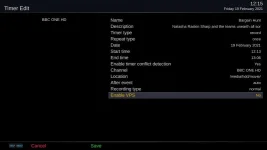
Testing on 5.4.006 (release) on a H7. Set up a one-off recording from the epg. VPS option is there (and was set to NO). Changed it to YES to enable and it fails the vps check as expected. But it is switching back to NO unlike on 5.3 where it does stick.
 
No, in 5.4 you couldn't see the option with a one-off timer.
I've just removed and reinstalled the release version on vps on 5.4 Epg/Green .......

no.webp

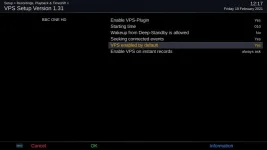
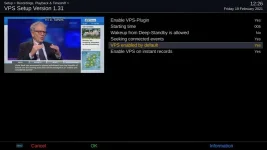
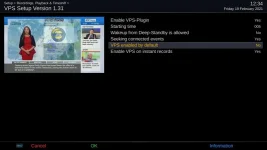
If you setup the vps plugin like this it doesn't show the option in epg/green...

yes.webp

So we're both right. :)

nb settings file keeps vps options after uninstalling the plugin.
 
No, in 5.4 you couldn't see the option with a one-off timer.

timers_vps.xml is the file it should be written to, but when that gets written no timer has vps enabled...

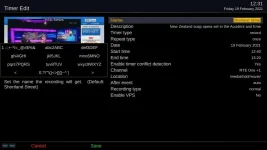
You can see the option in a one-off timer providing you have the "VPS enabled by default" set to no in the plugin settings. But, as @ccs posted, any value set in the timer menu was not saved.
 

Attachments

  • vps_settings.webp
    vps_settings.webp
    23.4 KB · Views: 8
  • manual_timer_vps.webp
    manual_timer_vps.webp
    29 KB · Views: 8
  • vps_settings_no.webp
    vps_settings_no.webp
    25.1 KB · Views: 4
Last edited:
nb settings file keeps vps options after uninstalling the plugin.
I don't think anything removes options when something is removed.
The only thing that could remove "old" options is the package itself, and it can't a enigma2 is (possibly) running so has them "active".
 
I don't think anything removes options when something is removed.
The only thing that could remove "old" options is the package itself, and it can't a enigma2 is (possibly) running so has them "active".

OK, but it can catch you out when you reinstall a plugin and epg/green no longer shows the option being discussed.

(Until you put back the original default.)
 
You can see the option in a one-off timer providing you have the "VPS enabled by default" set to no in the plugin settings. But, as @ccs posted, any value set in the timer menu was not saved.
OK.

But were in danger of losing track of what is and is not working if every change for point A gets a comment about each of points B to Z as well.

So can we agree that the fix does get the item back into the menu, but the following issues now exist:

  • The VPS option doesn't appear in the Timer Edit menu if the VPS plugin config is set to "enabled by default"
  • Changing the VPS option in the Timer Edit menu doesn't actually get set/stick in the timer
The latter seems to be the result of there being no code to actually pass on the change to the write-out function.
 
OK.

But were in danger of losing track of what is and is not working if every change for point A gets a comment about each of points B to Z as well.

So can we agree that the fix does get the item back into the menu, but the following issues now exist:


  • [*]The VPS option doesn't appear in the Timer Edit menu if the VPS plugin config is set to "enabled by default"
    [*]Changing the VPS option in the Timer Edit menu doesn't actually get set/stick in the timer
The latter seems to be the result of there being no code to actually pass on the change to the write-out function.

That's what I was seeing without your latest change to Modifications.py
 
OK.

But were in danger of losing track of what is and is not working if every change for point A gets a comment about each of points B to Z as well.

So can we agree that the fix does get the item back into the menu, but the following issues now exist:

  • The VPS option doesn't appear in the Timer Edit menu if the VPS plugin config is set to "enabled by default"
  • Changing the VPS option in the Timer Edit menu doesn't actually get set/stick in the timer
The latter seems to be the result of there being no code to actually pass on the change to the write-out function.

Your two bullet points are correct. But that has been the case all along (in 5.4 since I started testing VPS), it's not a new phenomenon.
 

OpenViX Feeds Status

Back
Top