Superb quality and spec AB-Com PULSe 4K SE. Crazy offer! Only £99! FREE UK DELIVERY! 4K UHD, Enigma 2, Multiboot 4 images & more!...
Superb quality and spec AB-Com PULSe 4K Rev II Twin Satellite tuner only £149! FREE UK DELIVERY! 4K UHD, Enigma 2, SATA HDD facility, Multiboot 4 images & more!...

[VU+ Duo] Vu+ Duo reboots when I try to access any HDD

  • Thread starter Thread starter wubbster
  • Start date Start date
W

wubbster

Guest
I was having speed problems transferring files via ftp so deleted a few things on HDD and USB drive. I then rebooted laptop, and tried again. Transfer speed a lot quicker but once finished, I could not access any HDD or USB drive, as it loads and would usually give me the choice of drive or file to select it crashes and I get the screen attached.
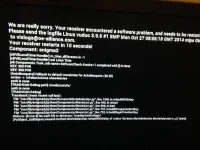
Photo 13-01-2015 22 36 33.webp

Any ideas? I assume I have deleted something I shouldnt have!
 
Looks like a read/write issue, with ViX not being able to use a .trashcan.
Impossible to tell from a dodgy pic why that's now happening though.
Proper log of the crash will be in /home/root/logs/ by default.
 
Code:
[TRASHCAN DeBug path] /media/autofs/
path is none
[TRASHCAN DeBug] 
Traceback (most recent call last):
  File "/usr/lib/enigma2/python/Screens/MovieSelection.py", line 1348, in reloadWithDelay
  File "/usr/lib/enigma2/python/Components/MovieList.py", line 495, in reload
  File "/usr/lib/enigma2/python/Components/MovieList.py", line 599, in load
  File "/usr/lib/enigma2/python/Components/MovieList.py", line 731, in buildGroupwiseSortkey
  File "/usr/lib/enigma2/python/Components/MovieList.py", line 722, in buildBeginTimeSortKey
OSError: [Errno 2] No such file or directory: '/media/autofs/logs/'
(PyObject_CallObject(<bound method MovieSelection.reloadWithDelay of <class 'Screens.MovieSelection.MovieSelection'>>,()) failed)
]]>
Remote mount not working so, or mounts without correct write permissions?
Does the same happen if you update to a current build?
 
Sorry I am a newbie when it comes to doing anything other than the normal. Do I ftp the downloaded vix to box and then install?
 
Blue button -> ViX -> Image Manager -> Yellow button, download latest image available to box.
Blue button -> ViX -> Image Manager -> Blue button, to install downloaded image.
Then set up the box from scratch on reboot.
 
Opening this up again, had some problems recently including timeslip not working, recording not working and things HD related, resolved the timeslip by changing destination but now recording is not working. Tried changing destination etc but now when I select the library button it crashes while accessing the HD drive. tried basic things,(my knowledge is limited) and searching online led me back to my old post. So tried the solution above and after I get to restore stage it crashes and reboots again. I have attached my error log.(error log is from when I tried to restore not from when it crashed when i selected library button). I have a 40GB internal drive and 160gb external drive.
View attachment enigma2_crash_1438717572.log
 
Looks like you had a network mount that's no longer available.
Code:
/media/autofs/pc/
Do a search in your settings file (/etc/enigma2/settings) for any lines that mention his mount point & delete.
 
I managed to get it updated to build 018 but it still crashes when I select library.
 
Ahhh yes i was streaming from my pc to box and it stopped working, struggled to get it working again and managed to add a few network locations it could not access. Will try now.
 
I can find one line of text which is last movie viewed which is on the PC mount, but i remove it, update file and then as soon as box is restarted it is back again. What am I doing wrong? Here is the log when I attempt to access library.
View attachment enigma2_crash_1438722330.log
 
You need to put E2 to sleep before editing this file.
Issue init 4 in telnet, edit the file then Init 3.
You also have messed up your timeshift location.
When you updated to build 18, you still used your old settings file.
 
How do i correct the timeshift problem?. As soon as wife has finished watching TV i will sort editing the file. Thanks.
 
A reflash without a settings restore would sort all your mount issues.
Other than that, point your timeshift to a hdd that exists & is mounted.
 
Still the same error.
Code:
OSError: [Errno 2] No such file or directory: '/media/autofs/pc/'
Try rebooting after editing the file.
 

OpenViX Feeds Status

Back
Top