Superb quality and spec AB-Com PULSe 4K SE. Crazy offer! Only £129! FREE UK DELIVERY! 4K UHD, Enigma 2, Multiboot 4 images & more!...
Superb quality and spec AB-Com PULSe 4K Rev II Twin Satellite tuner only £179! FREE UK DELIVERY! 4K UHD, Enigma 2, SATA HDD facility, Multiboot 4 images & more!...

Vu Duo ViX 2.3 (Linux 3.1.1) 25-12-2011

  • Thread starter Thread starter silverfox0786
  • Start date Start date
Still struggling with described issue :argue:
Logs are sent 2 days ago, i rly hope to get it solved. It seems it happens often last 2 days. Strange enough,every night before going to bed i do my box off, but next morning is vu+ on and frozen.

Harry
 
I would like to comment some issues that I have seen at the last time:
1. After clear update from Vix 2.2 to Vix 2.3 I see that circular polarization indicator in info panel does not work correctly. (I am using Vu+ Duo for 36e eutelsat with circular polarization)
2. Also determination of DVB-S/DVB-S2 system in info panel does not work correctly too.

And the one more question :)

How can I add cams info to info panel (or in the 2nd info panel) in VIX HD Night Skin?
 
I would like to comment some issues that I have seen at the last time:
1. After clear update from Vix 2.2 to Vix 2.3 I see that circular polarization indicator in info panel does not work correctly. (I am using Vu+ Duo for 36e eutelsat with circular polarization)
2. Also determination of DVB-S/DVB-S2 system in info panel does not work correctly too.

And the one more question :)

How can I add cams info to info panel (or in the 2nd info panel) in VIX HD Night Skin?

Which cam are you using as cccam and oscam info is there or have i misintreprated your post.
 
Sorry, I am using mgcamd 1.35a

And I have looked in skin.xml for the 1st item. I realized that this is the update icon, rather than circular polarization :D
 
Hello,
i have a problem when recording live TV
The recording is just stating the channel it recorded and not the program name
eg say i recorded a program called cricket and that was on SlySports 1 the program in the recorded menu comes up as SlySports 1 and not cricket

regards
 
Ive tried about 10 times now. Just got a brandnew vu duo. Booted up with original fw and it worked. I then tried 10 times to flash bootloader and then latest vix2.3 like I've always done, and the box just stays sitting at "Starting..."and no image on my TV, just black.

Who can help me out?
 
can some one tell me whats new in the new update of vix 2.3 191 build which came out today
thanks
 
I'm still having the issue where the 3d OSD options actually do nothing on the newer builds(161+) :(
The 3D OSD works on the 153 build flawlessly even autotriggers my TVs 3d mode when activated.
But on the latest 2 VIX builds I've tried. 161 and 191 it does diddly squat :(
As I use the 3d OSD quite a bit(mapped to a Macro) so I'll be sticking with 153 for the time being.
See my earlier posts on this here
http://www.world-of-satellite.com/s...-1)-25-12-2011&p=106299&viewfull=1#post106299
Its not much of an issue ;) but its enough to keep me on 153 :)
 
Last edited by a moderator:
I see there is a online update for the duo, anyone know what the changes are?
 
yes there is a changelog available

I have just checked mine and it does not show any change log option strange, but can see the log on your image, so nothing major.
 
Last edited:
Just did the latest update, system rebooted and now it keeps crashing Vix has dissapeared from the menu screen so has cccam 2.1 if i try to enter menu then plugin get black screen and then reboots cant access anything ?
 
Just did the latest update, system rebooted and now it keeps crashing Vix has dissapeared from the menu screen so has cccam 2.1 if i try to enter menu then plugin get black screen and then reboots cant access anything ?

When this happens it is best to do a reflash using your USB stick, and then try and do the online update again. Hope you backed up your files?
 
yeah just did the back up but now not going to try the update until i am off,
dont want to spoil the Mrs Tv for the night !!
 
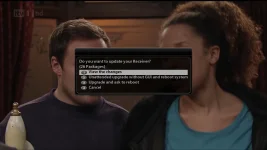
well funny you should ask that the new version software updater now allows you view the notes before you decided to update
update1.webpupdate.webp

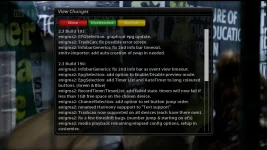
but anyway here is the notes. and before you ask build 193 is being test now so hopefully tomorrow release.

2.3 Build 190:
enigma2: InfobarGenerics: fix 2nd info bar as event view timeout.
enigma2: EpgSelection: add option to Enable/Disable preview mode.
enigma2: EpgSelection: add Timer List and AutoTimer to long coloured buttons. (Green & Blue)
enigma2: RecordTimer/TimerList: add failed state. timers will now fail if less than 1GB free space on the chosen device.
enigma2: ChannelSelection: add option to set button jump order.
enigma2: renamed Harmony suppport to "Text support"
enigma2: Trashcan now supported on all devices (each have there own).
enigma2: fix a few timeshift bugs. (number jump & starting on et's)
enigma2: media playback remaining/elapsed config options, setup in customise.
enigma2: tweaks made to MessageBox and ChoiceBox code.
enigma2: OLED update display. for Vu Ultimo
enigma2: update LED Buttons setup, to show Deepstandby setting when changing it.
enigma2-plugins: remove 'emission, menusort, movieepg, namezap, pipzap, pluginhider, pluginsort' at request of [email protected]
enigma2-plugins: update.
feeds: add PO package so people can update to email back to [email protected]
image: vuplus driver update
image: xtrend driver update
ViX: RestoreWizard, nows allows to select backup file to restore, and allows plugin only restore.
ViX: SoftwareUpdate: add an option to view changes before deciding to update.
Translations: NL updates.
 

OpenViX Feeds Status

Back
Top