steevieboy4u
New member
Any suggestions for this issue or is my Vu+ Duo 2 ****ed? 
It all started when I tried to do an online upgrade about 2 weeks ago...... Done it before loads of times and never had an issue but that time it wouldn't reboot so thought it was a dodgey image. So tried to reload my backup but woundnt reboot from that either so had to do a fresh flash. That works temporarily but if i have to reboot it sticks again on the vu+ logo screen on initial boot.
After this happened I'd do a fresh flash to get it working again but after 3 or 4 days I'd get up in a morning and it'd be stuck on the boot screen? I turned the power off at the rear as it would not respond to remote and the clock would also be frozen on whatever time it had gone wrong. But then after powering off and then trying to reboot it wouldn't get past the vu+ logo screen meaning openvix wouldn't load. It stays like this for a minute or so then goes off and repowers back up but then sticks on the vu+ logo screen again this continues to happen until its powered off and reflashed
Ive reflashed it numerous times even going back 3 openvix builds incase it was that. Tried loading image backups but then it sticks on the logo again.
I've even reflashed then not installed any plugins, skins etc but it's still doing the same thing. It will reflash as nothing is wrong, I setup everything again, it works fine but then like tonight......I was just watching BBC the screen went black and the front display froze. The remote control would not do anything and I had to power down at the rear. But now it's going to mean a reflash to get everything working but I know it's just going to be frozen again in the morning!
Also noticed since all this started happening I can no longer do OTA updates like I've always done previously as when it downloads the update now then reboots, it again sticks on the vu+ logo screen. Meaning I have to do a USB flash again
I thought it could be the 1tb internal HDD so I initialised that which wiped it but then it wouldn't initialise but I could record and playback?
So I disconnected the HDD and reflashed again, setup up the basics with no plugins or skins etc again..... All working ok but tried to do a reboot to check if it was the HDD to blame.....yet again it sticks on the vu+ logo and keeps doing as before stated above!
Thinking I've got a problem with the flash memory just wondered if this is fixable? Can the flash memory be replaced? It's a genuine box and has worked faultlessly for over 3 years. My last option I was thinking could I reflash the latest bootloader (V2 is already on it) but now worried if I do this and it's the flash at fault will it brick my box?
Sorry for the long story but just wanted to add as much detail as possible as I love my Duo2 and don't really wanting to be forking out to replace it if it can be fixed as they're not cheap.
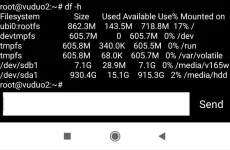
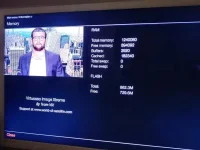
Currently box has been reflashed and is working as normal and I'm just keeping an eye on the flash memory info. Currently states total = 862.3M and free = 729.4M. I want to see if this reduces over the next few days (HDD still disconnected and I'll make sure no recordings are attempted)
Cheers all
It all started when I tried to do an online upgrade about 2 weeks ago...... Done it before loads of times and never had an issue but that time it wouldn't reboot so thought it was a dodgey image. So tried to reload my backup but woundnt reboot from that either so had to do a fresh flash. That works temporarily but if i have to reboot it sticks again on the vu+ logo screen on initial boot.
After this happened I'd do a fresh flash to get it working again but after 3 or 4 days I'd get up in a morning and it'd be stuck on the boot screen? I turned the power off at the rear as it would not respond to remote and the clock would also be frozen on whatever time it had gone wrong. But then after powering off and then trying to reboot it wouldn't get past the vu+ logo screen meaning openvix wouldn't load. It stays like this for a minute or so then goes off and repowers back up but then sticks on the vu+ logo screen again this continues to happen until its powered off and reflashed
Ive reflashed it numerous times even going back 3 openvix builds incase it was that. Tried loading image backups but then it sticks on the logo again.
I've even reflashed then not installed any plugins, skins etc but it's still doing the same thing. It will reflash as nothing is wrong, I setup everything again, it works fine but then like tonight......I was just watching BBC the screen went black and the front display froze. The remote control would not do anything and I had to power down at the rear. But now it's going to mean a reflash to get everything working but I know it's just going to be frozen again in the morning!
Also noticed since all this started happening I can no longer do OTA updates like I've always done previously as when it downloads the update now then reboots, it again sticks on the vu+ logo screen. Meaning I have to do a USB flash again
I thought it could be the 1tb internal HDD so I initialised that which wiped it but then it wouldn't initialise but I could record and playback?
So I disconnected the HDD and reflashed again, setup up the basics with no plugins or skins etc again..... All working ok but tried to do a reboot to check if it was the HDD to blame.....yet again it sticks on the vu+ logo and keeps doing as before stated above!
Thinking I've got a problem with the flash memory just wondered if this is fixable? Can the flash memory be replaced? It's a genuine box and has worked faultlessly for over 3 years. My last option I was thinking could I reflash the latest bootloader (V2 is already on it) but now worried if I do this and it's the flash at fault will it brick my box?
Sorry for the long story but just wanted to add as much detail as possible as I love my Duo2 and don't really wanting to be forking out to replace it if it can be fixed as they're not cheap.
Currently box has been reflashed and is working as normal and I'm just keeping an eye on the flash memory info. Currently states total = 862.3M and free = 729.4M. I want to see if this reduces over the next few days (HDD still disconnected and I'll make sure no recordings are attempted)
Cheers all