Superb quality and spec AB-Com PULSe 4K SE. Crazy offer! Only £99! FREE UK DELIVERY! 4K UHD, Enigma 2, Multiboot 4 images & more!...
Superb quality and spec AB-Com PULSe 4K Rev II Twin Satellite tuner only £149! FREE UK DELIVERY! 4K UHD, Enigma 2, SATA HDD facility, Multiboot 4 images & more!...

Vu+ Multiboot (Kexec)

deltec

Forum Supporter
Donated Member
Joined
Jan 2, 2014
Messages
838
Reaction score
1
Points
18
Age
61
im intrested in multi boot on my ultimo how do i set it up any tuts on this
 
here you go thanks to twol


In the last 2 months an OpenViX/OpenBH team have built multiboot for the Vu+ 4k boxes
The following sounds complicated .... but its not, just follow and all will straight forward.

So flash your OpenViX image with latest image.
On boot, don,t restore settings backup if the system finds one !! Just select screen output (e.g. 1080 or 2160), language and setup internet, then exit out of install wizard. Should go to Menu screen, if so select MultiBootSelector or long press power button -----> select Enable Vu+ Multiboot.
The box will re- initialise and reboot.
On reboot, press Blue button and select ImageManager...........download latest ViX image and hit Blue button (flash) .....you will be presented with the normal slot available display. Choose one and flash.
On reboot, setup as normal.

From then on you are in a normal multiboot setup, so can flash the 3 eMMC slots with different images.
If you have installed an internal HDD, you can add Multiboot slots on a USB stick --------> format a usb stick as ext4(either on PC or via OpenViX) and then restart.
Go to multibootSelector, and choose add usb slots (it will add 4 slots at a time on the USB stick) ---- you will then be able to flash more than 3 slots.

Any issues -----> post here!
 
multi boot

is there a tut on how to do miltiboot with vix is it in the plugins
 
Multi boot from

We’re can I find multiboot on the image is it in the plugin downloads any instructions how to use the multi boot never used one before
 
Last edited:
There is noting to download/install. For the Vu+, you just have to enable it after flashing the image. [strike]It is in the standby/restart menu.[/strike]

This is the PLI wiki, so very similar to
Code:
https://wiki.openpli.org/Vu_Multiboot
 
Last edited:
I have merged your threads. If you get stuck, clearly write what you don't understand/where you get stuck.
 
yes i no u have thank u very much for that
 
How to enable Kexec multiboot on Vu+ receivers for Vix users

1. Flash OpenViX image again. You can use the USB method or Image Manager

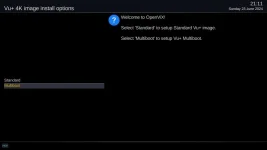
2. When the receiver reboots you can choose whether to use the receiver in standard mode (without the multiboot) or with the Kexec multiboot
Use your remote to select the multiboot option and press OK

2 select multiboot.webp

The directories/slots will then be created for you to flash images onto later.
A "recovery image" will be saved in the recovery slot/directory
A ViX image will be flashed into slot 1
The receiver will then reboot into the vix image in slot 1

3 wait.webp

You then set up the image as normal. If a settings backup is found, you will be offered the option to restore it.
 
Last edited:
How to flash an image into a different multiboot slot/directory/partition

The flashing process is exactly the same as normal. However, there is an additional step where you pick the slot/partition to flash into


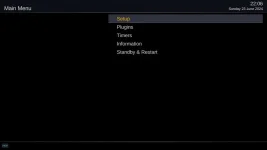
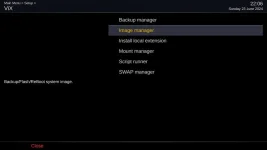
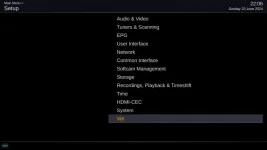
Menu > Setup > Vix > Image Manager

7 setup.webp

9 image manager.webp

8 vix.webp

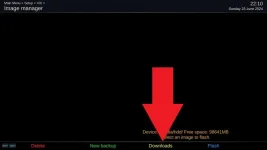
You then download the image that you want to flash. Press yellow (downloads)

10 download.webp


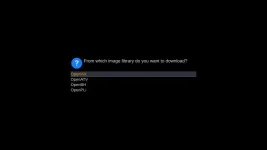
Pick the image you want in the next couple of screens and then confirm the download

11 images.webp

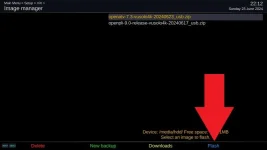
Once downloaded, ensure that the image you want to flash is highlighted. Then press Blue to flash it.

14 flash.webp


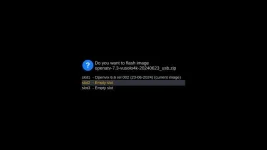
The additional step compared to non-multiboot receivers is where you select the slot/directory to flash the image into.
Vix does not allow you to flash into the recovery partition unless you are in the recovery partition already.

15 select slot.webp


Unlike other images, once the selected image is flashed, the receiver will reboot into it.
 
Last edited:
How to boot into a different image on hardware/kexec multiboot receivers

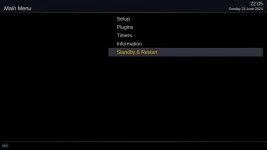
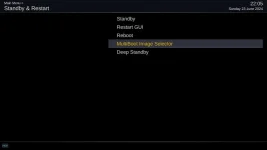
The Multiboot image selector is in the Standby & Restart menu

Menu > Standby/Restart > Multiboot Image Selector

5 standby_restart.webp

6 Multiboot.webp

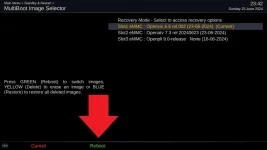
Using up/down on your remote, select the image you want to reboot into. Then press Green to reboot into it.

16 select image to boot into.webp
 
Last edited:

OpenViX Feeds Status

Back
Top