Superb quality and spec AB-Com PULSe 4K SE. Crazy offer! Only £99! FREE UK DELIVERY! 4K UHD, Enigma 2, Multiboot 4 images & more!...
Superb quality and spec AB-Com PULSe 4K Rev II Twin Satellite tuner only £149! FREE UK DELIVERY! 4K UHD, Enigma 2, SATA HDD facility, Multiboot 4 images & more!...

Vu+ Player for Android now available on Google Play

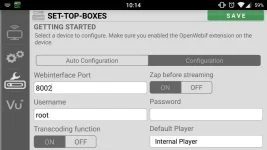
I don't know if they're being transcoded or not, but I can watch the recordings. I have the transcoding port set as you can see from the attached image, so I presume that means that it is using that port instead of standard streaming. Watching a HD recording on my Xperia Tablet Z works perfectly. I've resized the image just to keep the file size down.
player-config.webp
 
Can this only be used when connected to wi-fi? I was wondering if it were possible to stream from a VU+ Solo2 via 3G/4G mobile network whilst not at home?
 
Can this only be used when connected to wi-fi? I was wondering if it were possible to stream from a VU+ Solo2 via 3G/4G mobile network whilst not at home?
As far as I am aware from previous research into this, you can do it, but it exposes your box to the rest of the world unless you implement some security measures to protect it. I never got that far into it, and getting information on securing the box, was about as hard as getting blood from the proverbial stone.

I remember reading one post about tunnelling webif through SSH (that might be the wrong term, it was a while back when I was playing with this) but when I tried that, I couldn't get the box to accept an external connection for some reason. I had the ports forwarded correctly, but the box just refused to accept the connection from outside my LAN, so I gave up trying.
 
As far as I am aware from previous research into this, you can do it, but it exposes your box to the rest of the world unless you implement some security measures to protect it. I never got that far into it, and getting information on securing the box, was about as hard as getting blood from the proverbial stone.

I remember reading one post about tunnelling webif through SSH (that might be the wrong term, it was a while back when I was playing with this) but when I tried that, I couldn't get the box to accept an external connection for some reason. I had the ports forwarded correctly, but the box just refused to accept the connection from outside my LAN, so I gave up trying.

I understand. So are you saying that you can't stream or access the box when connected to wi-fi at any location other than the LAN?
 
No, you can do it quite easily, but it will be in a very insecure fashion. That's why you have to set up some form of security on the box, other than that in the Webif, and that's the part I couldn't work out how to do.

At the most basic level, it's simply a case of configuring a port in webif, and forwarding the port through your router. But if you do it in that way, chances are your box will be discovered and hacked. Apparently your password is simply transmitted unencrypted, so if someone is looking for your password, they won't have to try that hard to find it.

I read a couple of threads about people who discovered software installed on their boxes after using webif across the internet. You have to consider is watching your box across the net, worth the risk?

But that's all based on what I've read, and like anything on the internet, you have to take it at face value. It was enough to deter me though, especially as I couldn't get any secure ways to work.
 
I never got that far into it, and getting information on securing the box, was about as hard as getting blood from the proverbial stone.

I remember reading one post about tunnelling webif through SSH (that might be the wrong term, it was a while back when I was playing with this) but when I tried that, I couldn't get the box to accept an external connection for some reason. I had the ports forwarded correctly, but the box just refused to accept the connection from outside my LAN, so I gave up trying.
Have a look at this recent post by @pembo, some good advice on how to secure your box if you can't secure your router.
 
I understand. So are you saying that you can't stream or access the box when connected to wi-fi at any location other than the LAN?
Yes, you can. Better to do it on a secure network though as any un-secured network will be found and used pretty fast.
This isn't an E2 issue (although the lack of E2 security doesn't help either), opening any ports to any internal box is an issue.
But that's all based on what I've read, and like anything on the internet, you have to take it at face value. It was enough to deter me though, especially as I couldn't get any secure ways to work.
One example of where reading the internet worked so...
 
I'll have a read of that post judge, thank you... and yes, when you don't know any better (like I don't with these boxes), then you take all warnings as being serious, until you learn enough information to understand why, and how to avoid the risks.
 
Is it just as risky to open port 21 on your router to allow FTP to friends/family enigma2 boxes?
Just to update files every now and then without having to go and visit someone to update a file or two.
 
There is a recent post that describes the how-to.
But in the end it's not very simple; you'll have to invest some time in safety.
But whatever you do: don't leave the door open. After all your STB is simply a Linux computer; and I would hate the thought of somebody taking control of one of the computers in my own personal network.
 
SSH or VPN is the answer to safety.
And even then, use a non-standard port.
I once set up SSH on port 22 externally and found all sorts of login attempts in the failure logs. I changed to a non-standard port (externally) and they went away.
 
Hi guys

Do the Transcoding work for u on this app ?

I loves this app but just can't get Transcoding to work

It works on ur other app u made droid player

Can u plz fix the vu+ playerHD app

Thanks ��
 
Hi guys

Do the Transcoding work for u on this app ?

I loves this app but just can't get Transcoding to work

It works on ur other app u made droid player

Can u plz fix the vu+ playerHD app

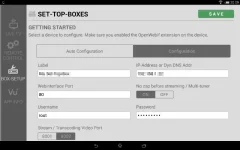
Thanks ��Screenshot_20160520-101456.webp
 

OpenViX Feeds Status

Back
Top