Superb quality and spec AB-Com PULSe 4K SE. Crazy offer! Only £129! FREE UK DELIVERY! 4K UHD, Enigma 2, Multiboot 4 images & more!...
Superb quality and spec AB-Com PULSe 4K Rev II Twin Satellite tuner only £179! FREE UK DELIVERY! 4K UHD, Enigma 2, SATA HDD facility, Multiboot 4 images & more!...

VU+ Solo lip sync problems

  • Thread starter Thread starter markys
  • Start date Start date
M

markys

Guest
Welcome to the world of VU+!

This is my first venture into the world of VU (coming from a dremabox) and I am having lip sync audio issue with my VU Solo. I am running th latest vix image with CCcam 2.2.1.

Whenever I change to a new channel I need to go through the constant task of pressing the audio button, followed by audio sync and then finally messing around with the 'service delay' toggle to achieve a normal audio to video sync. Without doing this, audio is well ahead of video and watching anything is a nightmare.

Is anyone aware of a permanent fix? Or a way to permananelty fix all channels at the required service delay (-250ms) seems to currently be optimum.

Thanks in advance guys
 
First of all: any sync problems are probably due to a TV taking it's time to produce a picture. Make sure to set all so called 'video-enhancers' of your TV to 'Off'.

Secondly: via the audio-button channel specific delays can be set.
 
Thanks for the reply.

All 'video enhancers' are set to off.

Currently I am setting delays via the audio button, but to do this everytime i switch channel is a tedious task that I did not have to do with my previous receiver. Is there anyway to set this audio delay as default for all channels?
 
How is you Solo connected? To an amp? I've personally factory reset to default settings and test, never had issue with lypsync here, connected direct to TV or amp.

Auto language settings you can set defualt audio.
 
I am connected directly to my TV through HDMI lead.

If possible how would I exercise default audio settings? I have been into both audio sync setup and auto language selection but I am not seeing where we can restore to default.

Thanks
 
Would anyone be able to post the default settings?

Otherwise it means a complete new image, bouquets, CCcam etc all being loaded again and it might not even be the fix

Thanks in advance
 
Anyone willing to post the settings they are using? I can then see if that issue will solve the lip sync problems

Thanks
 
Do you really think that my sync-settings will apply to your setup?
As I tried to explain: it's really a matter of TV and amp-setup. And your situation is unique.

But I agree: it's not easy to find correct settings.
TiP: on BBC HD-Preview you sometimes see that hammer and timing stripes: that's ideal for this.
 
Do you really think that my sync-settings will apply to your setup?
As I tried to explain: it's really a matter of TV and amp-setup. And your situation is unique.

But I agree: it's not easy to find correct settings.
TiP: on BBC HD-Preview you sometimes see that hammer and timing stripes: that's ideal for this.

Obviously I wanted the default settings, though you were quick to point out that maybe someone isn't using the default settings. All I am looking for is some help for a newbie, i'm not here for sarcasm. I will look elsewhere for help, thanks to those who took the time to respond without that tone of sarcasm and from a moderator it is surprising
 
Last edited by a moderator:
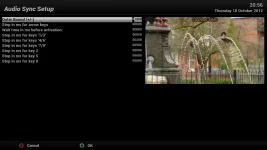
Not sure what you are exactly lookig for, never had an issue in this area so never had to change the default settings.
Are these the ones you want?
grab.webp
 
Not sure what you are exactly lookig for, never had an issue in this area so never had to change the default settings.
Are these the ones you want?
View attachment 20289

Thanks JUDGE, this has worked perfectly. Exactly what I was looking for and I am now back in sync on all channels. Much appreciated
 
Thanks JUDGE, this has worked perfectly. Exactly what I was looking for and I am now back in sync on all channels. Much appreciated
This is surprising: those settings do nothing at all :confused:
They only make out what steps the buttons do........
 
I think previously my outer bound was set at 0. Now managed to save at 250 and works perfectly in sync.

Thanks to all those who helped take the time and answer it is much appreciated
 
No worries, glad you're finally sorted.
 

OpenViX Feeds Status

Back
Top