Superb quality and spec AB-Com PULSe 4K SE. Crazy offer! Only £129! FREE UK DELIVERY! 4K UHD, Enigma 2, Multiboot 4 images & more!...
Superb quality and spec AB-Com PULSe 4K Rev II Twin Satellite tuner only £179! FREE UK DELIVERY! 4K UHD, Enigma 2, SATA HDD facility, Multiboot 4 images & more!...

Vu Uno ViX 2.3 (Linux 3.1.1) 25-12-2011

  • Thread starter Thread starter silverfox0786
  • Start date Start date
S

silverfox0786

Guest

Yt1FM.png


New VIX Image Vu+ Uno - Build 153
24/12/2011 - Open ViX 2.3

attachment.php


From VIX Team

​

Enigma: 24-12-2011.
Enigma Plugins: 24-12-2011.
GCC Version: 4.4.4
Kernel Version: 3.1.1
Drivers: 2011-12-22

Because of kernel change, you will not be able to perform an online update. A full flash is required for this version of ViX image. But you can use Backup Manager to backup your setting, although any extra plugin will not be reinstalled by the wizard due to the kernel change.


New Features

Subtitle structure - Has been changed and now where subtitles are available you will be able to select subtles either via the subtitles Menu or via the Audio Menu then Yellow button
Where Subtitles are not available you will not be able to bring up the Subtitle Menu or see the Yellow button via the Audio Menu
This is not a bug but rather a change in the Subtitle structure

OpenWebIf - this now how has replaced the old WebIf, and as a result it uses the default port of 8088, if you want you can change it back to 80 in the plugin setup.

Button Mappings
Short Red** & *** - Show current channel EPG info (ViX Single EPG).

Long Red*** - Show current event.
Short Green** & *** - Timers.
Long Green*** - AutoTimer Timers.
Short Yellow*** - EPG Search.
Long Yellow*** - IMDB Database.
Short Blue - Extensions.
Long Blue*** - Plugins Menu.
EPG - Opens ViX EPG.
Left/Right** - Opens ViX QuickEPG.
Up/Down** - Open Full Screen Channel List.
Long Up/Down** - Open Simple TV List.
TV Button** - Open Full Screen Channel List.
Long TV Button - Open Bouquets List.

** Can be changed in ViX Menu
*** Can be turned off in ViX Menu

Special Thanks


  • rytec - for his continued support.
  • zoka.cc for his Picon sets
  • all developers for their plugins used in the feeds of this image.
  • All of the ViX Beta team for their hours of testing and dedication on getting this image working.
  • 'Rob van der Does' & 'belierzz' for their translation work.
  • Silverfox0786 for channel settings and picons.

Requests

If anyone is interested in doing any translation work for the plugins and the image itself, please contact either Andy or Sicilian...

Download from HERE
 
Thank you! Nice Christmas present for me and my Vu+ ! :smiley_yup:
 
Cannot download any modules, always get "bad adress" :-( Crashed on menu EPG settings, cannot download Rytec providers, and so on ....
root@vuuno:~# opkg update
Downloading http://enigma2.world-of-satellite.com/feeds/2.3/release/vuuno/3rdpar
ty/Packages.gz.
wget: bad address 'enigma2.world-of-satellite.com'
Downloading http://enigma2.world-of-satellite.com/feeds/2.3/release/vuuno/all/Pa
ckages.gz.
wget: bad address 'enigma2.world-of-satellite.com'
Downloading http://enigma2.world-of-satellite.com/feeds/2.3/release/vuuno/mipsel
/Packages.gz.
wget: bad address 'enigma2.world-of-satellite.com'
Downloading http://enigma2.world-of-satellite.com/feeds/2.3/release/vuuno/vuuno/
Packages.gz.
wget: bad address 'enigma2.world-of-satellite.com'
Collected errors:
* opkg_download: Failed to download http://enigma2.world-of-satellite.com/feeds
/2.3/release/vuuno/3rdparty/Packages.gz, wget returned 1.
* opkg_download: Failed to download http://enigma2.world-of-satellite.com/feeds
/2.3/release/vuuno/all/Packages.gz, wget returned 1.
* opkg_download: Failed to download http://enigma2.world-of-satellite.com/feeds
/2.3/release/vuuno/mipsel/Packages.gz, wget returned 1.
* opkg_download: Failed to download http://enigma2.world-of-satellite.com/feeds
/2.3/release/vuuno/vuuno/Packages.gz, wget returned 1.
root@vuuno:~#
 
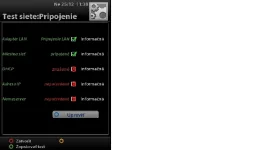
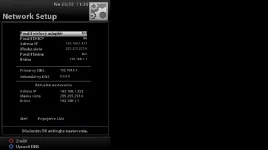
I think this is some problem with network interface in box, on local lan i can telnet or ftp to box, but this not functional on internet, other PC on the same lan dont have any problem access internet but UNO has.
 

Attachments

  • net01.webp
    net01.webp
    11.7 KB · Views: 43
  • net02.webp
    net02.webp
    11.3 KB · Views: 30
Try changing your DNS settings to those of google.

The Google Public DNS IP addresses (IPv4) are as follows:

8.8.8.8
8.8.4.4

My box is running this image and connects fine with no problems at all. I'll recheck when i get in from work but when i left this morning it was fine.
 
my box is bricked with the update ..thx , merry xmas
Stuck on starting
 
Did u do a reflash and not an update? It sates it in the thread in red youneed to reflash as the new kernel cannot be updated via online software update

yes mate i usb flashed it , but it stuck on starting , will have couple more trys mate, to be fair i may have a dodgy usb stick lol
will post back in a bit
 
Got same problem here flashes ok the when I reeboot just sticks on Starting..... Back to 2.2 for me then!!:confused:
 
I very much doubt it's bricked, download the image from the thread power the box down for a few minutes then load the image via USB as you would any other, it is in clear red wording at the top of the release thread that this version must be flashed via usb to prevent problems.
 
Ive done mine as I always do mate and used other usb even downloaded files from another link but still same result "Stuck on Starting!" putting 2.2 back on now no problem so me thinks there is a problem with the image file!
 
2.2.1 back on now working fine 2.3 has a bug mate sorry was looking forward to that!!:confused:
 
yup im still stuck on starting too...gonna try a different usb drive ....
 
Imnot sure if its a bug as loads of us have flashed countless times and other users have downloaded it too and not had problems. Maybe try another stick. Try downloading the file via a different browser
 
Imnot sure if its a bug as loads of us have flashed countless times and other users have downloaded it too and not had problems. Maybe try another stick. Try downloading the file via a different browser

Tried both of them mate, strange how some work some dont??
 

OpenViX Feeds Status

Back
Top