Superb quality and spec AB-Com PULSe 4K SE. Crazy offer! Only £129! FREE UK DELIVERY! 4K UHD, Enigma 2, Multiboot 4 images & more!...
Superb quality and spec AB-Com PULSe 4K Rev II Twin Satellite tuner only £179! FREE UK DELIVERY! 4K UHD, Enigma 2, SATA HDD facility, Multiboot 4 images & more!...

[ViX_Misc] Vu-Zero USB Backup and Restore

  • Thread starter Thread starter 2Hot
  • Start date Start date
2

2Hot

Guest
The USB is FAT32 and formatted. Backup Manager Selected, however Backup Location can't be changed to /media/usb. The usb was sussefully mounted and box restarted. Still unable to change /media/hdd to /media/usb.
Please, help needed in doing full backup of the Vu-Zero Open Vix Image to USB so it can be restored back with all settings and plugins. Thanks
 
Hello Folks and Super Admins, please could someone with brilliant idea help with above or do you need more explanation of the problem?
 
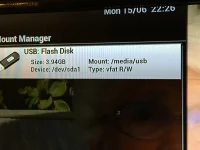
Can you show us what the mount points are. A screenshot of your mount manger will be perfect.
 
Yeah, I was able to backup using the Backup Manager but only three folders was copied namely etc, tmp & usr. I want to do full USB backup that will include settings and plugins. I've tried using Backup Suite to know luck.
 
The plugins themselves are not saved in Backup Manager IIRC. They will be re-installed when you restore. You will be prompted if you want to restore plugins too. You can however, include the plugin folder. Press Menu for more options.

If you backup the image, it is an exact copy of image. It also includes plugins.
 
So what you are saying is I can't backup full USB image to flash on virgin Vu Zero or flash a Vu Zero that has other image other than openvix?

The Backup I want to do is the type that can be backed on USB and use to flash a new box without having to install settings and several addons all over again. Thanks for your support.
 
I dont know about other images.On openVix we have two backup processes built into the image.
Backup Manager > User settings and files.
Image Manager > Full backup image

In the case of Image Manager, as stated in post 7, it is a clone of the image on the receiver. Inclusive of any plugins, files etc. You can restore to same model of receiver, image will be exact replica of when when backup was made. Have a look at section 8 of the Vix manual
 
Thanks a bunch. I've been using Backup Manager instead of Image Manager.
Image Manager done the magic as you explained above. Thanks once again.:thumbsup:
 

OpenViX Feeds Status

Back
Top