Superb quality and spec AB-Com PULSe 4K SE. Crazy offer! Only £99! FREE UK DELIVERY! 4K UHD, Enigma 2, Multiboot 4 images & more!...
Superb quality and spec AB-Com PULSe 4K Rev II Twin Satellite tuner only £149! FREE UK DELIVERY! 4K UHD, Enigma 2, SATA HDD facility, Multiboot 4 images & more!...

watch my box with Cyberlink Powerdvd and NOT windows media player

  • Thread starter Thread starter arnie2014
  • Start date Start date
A

arnie2014

Guest
Hi all

currently when I watch a channel on my pc through openwebif it automatically opens windows media player

is their a way I can make it use cyberlink powerdvd instead
 
Default Programs...

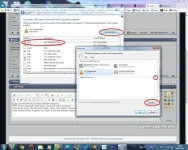
Goto Control Panel And Select Default Programs...
Then Select 'Associate a file type or protocol with a program'...
Then Scroll Down The List And Select '.m3u', And Select 'Change Program'...
Then Choose Which Program You Wish, If It's Not Initially Listed, You Can Drop Down 'Other Programs', Or 'Browse' To The Location Of The Program...

See Attachment...

ProgDefault.webp
 
ok I managed to change the program to Cyberlink powerDVD 14 but when I click which channel I want to stream it comes up in the bottom of the browser:

do I want to open or save the stream.msu - so I click on open, and that opens cyberlink powerdvd 14 - but then I get an error message

cyberlink power dvd could not import the playlist because its contents are not recognizable, corrupt or invalid

iv tried this on a few channels, HD and SD but all the same error
 
I Don't Think PowerDVD Is Recognising That It Is A File Pointing To A Streaming Source... It Assumes It's A Playlist, So You'll Need To Use Another Application...
 

OpenViX Feeds Status

Back
Top