


jonline
Forum Supporter

- Joined
- Oct 1, 2010
- Messages
- 34
- Reaction score
- 0
- Points
- 0
Hi guys
This is a technical question that maybe solved by the mods or someone more advanced in the forum
Basically I notice that with the max digital xp1000 and gigablue gb800se when trying to access the full remote control the picture doesn't display.
It attempts to navigate to
ip address/images/remotes/xp_rc14_normal.png (for xp1000)
ip address/images/remotes/dm_normal.png (for gb800se)
My vu duo navigates to ip address/images/remotes/vu_normal.png but this remote control picture works perfectly. (i have attached image in post)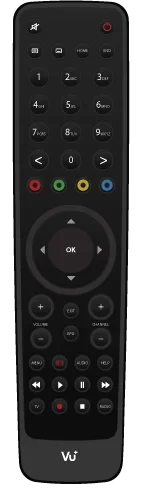
I have searched through ftp for these directories on both boxes, but couldn't find the locations. Does any know where to put the files?
also does anyone have these remote png files?
thanks in advance.
This is a technical question that maybe solved by the mods or someone more advanced in the forum
Basically I notice that with the max digital xp1000 and gigablue gb800se when trying to access the full remote control the picture doesn't display.
It attempts to navigate to
ip address/images/remotes/xp_rc14_normal.png (for xp1000)
ip address/images/remotes/dm_normal.png (for gb800se)
My vu duo navigates to ip address/images/remotes/vu_normal.png but this remote control picture works perfectly. (i have attached image in post)
I have searched through ftp for these directories on both boxes, but couldn't find the locations. Does any know where to put the files?
also does anyone have these remote png files?
thanks in advance.

