Superb quality and spec AB-Com PULSe 4K SE. Crazy offer! Only £99! FREE UK DELIVERY! 4K UHD, Enigma 2, Multiboot 4 images & more!...
Superb quality and spec AB-Com PULSe 4K Rev II Twin Satellite tuner only £149! FREE UK DELIVERY! 4K UHD, Enigma 2, SATA HDD facility, Multiboot 4 images & more!...

When streaming via webif, VLC adds a desktop shortcut

thecaretaker

Forum Supporter
Donated Member
Joined
Apr 22, 2012
Messages
327
Reaction score
4
Points
18
Location
Southern UK
Website
www.thecaretakers.co.uk
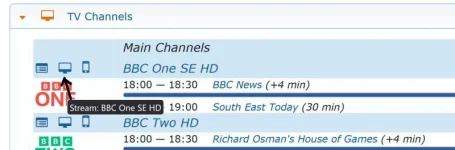
I'm sure there is a simple answer to this, but when streaming a channel from webif, VLC media player adds a desktop shortcut each time. My wife ends up with a desktop full of red cone shortcuts. How can I stop VLC from doing this?
 
I'm sure there is a simple answer to this, but when streaming a channel from webif, VLC media player adds a desktop shortcut each time. My wife ends up with a desktop full of red cone shortcuts. How can I stop VLC from doing this?
Surely that's an issue with the desktop setup?
 
I've tried this on my PC and I don't use VLC, I use JRiver Media Centre and it creates shortcuts for that on my desktop too. I tried a different browser (Edge) and it does the same. It is basically downloading a file, a .m3u8 file. Looks like I can't stop this happening. :(
 
I've tried this on my PC and I don't use VLC, I use JRiver Media Centre and it creates shortcuts for that on my desktop too. I tried a different browser (Edge) and it does the same. It is basically downloading a file, a .m3u8 file. Looks like I can't stop this happening. :(
Don't click on the download.
 
This is a file type association issue on your PC. Somewhere along the line, you have set it to download/save the m3u file instead of opening with VLC or media player classic.

Try reinstalling VLC and reset defaults.
 
Last edited:
I've tried this on my PC and I don't use VLC, I use JRiver Media Centre and it creates shortcuts for that on my desktop too. I tried a different browser (Edge) and it does the same. It is basically downloading a file, a .m3u8 file. Looks like I can't stop this happening. :(
You can if you don't put your downloads onto the Desktop. Put them in Downloads.
 
What I have done is to let it make the .m3u8 files on the desktop. I've added all the channels she looks at and put them all in a folder called TV Channels. I've removed the webif shortcut so she can't use it, so it won't be filling her desktop with these files any more. All she has to do is double click on the channel name .m3u8 file she wants to watch from the folder. Problem solved.
 

OpenViX Feeds Status

Back
Top