Superb quality and spec AB-Com PULSe 4K SE. Crazy offer! Only £129! FREE UK DELIVERY! 4K UHD, Enigma 2, Multiboot 4 images & more!...
Superb quality and spec AB-Com PULSe 4K Rev II Twin Satellite tuner only £179! FREE UK DELIVERY! 4K UHD, Enigma 2, SATA HDD facility, Multiboot 4 images & more!...

[ViX_Misc] Why does VIX image stop seeing HDD ?

satnut2

Member
Joined
Aug 7, 2014
Messages
111
Reaction score
0
Points
16
Ive had a problem with both SOLO 2 and XTrend 8500 where suddenly I cannot record and get disk full error with a 1TB drive

I end up initialising disk losing all recordings and everything is ok for 12 months

Can anyone advise why this happens please ? , what would be the solution to stop losing recordings ? , remove HDD from box transfer recordings , Initalise HDD then transfer recordings again ?

Didnt have logs enabled so got nothing to show

Any feedback appreciated , Ive had this problem when using old vix images on my SOLO2 and today using XTREND 8500 the very latest build , is this a symptom of duff HDD ?
 
Are you using an external HDD and sharing between the two receivers or are these two separate HDDs?
 
Ive had a problem with both SOLO 2 and XTrend 8500 where suddenly I cannot record and get disk full error with a 1TB drive

I end up initialising disk losing all recordings and everything is ok for 12 months
If the box can't see the disk, how can it initialize it? So clearly something else is at fault - presumably something that would mean you do not need to initialize it.

Can anyone advise why this happens please ?
I can think of a possibility.
If you are relying on the disk always ending up with the same device id (e.g. /dev/sda1) then you may well find that this fails. The naming order is just based on which device replies first - and occasionally a USB stick may get there ahead of the hdd. At that point /media/hdd /movie would be on the USB stick.

This happened to me when I first got my box.

The solution to this problem is to use the Vix Mount Manager (I think) to set a specific mount point to a specific device. This then mounts using the UUID, which doesn't depend on who which was quickest to wake up.
 
Ive had a problem with both SOLO 2 and XTrend 8500 where suddenly I cannot record and get disk full error with a 1TB drive

I end up initialising disk losing all recordings and everything is ok for 12 months

Can anyone advise why this happens please ? , what would be the solution to stop losing recordings ? , remove HDD from box transfer recordings , Initalise HDD then transfer recordings again ?

Didnt have logs enabled so got nothing to show

Any feedback appreciated , Ive had this problem when using old vix images on my SOLO2 and today using XTREND 8500 the very latest build , is this a symptom of duff HDD ?

1. As Abu Baniaz has asked - what is the HDD configuration for each box?

2. If you also have a USB stick in each box (for picons, EPG etc.), then, as Birdman has suggested, it could be a mounts issue - look in Menu/Setup/Vix/Mount Manager - if you have mounted the HDD and USB stick correctly, they will be listed, along with their Size, Device IDs, what they are Mounted as and their Type.

3. If you press Media or List button to access your recordings, what is returned as free diskspace?

4. In Menu/Setup/System/Recording and playback settings, what are your settings for:

A. Default movie location
B. Timer recording location
C. Instant recording location

5. Providing answers to the above questions will give you a much better chance of getting more specific advice.

Good luck!
 
Are you using an external HDD and sharing between the two receivers or are these two separate HDDs?

Sorry to clarify , I no longer have the SOLO2 but have had this issue twice with the Solo2 and now once with the Xtrend

I do have and external connected but the default movie location points to the internal 1TB drive fitted in my Xtrend
 
Perhaps you have PTS (Permanent TimeShift) enabled and your timeshift settings are such that you are saving everything, all of the time?

Check your timeshift settings!
 
1. As Abu Baniaz has asked - what is the HDD configuration for each box?

2. If you also have a USB stick in each box (for picons, EPG etc.), then, as Birdman has suggested, it could be a mounts issue - look in Menu/Setup/Vix/Mount Manager - if you have mounted the HDD and USB stick correctly, they will be listed, along with their Size, Device IDs, what they are Mounted as and their Type.

3. If you press Media or List button to access your recordings, what is returned as free diskspace?

4. In Menu/Setup/System/Recording and playback settings, what are your settings for:

A. Default movie location
B. Timer recording location
C. Instant recording location

5. Providing answers to the above questions will give you a much better chance of getting more specific advice.

Good luck!

shrink.webpshrink2.webp

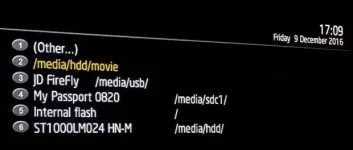
Hi guys please see images attached , so since I initilaised the internal hard drive the old location 2 - /media/hdd/movie is still present in the list but does nothing , this has been replaced by 6 - ST1000LM024 /media/hdd/ this is where my recordings go now

Why cant I delete number 2 ?

My current disk space is 896 gb , I dont believe I was low on disk space when the fault with not enough disk space came up. As you fill up with recordings when I press 'LIST' on the remote to get the recordings I used to get the spinning vix for about 2 seconds before the list displayed , I'm assuming the rest of you get this ?
 
Perhaps you have PTS (Permanent TimeShift) enabled and your timeshift settings are such that you are saving everything, all of the time?

Check your timeshift settings!

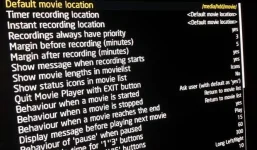
My time shift settings are /media/hdd/timeshift

Automatically start after 2 seconds , where is the setting for permanent time shift ?
 
My time shift settings are /media/hdd/timeshift

Automatically start after 2 seconds , where is the setting for permanent time shift ?

That is the setting. Timeshift starts automatically after the time you set. It is therefore permanently on. You do not have to press pause to activate it.
 
If the box can't see the disk, how can it initialize it? So clearly something else is at fault - presumably something that would mean you do not need to initialize it.

I can think of a possibility.
If you are relying on the disk always ending up with the same device id (e.g. /dev/sda1) then you may well find that this fails. The naming order is just based on which device replies first - and occasionally a USB stick may get there ahead of the hdd. At that point /media/hdd /movie would be on the USB stick.

This happened to me when I first got my box.

The solution to this problem is to use the Vix Mount Manager (I think) to set a specific mount point to a specific device. This then mounts using the UUID, which doesn't depend on who which was quickest to wake up.

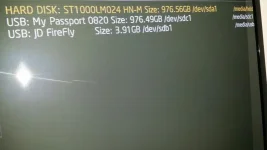
I have not used vix manager but see the image , this is my set up , External HDD just files I had stored on it for viewing , firefly is for picons and ST1000LM024 is the internal HDD

I have never played with these settings , is there something I should do with these ?

20161209_174027_resized.webp
 
I have not used vix manager but see the image , this is my set up , External HDD just files I had stored on it for viewing , firefly is for picons and ST1000LM024 is the internal HDD

I have never played with these settings , is there something I should do with these ?
You should go into menu -> Setup -> Vix -> Mount Manager and use Setup Mounts. Then make sure /media/usb and /media/hdd are correct, and Save. This will ensure they stay that way round.

PS: It's easier(?) to take screen shots via OpenWebIF. Point your web browser at your box and click on the Grab Screenshot (which looks like it might just be a label in the remote box, but is in fact a link). You cna then get the video, the OSD menu or both.
 
You should go into menu -> Setup -> Vix -> Mount Manager and use Setup Mounts. Then make sure /media/usb and /media/hdd are correct, and Save. This will ensure they stay that way round.

PS: It's easier(?) to take screen shots via OpenWebIF. Point your web browser at your box and click on the Grab Screenshot (which looks like it might just be a label in the remote box, but is in fact a link). You cna then get the video, the OSD menu or both.

Thanks , just done this and saved anyway

Thanks for the tip about openweb , keep forgetting about this , I'm still doing screen shots the old fashioned way !
 
sooo , over the last couple of weeks when recording I am getting random 'disk full ' errors

I go to list and my disk space is zero , reboot the Xtrend box and the recordings recover and space can be seen on the HDD

I am finding I get about 5 mins of a scheduled recording and then recording stops due to this error which is becoming increasing frustrating

Anyone else had / having issues ? I did not have the issue with my VU Solo boxes

Any advice appreciated

The HDD was new 12 months ago
 
How much free space is there on the disk after reboot.

There was a recently discovered issue with HDD and space reporting and may be worth your while to update once the next release is out.


Sent from my SM-N9005 using Tapatalk
 
Hi Stanman, Ive just updated to the very lastest build 5.0.005, disk space is only showing (9%) free disk space , looking through my recordings this should be alot higher , something isnt right

Any more details on the disk space issue ?
 
Yup that's the thread.

If you have not done update and see if it fixes your issue.

Also nothing in your deleted folder in movie list?

Sent from my SM-N9005 using Tapatalk
 
thanks for the links guys , glad I'm not alone , updated and currently monitoring
 

OpenViX Feeds Status

Back
Top