Superb quality and spec AB-Com PULSe 4K SE. Crazy offer! Only £129! FREE UK DELIVERY! 4K UHD, Enigma 2, Multiboot 4 images & more!...
Superb quality and spec AB-Com PULSe 4K Rev II Twin Satellite tuner only £179! FREE UK DELIVERY! 4K UHD, Enigma 2, SATA HDD facility, Multiboot 4 images & more!...

[SF8008] Why is Octagon SF8008 image 5.3.023 so much smaller than previous images??

allanapp

New member
Joined
Nov 16, 2013
Messages
58
Reaction score
0
Points
0
Location
Azores, Mid Atlantic
Hello. I've just flashed image 5.3.023 having previously save image 5.3.019 together with a backup.

On restart it was just like I'd done a complete new flash from USB and there was no backup or previous images available and my HDD was not recognised in the new image.

I see that previous images were 247.xx Mb in size whilst the new image 5.3.023 is just 119.9Mb in size, so a vast difference.

Could this be the reason for the odd behaviour of the new image?
 
5.3.019 has a very large additional file usb_update.bin in the zip for some reason.

(Or maybe it is missing from 5.3.023 :))
 
Yes but the SF 808 image has been that large size since 5.3.001 and now suddenly smaller. I had no issues updating throughout the 5.3.xxx image and always had my backup files and previous image files stored on the HDD. Now with 5.3.023 it's all gone and will have to set up from scratch. Probably will run the 5,3,022 image as I don't trust the 023.
 
I'd reflash 5.3.019 and see if your hdd reappears.
 
In ImageManager, hit the menu button and just check that the backup location hasn‘t changed - use the <> keys to check whats there
 
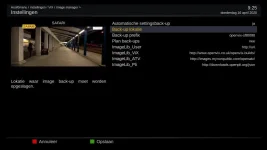
I also have the problem with the latest image 23 that there is no backup location anymore. I mounted my NAS to the octagon sf8008 and after restart no backup location is present. See screenshot. With image version 19 there is no problem mounting the sf8008 to the NAS. Other images also go smoothly.1_0_1_13_3_1_2950FA6_0_0_0_20200416092513.webp
 
This is because of preparation for partitioning like zgemma. The sf8008 will have in future two zips a recovery zip and a zip containing the root and kernel for flashing.
This split has already taken place which is why its smaller
 
For the moment just flash the 5.3.022 image. You can safely do an online software update to 023
 
OK - think I have found the issue and a fix for NAS mounts (autofs was OK) - probably in next release.
 

OpenViX Feeds Status

Back
Top