
Superb quality and spec AB-Com PULSe 4K SE. Crazy offer! Only £129! FREE UK DELIVERY! 4K UHD, Enigma 2, Multiboot 4 images & more!...
Superb quality and spec AB-Com PULSe 4K Rev II Twin Satellite tuner only £179! FREE UK DELIVERY! 4K UHD, Enigma 2, SATA HDD facility, Multiboot 4 images & more!...
You are using an out of date browser. It may not display this or other websites correctly.
You should upgrade or use an alternative browser.
You should upgrade or use an alternative browser.
Xtrend 8500 lcd not working
- Thread starter Turboman
- Start date


Was this working and then failed or after a software upgrade or ?
As far as I remember it splits the framebuffer between lcd and screen, so maybe hardware issue…..but if latter
1) turn on debug logs, reboot and post here (menu/setup/system/logs/settings …..> enable, save on hdd or usb, local time
2) post a picture of menu/setup/user interface/Front panel display
If hardware, the debug logs may indicate a framebuffer issue, so worth doing 1, just to check.
This is probably my all time favourite box, so would like to help.
As far as I remember it splits the framebuffer between lcd and screen, so maybe hardware issue…..but if latter
1) turn on debug logs, reboot and post here (menu/setup/system/logs/settings …..> enable, save on hdd or usb, local time
2) post a picture of menu/setup/user interface/Front panel display
If hardware, the debug logs may indicate a framebuffer issue, so worth doing 1, just to check.
This is probably my all time favourite box, so would like to help.
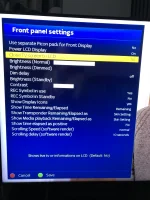
So if you turn on clone tv screen to lcd —— do you get the picture?
If so turn it back off and turn dimming on.
I seen to remember that the et8500 had some special setup for the lcd screen, but would have to check.
Anyway first would like to know if it shows TV picture.
Also post debug log
If so turn it back off and turn dimming on.
I seen to remember that the et8500 had some special setup for the lcd screen, but would have to check.
Anyway first would like to know if it shows TV picture.
Also post debug log
I realise that, I want to see if its hardware( no tv screen) or the setupThem settings have always been like that when the front screen was working.
So it looks like the framebuffer is on the way out…does the box still run E2?When I switch on clone tv I still don’t get a picture.
The reason I was asking for the debug log, is that it sets up the framebuffer early in the E2 boot and I want to see if it posts any issues that might tell us more.E2 still works. Is there anyway of checking if it the front screen or the board supplying the front screen?
Probably 1st 3 pagesI have flashed the box with the latest openvix image but the front screen still doesn’t work so it’s not a software problem. Do you need all the debug log or just part of it?
6296.795569> [StbHardware] Error: getFPVersion failed6297.464421> [eDVBFrontend] Failed to open /dev/dbox/fp0
I found these 2 files that failed.
Can you post the debug log6296.795569> [StbHardware] Error: getFPVersion failed
I found these 2 files that failed.
Are you sure? Remove casing and checkHow to remove front screen which I think will be glued in?

abu baniaz
Moderator
Edit: Correction, it is only a small amount of adhesive on the edges. You can just pull it off.
You have already been shown a link to the hardware thread by Johnny.B. I have forgotten my logon to that forum, but definitely need to track faults. Just replacing the screen is not guaranteed to cure the issue.
And you have an existing thread on this forum. I'll merge your threads later.
Last edited:
Similar threads

- Replies
- 17
- Views
- 349

- Replies
- 1
- Views
- 97

- Replies
- 1
- Views
- 294