Superb quality and spec AB-Com PULSe 4K SE. Crazy offer! Only £129! FREE UK DELIVERY! 4K UHD, Enigma 2, Multiboot 4 images & more!...
Superb quality and spec AB-Com PULSe 4K Rev II Twin Satellite tuner only £179! FREE UK DELIVERY! 4K UHD, Enigma 2, SATA HDD facility, Multiboot 4 images & more!...

[ET9x00] xtrend9200 stuck on start up

  • Thread starter Thread starter geordiewhite
  • Start date Start date
G

geordiewhite

Guest
Hi, i was trying to move some music files into my media player and then restarted the box only to find a message saying there was a software problem, the box says booting and the tv screen loading after 10 mins or so its gone back to saying there was a software problem and send the log file to vixlogs, i cant access the ftp to get back into the box any ideas please.
 
Just to clarify where you moving files to the xtrend? I have no experience in the extrend, so if you want answears from me you have to give me some more info =p

1) Does the extrend9200 have an internal or usb harddisk attached to it?
2) Are you sure it was working when you transfered the files, otherwise you could have been filling up the root filesystem (for example if /media/hdd wasnt mounted, you would have copied the files to the internal flash instead and problary filled it up...)

Otherwise you have to wait for someone who actually know something about the xtrend9200...

sry..
 
yes i have a hdd drive installed,i moved an album to the media file to see if i could play the music album in the media player,it was working ok, after i moved it over i restarted the box thats when it said there was a software problem.
 
did you put the music directly under /media ? Or under a subfolder like /media/hdd ?
 
If you by that mean /media then you have problary filled your root drive since you cant access the box via ftp anymore. See if you can access the box with telnet, if you can login post the result of 'dh -h'
 
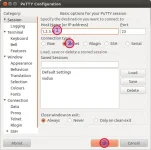
Google putty.exe download it.
PuTTY Configuration_001.webp
1) Type ip of box here
2) Choose telnet
3) Open/Connect

Login as: root
Type password if you have one, otherwise you dont need one

Run the command
 
Hmmm just getting a blank screen, think i might need to reflash.
 
If you put the files in media you've prob filled the flash. You should ftp to /media/hdd or usb, depends what you have attached. Sounds like a re-flash is in order.
 
Hi i attached a music album to see if i could play music in the media player, ive tried ftp to the box but i cant access it,i have tried a new bootloader as well but the box is not responding when i plug in the usb and turn it off and on, regards.
 
Hi i attached a music album to see if i could play music in the media player, ive tried ftp to the box but i cant access it,i have tried a new bootloader as well but the box is not responding when i plug in the usb and turn it off and on, regards.

Why on earth are you flashin bootloader??? WOS would have supplied with new bootloader pre-flashed. Follow advice and re-flash the unit. You have filled the flash with your files, hence not booting.
 
I was advised to flash again with bootloader.. so just flash again with the new image..? thanks
 
Why on earth are you flashin bootloader??? WOS would have supplied with new bootloader pre-flashed. Follow advice and re-flash the unit. You have filled the flash with your files, hence not booting.
I was saying yesterday i was advised to flash with bootloader im just making sure im doing the right thing to get it sorted not everyone does the right thing or gives out the right advice.
 
Last edited by a moderator:
Why on earth are you flashin bootloader??? WOS would have supplied with new bootloader pre-flashed. Follow advice and re-flash the unit. You have filled the flash with your files, hence not booting.
I was saying yesterday i was advised to flash with bootloader im just making sure im doing the right thing to get it sorted not everyone does the right thing or gives out the right advice.

Who advised flashing bootloader?
 

OpenViX Feeds Status

Back
Top