Superb quality and spec AB-Com PULSe 4K SE. Crazy offer! Only £129! FREE UK DELIVERY! 4K UHD, Enigma 2, Multiboot 4 images & more!...
Superb quality and spec AB-Com PULSe 4K Rev II Twin Satellite tuner only £179! FREE UK DELIVERY! 4K UHD, Enigma 2, SATA HDD facility, Multiboot 4 images & more!...

[ViX_Misc] Yellow and Blue buttons missing in Backup Manager

maxben

Forum Supporter
Donated Member
Joined
Nov 10, 2014
Messages
352
Reaction score
0
Points
16
..buttons for choosing location and files after pressing menu, although the functions are still operational.

Not a box specific issue.

Not a skin specific issue.

Users possibly not knowing the functions exist if not familiar.

EDIT: sorry should be backup manager
 

Attachments
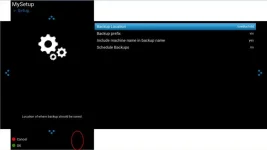
  • backupmanager.webp
    backupmanager.webp
    9.9 KB · Views: 32
Last edited:
read above, if it also happens with default skin then not skin problem.
 
read above, if it also happens with default skin then not skin problem.

Doesn't happen on my setup - see signature.

Sorry - please ignore - missed that you are on openvix 5.
 
Last edited:
screenshot please

and are you using ViX 5 ?
 
What do you think the yellow and blue buttons should do? I use a different skin and don't have them either but don't see what functionality is missing. To change the backup location use the right/left arrows to change.
 
The buttons still function.

Just updated my Zero, here are before and after.
 

Attachments

  • bfore5.webp
    bfore5.webp
    10.3 KB · Views: 37
  • after5.webp
    after5.webp
    9.6 KB · Views: 28
The point the OP is making is that the guide text and screen buttons are missing from the screen as you have demonstrated.
 
In backup manager, after pressing 'Menu' the yellow button allows you to select additional files to add to the backup.
Although it still functions if you press it, there is no visual indication.
 
As pointed out code is still there so its a skin issue...... changes recently in Backup....so?
 
As pointed out code is still there so its a skin issue...... changes recently in Backup....so?

So..... the buttons and guide text/help text should be displayed, otherwise how will people know that the functions are available?
 
So..... the buttons and guide text/help text should be displayed, otherwise how will people know that the functions are available?

Correct.... the so was for it to be looked into:)
 
dont know if this is related but i couch flashed to vix 5 and restored settings.
when i pressed blue button, select softcam manager, it showed oscam was installed but there was no blue button (enable startup) or yellow button (restart cam)
i then looked in menu, plugins, red button (uninstall plugins) and there were no softcams to remove.
i pressed green (download plugins) downloaded oscam-latest and the coloured buttons that were missing before appeared.

had a similar thing with my son's receiver, only this time it was a fresh install of vix 5 with no settings restore, i was setting up EPG but some coloured function buttons were missing again, i then realised i hadn't replace the usb stick that was required, after putting in the stick i rebooted and the coloured buttons were back.

all this might not be relevant to the OP problems but might help someone else that finds this thread looking for missing coloured function buttons.
good luck
 

OpenViX Feeds Status

Back
Top