
Superb quality and spec AB-Com PULSe 4K SE. Crazy offer! Only £129! FREE UK DELIVERY! 4K UHD, Enigma 2, Multiboot 4 images & more!...
Superb quality and spec AB-Com PULSe 4K Rev II Twin Satellite tuner only £179! FREE UK DELIVERY! 4K UHD, Enigma 2, SATA HDD facility, Multiboot 4 images & more!...
You are using an out of date browser. It may not display this or other websites correctly.
You should upgrade or use an alternative browser.
You should upgrade or use an alternative browser.
[ViX_Misc] Zap timers lock box
- Thread starter mrocm
- Start date

Now that I got it working once I will try another re-install from scratch to see if I can get it working again. If so I will try to add bouquet and settings in stages to see when it stops working. I hope this approach will narrow it down a bit. A problem with the bouquet is of course one possibility. I have a hunch it may be to some extent related to some of the chosen settings (or some plugin). I probably won't have time to do it until the weekend though.
I have now narrowed it down to a single setting. It has nothing to do with the bouquet itself. The problem is the setting to allow multiple bouquets or not. Since I am only using a single favourite bouquet I have always had this setting to "no", on my old dm8k box as well as my solo4k box (both using dual tuners). However, with the ViX image it seems zap timers fail if this is set to "no". If it is set to "yes" zap timers work fine. I'm not sure whether this is to be considered a bug but it is at least a problem I have not encountered in any other image on dm8k or solo4k.
Having found a way to get around the problem I will most likely stay with the ViX image. This setting is actually only an inconvenience when building a bouquet list. You then have the extra step of selecting a bouquet for every channel you want to add. After the bouquet is created you normally don't notice it so it is certainly something I can live with.
Having found a way to get around the problem I will most likely stay with the ViX image. This setting is actually only an inconvenience when building a bouquet list. You then have the extra step of selecting a bouquet for every channel you want to add. After the bouquet is created you normally don't notice it so it is certainly something I can live with.

birdman
Moderator
Almost anything that results in a hang or a crash is a bug.I have now narrowed it down to a single setting. It has nothing to do with the bouquet itself. The problem is the setting to allow multiple bouquets or not. Since I am only using a single favourite bouquet I have always had this setting to "no", on my old dm8k box as well as my solo4k box (both using dual tuners). However, with the ViX image it seems zap timers fail if this is set to "no". If it is set to "yes" zap timers work fine. I'm not sure whether this is to be considered a bug but it is at least a problem I have not encountered in any other image on dm8k or solo4k.
There is code to search through your bouquets to find the channel you are zapping to so as to fix up the up/down channels etc., so perhaps this fails ot seacrth everythign becuase of this setting.
I did post a patch and updated RecordTimer.py in a previous post which should fix this (at least stop it looping). Have you tried it?
Almost anything that results in a hang or a crash is a bug.
There is code to search through your bouquets to find the channel you are zapping to so as to fix up the up/down channels etc., so perhaps this fails ot seacrth everythign becuase of this setting.
I did post a patch and updated RecordTimer.py in a previous post which should fix this (at least stop it looping). Have you tried it?
Yes, personally I would consider it a bug. However, since it is now quite easy a avoid it I no longer see it as a reason to consider changing to some other image.

I'm sorry for not reacting to your suggestion and the modified py file. I wasn't 100% certain it was aimed at me but the main reason for not doing anything with it is that I am almost completely unfamiliar with the structure of these images and with Python as a programming platform. Where do I put the file? Do I need to compile or build something after the file is replaced (and how) or is it only a script file interpreted at runtime? I will surely try it if I can figure out how.....

abu baniaz
Moderator
With the python files it is easy to do.
The way I do it when experimenting (some stages you may feel are are un-necessary)
Make an image backup and save away from receiver. This is so that you can can reflash if your box does not boot.
Find the target location. It is usually /usr/lib/enigma2/python or a sub directory
Mame a backup of the orginal .pyo file (add .bak) at end of name. RecordTimer.pyo will become RecordTimer.pyo.bak
Transfer new .py
GUI restart. You can do this at commnd line "init 4 && sleep 10 && init 3". I add the 10 second wait to enable it to write files kept in RAM properly
After restart, the .py file will compile to .pyo
Delete the .py file so that it does not keep compiling after each restart.
If you leave the .py file in there, and there is an update, your version will replace the official file. This can cause crashes that nobody can replicate becuese they are not using the same files as you.
Submit a pull request on Github for the fix to be considered/applied.
If you get an Enigma bootloop with new file.
Stop Enigma2 from running with "init 4" command.
Check crashlog for issue (default location is home/root/logs)
Edit .py file with any fixes and restart. Not forgetting to let transfer complete before restart.
Should you wish to do more detailed analysis and in real time, you can start enigma2 in console mode
To end console mode
ctrl & c
init 6
I will add the details of the multiple bouquets settings to the bug report. Being able to reproduce an issue makes testing fixes/avoidance easier.
The way I do it when experimenting (some stages you may feel are are un-necessary)
Make an image backup and save away from receiver. This is so that you can can reflash if your box does not boot.
Find the target location. It is usually /usr/lib/enigma2/python or a sub directory
Mame a backup of the orginal .pyo file (add .bak) at end of name. RecordTimer.pyo will become RecordTimer.pyo.bak
Transfer new .py
GUI restart. You can do this at commnd line "init 4 && sleep 10 && init 3". I add the 10 second wait to enable it to write files kept in RAM properly
After restart, the .py file will compile to .pyo
Delete the .py file so that it does not keep compiling after each restart.
If you leave the .py file in there, and there is an update, your version will replace the official file. This can cause crashes that nobody can replicate becuese they are not using the same files as you.
Submit a pull request on Github for the fix to be considered/applied.
If you get an Enigma bootloop with new file.
Stop Enigma2 from running with "init 4" command.
Check crashlog for issue (default location is home/root/logs)
Edit .py file with any fixes and restart. Not forgetting to let transfer complete before restart.
Should you wish to do more detailed analysis and in real time, you can start enigma2 in console mode
Code:
init 4
enigma2
To end console mode
ctrl & c
init 6
I will add the details of the multiple bouquets settings to the bug report. Being able to reproduce an issue makes testing fixes/avoidance easier.
Last edited:
birdman
Moderator
While this patch would be worth having (assuming it works) your comment in #43 indicates the fundamental cause, which should also be looked at.I did post a patch and updated RecordTimer.py in a previous post which should fix this (at least stop it looping). Have you tried it?
When you say, "The problem is the setting to allow multiple bouquets or not..." is that an ABM setting, or somewhere else in the menus?
abu baniaz
Moderator
It is a settings in the "channel selection settings". Default is yes.

abu baniaz
Moderator
Ouch, some nasty bug in the multiple bouquet section I think. Used Birdman's patch, channel zapped. Bouquets gone.
EDIT 1:
"Last scanned" and "favourites" are system bouquets and cannot be undone. I wonder if this is where the issue lies.
EDIT 2:
Bouquets are not deleted, they are still there. They show up when you set multiple bouquets to yes again.
EDIT 1:
"Last scanned" and "favourites" are system bouquets and cannot be undone. I wonder if this is where the issue lies.
EDIT 2:
Bouquets are not deleted, they are still there. They show up when you set multiple bouquets to yes again.
Last edited:
birdman
Moderator
That seems to be, "Show bouquet on launch".config.epgselection.multi_showbouquet=true is in my settings.
The entry in question is marked as, "Enable multiple bouquets" and shows up as the config.usage.multibouquet setting.
birdman
Moderator
The code looks like this:Ouch, some nasty bug in the multiple bouquet section I think. Used Birdman's patch, channel zapped. Bouquets gone.
Code:
  if config.usage.multibouquet.value:
          bqrootstr = '1:7:1:0:0:0:0:0:0:0:FROM BOUQUET "bouquets.tv" ORDER BY bouquet'
  else:
bqrootstr = '%s FROM BOUQUET "userbouquet.favourites.tv" ORDER BY bouquet'% self.service_typesThe EPG (which is what you set timers from) presumably uses some other test to find your channels.
My fix was just to add an exit clause to the bouquet scan, which cures the symptoms, not the real cause.
birdman
Moderator
Also note that the scan only goes through the tv bouquet - I wonder if you'd have the same loop trying to zap to a radio channel (I wouldn't, as I have all of my radio channels in the TV bouquet - and vice versa, as I can't see nay reason to separate them - the service descriptor says what type it is).
And I've just come across setCurrent() in Components/ServiceList.py, which looks as though it would do a better job of finding the entry in the bouquets than the RecordTimer.py code does, as it does handle radio. Mind you, it doesn't do anything if config.usage.multibouquet isn't set. I have no idea what is supposed to happen in such a case.
And I've just come across setCurrent() in Components/ServiceList.py, which looks as though it would do a better job of finding the entry in the bouquets than the RecordTimer.py code does, as it does handle radio. Mind you, it doesn't do anything if config.usage.multibouquet isn't set. I have no idea what is supposed to happen in such a case.
birdman
Moderator
AFAIK using ABM will produce a bouquets.tv file(?). If so the value should always be set to yes. Does ABM force this?..so if you have the setting set to "yes", it will use the results of an ABM scan, otherwise it assumes there is a userbouquet.
Basically there are several bits of code which will use bouquets.tv if the value is yes, and userbouquet.favourites.tv if it is set to no.
abu baniaz
Moderator
Ignore ABM. It is nothing to do with the issue.
If you install a new image and restart, you will get the a bouquets.tv file. It is the container for all other bouquet files. When you scan ( non-abm), you will get a last scanned bouquet too.
If you install a new image and restart, you will get the a bouquets.tv file. It is the container for all other bouquet files. When you scan ( non-abm), you will get a last scanned bouquet too.
birdman
Moderator
But if you have config.usage.multibouquet set to "no" then the code assumes, in several places, that the container (or at least the root) for bouquets is userbouquet.favourites.tv.Ignore ABM. It is nothing to do with the issue.
If you install a new image and restart, you will get the a bouquets.tv file. It is the container for all other bouquet files.
So I suppose the question is, "What function does this setting serve?".
abu baniaz
Moderator
Many thanks for your avoidance patch. Has been added.
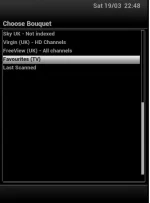
In this screenshot, the last two bouquets are "favourites/userbouquet.favourites.tv" and "last scanned". Not sure how mrocm made his bouquets, but I could cause the crash without it being populated. Ideally if the bouquet does not exist, it should be called from the all services list method not bouquet list method.
In this screenshot, the last two bouquets are "favourites/userbouquet.favourites.tv" and "last scanned". Not sure how mrocm made his bouquets, but I could cause the crash without it being populated. Ideally if the bouquet does not exist, it should be called from the all services list method not bouquet list method.
Attachments
abu baniaz
Moderator
But if you have config.usage.multibouquet set to "no" then the code assumes, in several places, that the container (or at least the root) for bouquets is userbouquet.favourites.tv.
I may be mistaken.
The bottom line is that if that bouquet does not exist/is empty, system should not crash/lockup.
birdman
Moderator
But the code, at various places, makes a choice about how bouquets are set-up based on the setting of config.usage.multibouquet.The bottom line is that if that bouquet does not exist/is empty, system should not crash/lockup.
This strikes me as being wrong. What it should be doing is making that choice based on how the bouquets were set-up at the time the EPG code read them (all) in. Or, even better, use the bouquet structure that was created at that time.
My fix is a sticking plaster - 'it would be better to avoid getting cut in the first place.
Similar threads
- Replies
- 17
- Views
- 951
- Replies
- 48
- Views
- 2K


- Replies
- 16
- Views
- 3K
