Superb quality and spec AB-Com PULSe 4K SE. Crazy offer! Only £129! FREE UK DELIVERY! 4K UHD, Enigma 2, Multiboot 4 images & more!...
Superb quality and spec AB-Com PULSe 4K Rev II Twin Satellite tuner only £179! FREE UK DELIVERY! 4K UHD, Enigma 2, SATA HDD facility, Multiboot 4 images & more!...

Zgemma H7S 4K UHD

Alec

Member
Joined
Jun 4, 2010
Messages
233
Reaction score
0
Points
16
Zgemma H7S 4K UHD 2x DVB-S2X + 1x DVB-C/T2

Hi, I'm thinking of changing a VU+ Duo2 with 2 sat tuners, that drives a 1-metre dish by a Vee box.
What are sizes for this box, especially when the HD is sticking out at the back? And are there any serious issues with it.
 
The HDD is 2.5" internal. Not sure what you mean about sticking out the back.
 
It said that the HD in the Zgemma H7S 4K UHD 2x DVB-S2X + 1x DVB-C/T2 is at the back sticking out.

Zgemma H7S 4K UH VERSION V2 WITH REAR HDD SLOT
 
Last edited:
Many users have the first addition with internal hdd , later ones have rear entry.
 
Zgemma H7S 4K UHD 2x DVB-S2X + 1x DVB-C/T2

Hi, I'm thinking of changing a VU+ Duo2 with 2 sat tuners, that drives a 1-metre dish by a Vee box.
What are sizes for this box, especially when the HD is sticking out at the back? And are there any serious issues with it.

Why would there be any issues just because new model has hd accessible, just slot drive in initialise it and all done.
rather than opening up unit messing about with cables and even messing up warranty if done wrong.
 
Why would there be any issues just because new model has hd accessible, just slot drive in initialise it and all done.
rather than opening up unit messing about with cables and even messing up warranty if done wrong.

In my long experience, box's have had some issues, and I am not talking about the HD sticking out at the back, but I am amazed that no one puts the measurements of this box, because something sticking out will obviously add to the space needed.
Although I have at last from another source found the sizes. I would have preferred the HD fully inside the box, because it is usually pretty straight forward to install it.
 
A hard drive sticking out maybe a centimeter at the back wont make any difference as there are other cables such as HDMI and antenna cables to be connected and they wont be flat against the back of the box. The H7S doesnt have any known issues - I've been running one for nearly 3 years.
 
A hard drive sticking out maybe a centimeter at the back wont make any difference as there are other cables such as HDMI and antenna cables to be connected and they wont be flat against the back of the box. The H7S doesnt have any known issues - I've been running one for nearly 3 years.

So your box never locked up and had to be powered off at rear as time clock stopped?
 
Some do, some don't. Either way ntp corrects the clock on boot before enigma starts if a network connection is available.
 
My box on standby shows a clock and is hard wired and just using Saorview at the moment.

I thought when i was on a sat channel it showed channel number as Saorview only shows the time on front panel.
 
My box on standby shows a clock and is hard wired and just using Saorview at the moment.

I thought when i was on a sat channel it showed channel number as Saorview only shows the time on front panel.
Is that related to this thread? It should show the same info for satellite and terrestrial.
 
Is that related to this thread? It should show the same info for satellite and terrestrial.

Yes i thought it was related to issues on H7S , when i said time clock stopped , i should have said frozen and non responsive to remote.
 
Yes i thought it was related to issues on H7S , when i said time clock stopped , i should have said frozen and non responsive to remote.

Sounds like a memory leak. You should look what plugins, etc, you have loaded.
 
Sounds like a memory leak. You should look what plugins, etc, you have loaded.

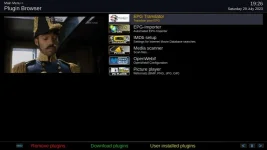
plugins.webp

This is whats on box
Dam i forgot about user installed ones that need to be removed.


Cant add 2nd screenshot
Epg translator
Softcam Oscam latest
Vhannibal quad settings
removed now.
 
Last edited:
Please save your money. Unless someone gives you an H7. One of the biggest let downs is no blindscan. The 2 sat tuners are ok I guess. A 2.5" HDD fits in it fine and so far the latest vix is working well. Mine is currently running in client mode and seems pretty stable. I grabbed and old USB wifi dongle from a Linkbox in the junk and it worked right away with no hunting for drivers.
But no blindscan really sucks. I never use transponder time. NTP is the only way. Unless they changed something my HDD fits entirely inside. Front panel display options should get you what you want. Either channel or time display.
As far as RTC goes. I think I can power it down entirely for a little while before the capacitors discharge and it loses time. But powered down with the remote, the HDD still spins. Its kind of a turd receiver really.
 
Receive the box today from World of Sat, and so far so good, and it is fast. The SSD sticks out at the back, just under 50 mm, and one of the USB needed to be at the front, I'm waiting for USB male to female cable. The 1 TB SSD from Amazon seems so far an excellent buy for £34 if it lasts a few years. I'm still needing more time to set it up to my liking.
 

OpenViX Feeds Status

Back
Top