Superb quality and spec AB-Com PULSe 4K SE. Crazy offer! Only £129! FREE UK DELIVERY! 4K UHD, Enigma 2, Multiboot 4 images & more!...
Superb quality and spec AB-Com PULSe 4K Rev II Twin Satellite tuner only £179! FREE UK DELIVERY! 4K UHD, Enigma 2, SATA HDD facility, Multiboot 4 images & more!...

Zgemma H7S front panel

  • Thread starter Thread starter BrianTheTechieSnail
  • Start date Start date
B

BrianTheTechieSnail

Guest
My Zgemma H7S is running OpenVIX 5.3.026 (Release).

The front panel keeps getting in a weird state where when I bring the unit out of "standby" with the red button on the remote:
a) The clock display is frozen (colon not flashing, time not updating)
b) If I use the remote to enter a channel number eg. 2015 then the display is left showing " 201", that is just the first 3 digits of the number.
c) If I use the red button on the remote to go back to "standby" mode the dimmed clock display works fine!

I don't really have any idea what makes it go in and out of this broken mode, I can find no pattern at all, but I think leaving the box alone for an hour or two seems to fix it sometimes.

Anyone got any ideas what could be wrong?
 
Last edited:
Have you got the vfdcontrol plugin installed? It's a system plugin.
I can't remember whether it's needed or not but if it's installed, try removing it and reboot.
 
I haven't added anything extra except some skins (I am using Magic-FHD skin), SAMBA and miniDLNA.
 
THe plugin is called Permanent VDF Clock.
 
Permanent clock puts a clock on the TV screen.
vfdcontrol gives extra options on the front panel clock. If it's installed, remove it. If it isn't, try it.
 
Permanent clock puts a clock on the TV screen.
vfdcontrol gives extra options on the front panel clock. If it's installed, remove it. If it isn't, try it.

I did not mention Permanent clock that is different plugin , I said Permanent VDF Clock. :)
 
THe plugin is called Permanent VDF Clock.

You were the one who brought up Permanent VDF Clock? (which I'm sure is VFD for vacuum filled display).
I only offered a suggestion that adding or removing vfdcontrol might help. You haven't said if you've tried my suggestion.
 
THe plugin is called Permanent VDF Clock.

Seems to only do exactly what it's called, and without any flashing colon.

Parts of the channel number still show until this plugin overwrites them after an effectively random time.

I want it working nicely, the way it sometimes does, but all the time.

I want the clock, with a flashing colon except when keying in a channel number I want to see the digits and after changing channel I want to see the channel number for a few seconds before it flips back to the clock.
 
Last edited:
vfdcontrol gives extra options on the front panel clock. If it's installed, remove it. If it isn't, try it.

Doesn't seem to be completely compatible, or to offer many options.
I uninstalled it again.
 
Correct my mistake :eek: should have said Permanent VFD Clock.
 
Weird.
So far today it's working fine all the time!
(with none of the plug-ins mentioned above installed)
 
I think it's when a recording is in progress the front panel is messed up.
Where do I report this bug?
 
Have you been in to check the settings for panel on openatv you go to menu \ setup \Usage & GUI \STB Display \Display settings
for Record Symbol in use settings you have choices of:
REC, Blinking REC, or Time

You also have same choices for Record Symbol in Standby settings.
 
Have you been in to check the settings for panel on openatv you go to menu \ setup \Usage & GUI \STB Display \Display settings
for Record Symbol in use settings you have choices of:
REC, Blinking REC, or Time

You also have same choices for Record Symbol in Standby settings.

Bingo!

The H7's display can't show those symbols because it is just four 7 segment LEDs.
However the settings aren't ignored as I assumed, instead you need to set things up so that the display is never asked to show anything except numbers, otherwise the display stops updating until later on it again receives 4 numeric digits.
 
Theres a bug in openvix and the display for the H7. When recording the start time freezes on screen, after recording goes back to normal. It should show REC. It's been noted to look further into.
 
Theres a bug in openvix and the display for the H7. When recording the start time freezes on screen, after recording goes back to normal. It should show REC. It's been noted to look further into.

I think it behaves as if the hardware isn't capable of showing "REC".
I've never seen anything except numbers on the display.

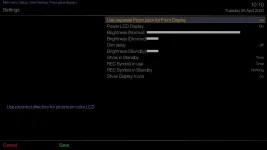
I now have the settings set so that nothing except numbers will be shown and the display doesn't freeze.
screenshot_20200428101034.webp
 
Hmmm, though of course I have seen "boot" on the display.
And now after reflashing from USB I have seen "FLSH".
Weird that "REC" won't show.
If it could manage to show REC and the time alternating that would be super, plus still show channel numbers as you type them on the remote.
But I'm happy enough with the settings I showed and "REC" never showing.
 
There still, in addition to what I worked around above, a problem with the front panel display on the Zgemma H7 freezing when I open certain menus in OpenVIX.
For instance if I press File-List on the remote to choose a movie to play it freezes the front panel display.
(The time doesn't update and the colon stops flashing)
 

OpenViX Feeds Status

Back
Top