Superb quality and spec AB-Com PULSe 4K SE. Crazy offer! Only £99! FREE UK DELIVERY! 4K UHD, Enigma 2, Multiboot 4 images & more!...
Superb quality and spec AB-Com PULSe 4K Rev II Twin Satellite tuner only £149! FREE UK DELIVERY! 4K UHD, Enigma 2, SATA HDD facility, Multiboot 4 images & more!...

[Zgemma H7] Zgemma H7s - issue changing timeshift settings in menus

smipx

Forum Supporter
Donated Member
Joined
Nov 30, 2019
Messages
475
Reaction score
9
Points
18
Hi all,

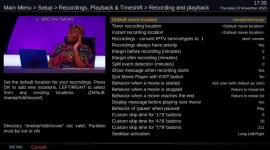
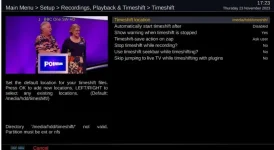
Been having some "challenges" with timeshift over the yeasrs so I decided I would go into the menus and check the timeshift settings. I went into Recordings and Timeshift in the menus and the to "timeshift" but I am getting an error in the screen. It is telling me that the directory media/hdd/timeshift is invalid as it must be ext or nfs. It is of course but the upshot is that I cannot navigate the menus within this screen as the up and down are effectively locked out. I can only press the red button to cancel and come out. If I then go into the recording and playback screen I get the same error message and can't navigate that screen either.

Recordings and Timeshift do work and the debug logs show timeshift files being deleted when I stop timeshift so someting is a bit awry ??

2023-11-23 17_24_00-Zgemma H7 - OpenWebif.webp

thanks
Paul
 
2023-11-23 17_30_30-Zgemma H7 - OpenWebif.webp
Here is the screen from the recording section
 
and here is the filesystem (ext4) for media/hdd:

TARGET SOURCE FSTYPE OPTIONS
/ /dev/mmcblk0p7[/linuxrootfs2] ext4 rw,relatime,data=ordered
├─/proc proc proc rw,relatime
├─/sys sysfs sysfs rw,relatime
│ └─/sys/kernel/debug debugfs debugfs rw,relatime
├─/dev devtmpfs devtmpfs rw,relatime,size=190208k,nr_inodes=47552,mode=755
│ └─/dev/pts devpts devpts rw,relatime,gid=5,mode=620,ptmxmode=000
├─/media tmpfs tmpfs rw,relatime,size=64k
│ ├─/media/hdd /dev/sdb1 vfat rw,relatime,fmask=0000,dmask=0000,allow_utime=0022,codepage=437,iocharset=iso8859-1,shortname=mixed,errors=remount-ro
│ │ └─/media/hdd /dev/sda1 ext4 rw,relatime,data=ordered
│ └─/media/autofs /etc/auto.network autofs rw,relatime,fd=6,pgrp=2159,timeout=5,minproto=5,maxproto=5,indirect
├─/boot /dev/mmcblk0p1 vfat rw,relatime,fmask=0022,dmask=0022,codepage=437,iocharset=iso8859-1,shortname=mixed,errors=remount-ro
└─/var/volatile tmpfs tmpfs rw,relatime
 
and here is the filesystem (ext4) for media/hdd:

TARGET SOURCE FSTYPE OPTIONS
/ /dev/mmcblk0p7[/linuxrootfs2] ext4 rw,relatime,data=ordered
├─/proc proc proc rw,relatime
├─/sys sysfs sysfs rw,relatime
│ └─/sys/kernel/debug debugfs debugfs rw,relatime
├─/dev devtmpfs devtmpfs rw,relatime,size=190208k,nr_inodes=47552,mode=755
│ └─/dev/pts devpts devpts rw,relatime,gid=5,mode=620,ptmxmode=000
├─/media tmpfs tmpfs rw,relatime,size=64k
│ ├─/media/hdd /dev/sdb1 vfat rw,relatime,fmask=0000,dmask=0000,allow_utime=0022,codepage=437,iocharset=iso8859-1,shortname=mixed,errors=remount-ro
│ │ └─/media/hdd /dev/sda1 ext4 rw,relatime,data=ordered
│ └─/media/autofs /etc/auto.network autofs rw,relatime,fd=6,pgrp=2159,timeout=5,minproto=5,maxproto=5,indirect
├─/boot /dev/mmcblk0p1 vfat rw,relatime,fmask=0022,dmask=0022,codepage=437,iocharset=iso8859-1,shortname=mixed,errors=remount-ro
└─/var/volatile tmpfs tmpfs rw,relatime
So what does MountManager show? Blue button, vix, mountmanager
 
Hi Twol.

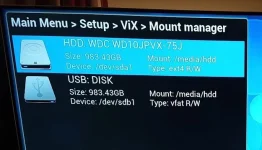
U R a star. In fact I had a small USB stick plugged into the back but for some odd reason the system thought it was a 1Tb USB hard drive of format vfat. In fact the USB stick is a little 4Gb FAT32 formatted drive. It was however corrupted at some point by the Zgemma as when I plugged it in to my PC it came up with a chkdsk prompt!! Go figure :-).

2023-11-23 22_51_13-Photo - Google Photos.webp

In any event the OpenVix was reading it as Vfat and 983Gb (identical size to the internal SATA hard drive) and also decided to use it for timeshift over and above the proper timeshift location used for eon's

Now...... Had a chance to fiddle with the timeshift settings and I also fixed my other bugbear. As it was, with Timeshift, if I paused a program and then used the 3,6,9, buttons to jump through it (e.g. past adverts) then, if I inadvertantly pressed 3 or 6 or 9 and it took be beyond the end of the current shifted recording then a most odd thing happened. the system went into a bit of a limbo situation where timeshift was still active but the TV program went to real time. I could not press "stop" and get the usual prompt to save / discard timeshift nor could I press pause again to re-pause the live program. The only way to get the pause button to work again was to press the stop button twice (to get a red cross in the top left) or change channel and change back again. That then terminated the orginal timeshift session and allowed me to pause (timeshift) again.

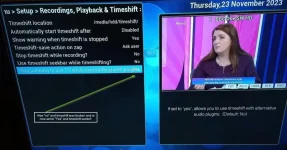
Well-ie well well well (as Art Garfunkel in "Detectorists" would say) - If I set the setting in timeshift that is called "Skip Jumping to live TV........." to yes it fixes the issue by the back door. It then does not seem to allow you to skip past the end of the timeshift file and so you have to press stop to stop it rather then being kicked into a limbo state. Problem solved but...... This setting is meant to relate to allowing Timeshift to work with alternative Audio Plugins - why that would be the case and why it would seem to fix it is a mystery to me.

Thanks
Paul
 

Attachments

  • 2023-11-23 22_55_11-Photo - Google Photos.webp
    2023-11-23 22_55_11-Photo - Google Photos.webp
    50.6 KB · Views: 6

OpenViX Feeds Status

Back
Top