Superb quality and spec AB-Com PULSe 4K SE. Crazy offer! Only £99! FREE UK DELIVERY! 4K UHD, Enigma 2, Multiboot 4 images & more!...
Superb quality and spec AB-Com PULSe 4K Rev II Twin Satellite tuner only £149! FREE UK DELIVERY! 4K UHD, Enigma 2, SATA HDD facility, Multiboot 4 images & more!...

[ABM-DVB-S/S2] ZoomZoomLuke's Custom 28.2 xml file

Status
Not open for further replies.
Because that is the way E2 numbers the channels. You can't repeat channel numbers.
 
Because that is the way E2 numbers the channels. You can't repeat channel numbers.

Thanks @Huevos - no problem if E2 numbers the channels in that way, but LCN's are also available, so why not use the LCN as the "display" number within the bouquet for what is after all only one actual channel coming from the transponder. I can't imaging a reason to want to "zap" to 2001, versus the "LCN" - sorry perhaps I am assuming too much?

Virtual numbering to create bouquet lists - completely understandable for absolute referencing, but perhaps consider the channel number that is displayed?

Also I asked about the back-up of this folder and the notation in the readme file?

Thanks!
 
You can add any folder or file to be backed up. Just press menu to add it. It is unlikely that we will add the location to be backed up as standard, becaue some providers use files in that location as part of the process. They may need to be updated.
 
You can add any folder or file to be backed up. Just press menu to add it. It is unlikely that we will add the location to be backed up as standard, becaue some providers use files in that location as part of the process. They may need to be updated.

Thanks - I never knew! I see then that yellow button allows you to select folders / files
 
Don't Think this has been mentioned but since ITV Encore HD changed frequency a couple of weeks ago its has been available again

you can add ITV Encore HD to your white list on line 214

if you Have HD swap enabled you may wish to add the following to line 174 <channel number="269" with="123" /><!-- ITV Encore HD -->
 
Just done a full clean flash of vix apollo 166 on a duo2 and downloaded zoomzoomlukes xml, everything is working fine but
Just wondering where the Sky UK (SD) swap channel option is for Sky UK (SD) Republic of Ireland?
The main bouquet starts at number 103 TV3 and number 104 is missing which should be TG4,
Channels RTE 1 and RTE 2 should be numbers 101 and 102 but they are numbers 161 and 162 and TG4 which should be 104 is 163
The swap channel option is there for every area bar Republic of Ireland.
I tried the xml from the feeds and this site but same results, I'm probably missing something simple
Any idea's
Thanks in advance
 
Last edited:
ZoomZoomLukes is already built into ViX's ABM, why download? sky UK (SD) is ZoomZoomLuke's file.
When you say ROI swap, do you mean the setanta ireland sports in the UK sports folder?
 
1. The numbering for Sky ROI and SKy UK are different. Unless there is some extra coding, differentiating between the regions so that different swaps are used will be difficult. One of the reasons UK countries were split.
2. There was a ROI version of teh file. Hardly any feedback was given, so that never made it to the feeds.
3. Dont forget the non-indexed channels.
4. I have misgivings about the RO region having been used. The debug log will aid clarification/confirmation.
 
ZoomZoomLukes is already built into ViX's ABM, why download? sky UK (SD) is ZoomZoomLuke's file.
When you say ROI swap, do you mean the setanta ireland sports in the UK sports folder?

I thought there maybe a difference between the xml on the feeds and the one on this thread, There isn't, My mistake for thinking there was :)
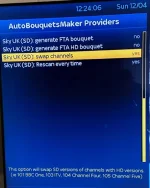
The option I'm talking about is in the pick below, in yellow. That option isn't there on the ROI area of the Sky UK (SD)
IMG_20150412_122405.webp

Please post your debug log so we can replicate this exactly.
There was no crash so apologies if I gave that impression, I was trying to explain about a channel number issue on the Main Sky UK (SD) ROI Bouquet :thumbsup:

1. The numbering for Sky ROI and SKy UK are different. Unless there is some extra coding, differentiating between the regions so that different swaps are used will be difficult. One of the reasons UK countries were split.
2. There was a ROI version of teh file. Hardly any feedback was given, so that never made it to the feeds.
3. Dont forget the non-indexed channels.
4. I have misgivings about the RO region having been used. The debug log will aid clarification/confirmation.
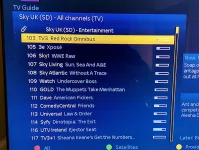
If you see the Pic below in the Sky UK (SD) All Channels Bouquet, the channels start at number 103, It should start at 101 and RTE1 should be Channel 101, Channel 102 should be RTE2 but currently they are numbers 161 and 162.
Number 104 on the Sky UK (SD) All Channels Bouquet is also missing and that should be channel TG4, it's currently number 163.

There was no crash on the box, Everything is working perfect but just wondering why channels 101, 102 and 104 are missing in the main bouquet,
It's not a big issue as the channels are there but further down the channel list. They're just not the same way they would be if a SKY ROI scan was done.
I still wouldn't change from zoomzoomlukes xml as its brilliant as too is vix, but just thought I'd ask. :)

IMG_20150412_121411.webp
 
Crash logs and debug logs are different. Huevos made a change to ABM so that the exact settings used are recorded in the debug logs. This takes the guesswork out of trobleshooting. This leads to quicker fixes. You will have to enable debug logs. Please see this thread
http://www.world-of-satellite.com/showthread.php?44783-ABM-support-questions

You are right, the ROI region is not included in the filter list for swaps. The channel numbers are different so having swaps for ROI in the same file is going to be an issue. We may end up adding an ROI version. There was hardly any feedback given after a file was uploaded. Since then Huevos has added obtaining not-indexed chanensl too. However, still need to address the wrong/missing chanenls

You may find it beneficial to refer to guides for obtaining screen shots.
 
Crash logs and debug logs are different. Huevos made a change to ABM so that the exact settings used are recorded in the debug logs. This takes the guesswork out of trobleshooting. This leads to quicker fixes. You will have to enable debug logs. Please see this thread
http://www.world-of-satellite.com/showthread.php?44783-ABM-support-questions

You are right, the ROI region is not included in the filter list for swaps. The channel numbers are different so having swaps for ROI in the same file is going to be an issue. We may end up adding an ROI version. There was hardly any feedback given after a file was uploaded. Since then Huevos has added obtaining not-indexed chanensl too. However, still need to address the wrong/missing chanenls

You may find it beneficial to refer to guides for obtaining screen shots.

Thanks for clearing that up, appreciated :thumbsup:
 
I was just trawling through this post and had a look to see if the file was already on mine and it is (slightly older version ) When I look in PROVIDERS ORDER I see this
sat_282_sky_uk
sat_282_sky_irl
sat_282_sky_uk_zzl
But when I look in PROVIDERS it's not there - where is it ?

Will
 
Sheffield SD should be fine as it's enabled for swapping. There shouldn't be any HD sections. The channel swap option should then show and be set up for how you want.

View attachment 36340

(i'm sure you have, but ensure 'Configure -> Setup Mode -> Expert is enabled' :) )

Ahhh I was expecting to see this. ^

Should I swop the file for the latest one ?

Will
 
Should I swop the file for the latest one ?
No, because latest version will not be compatible with your image.

Also from next build onwards this provider file will no longer be embedded in the image. Something new instead that doesn't require 2 different files to be maintained. :D
 
With the Event ordered i checked Sky Sports Box Office HD it cleared fine for me during last nights WWE Extreme Rules

'SkySpBoxOffHD'

Line 206 now looks like this
Code:
hdsports = ['BT Sport 1 HD','BT Sport 2 HD','ESPN HD','BoxNation HD','SkySpBoxOffHD']

after updating
SkySpBoxOffHD will be placed in All channels & Sports Fav
 

Attachments

Status
Not open for further replies.

OpenViX Feeds Status

Back
Top