Superb quality and spec AB-Com PULSe 4K SE. Crazy offer! Only £129! FREE UK DELIVERY! 4K UHD, Enigma 2, Multiboot 4 images & more!...
Superb quality and spec AB-Com PULSe 4K Rev II Twin Satellite tuner only £179! FREE UK DELIVERY! 4K UHD, Enigma 2, SATA HDD facility, Multiboot 4 images & more!...

[VU+ Duo] New VIX Image Vu+ Duo Version 2.4 15/05/2012 - DISCUSSION ONLY -

apologies. seems the problem had was actually due to a game setting on the tv which intensifies the brightness of the screen. It seems the TV has difficulty maintaining this game setting for an extended period of time and starts to play up. My son had changed to this setting but when I I put it back to normal mode everything has been fine. apologies for the inference that this was a vix problem

well at least you know now.
 
I upgraded yesterday, (from v 204) including the online updates this evening, all was working fine.

I was watching a film a little while ago, a separately provided .avi file, and was almost at the end of approx 3 hour movie when the box suddenly rebooted and is now stuck on starting (on screen) and Vu+ in the display. I can't access via telnet.
Am I going to have to reflash? Any ideas?

***********************************************

Scratch that, after being stuck as described for approx 15 mins, all of a sudden the box sprang back into life. Longest boot-up I've ever seen. Now it appears to be working properly again.
 
On channel change in the Magic-HD skin when I zap to a channel or just press the ok button whilst on a channel I get extra buttons which I would like to hide.
THe buttons are Single EPG (red) Timers (green) Search (orange) Extensions (blue)
I am pretty sure they were not in the old image
Can these buttons be hidden from the menus or are they a permanent feature of the skin ?
LoL, they were there a long time ago; I removed them as being not needed, then I got many requests to get them back again, and now.....
I can't please all, as you see.

apologies. seems the problem had was actually due to a game setting on the tv which intensifies the brightness of the screen. It seems the TV has difficulty maintaining this game setting for an extended period of time and starts to play up. My son had changed to this setting but when I I put it back to normal mode everything has been fine. apologies for the inference that this was a vix problem
Anyway: good to see that you sorted it!

I upgraded yesterday, (from v 204) including the online updates this evening, all was working fine.
I was watching a film a little while ago, a separately provided .avi file, and was almost at the end of approx 3 hour movie when the box suddenly rebooted and is now stuck on starting (on screen) and Vu+ in the display. I can't access via telnet.
Am I going to have to reflash? Any ideas?
***********************************************
Scratch that, after being stuck as described for approx 15 mins, all of a sudden the box sprang back into life. Longest boot-up I've ever seen. Now it appears to be working properly again.
Hmmm, doesn't sound good. Anyway: a crash means a crashreport: please provide that to us.
 
Thanks sivhead thats were the problem was..now using usb drive ..
ps fantastic image great work guys....
 
Last edited by a moderator:
When i install new vix 2.4, do i have to initialise my HDD or just remount?

you dont need to do anything to the hdd or usb as long as they were correctly mounted on the 2.4 image they will still be mounted when the new image is booted
 
LoL, they were there a long time ago; I removed them as being not needed, then I got many requests to get them back again, and now.....
I can't please all, as you see.
.

So it is part of the skin then. I would have turned it off it was in the menus. The buttons look ok in the VIX-HD Skin but looks out of place in the Magic-HD skin. Thats just my opinion. Even with the buttons in I am still going to stick with Magic HD Skin even if I am never going to use the buttons. :lifting: IMO its the best skin out of all the skins including blackhole, VTI, PLI (wait not pli as its in there too) Great image and great skin.... much appreciated. Dont change the skin for me you cant please everyone as you say...
 
Guys I am having probems with CCcam ecm times from a local card using wireless networking (cc cam 2.2.1).I had the same problems with vix 2.3 on the new kernal. Funnily 2.3GM works with out any bother .Ecm times keep jumping from .190 to .350 to sometimes 2.345 with the resulting glitching ..why would ecm times jump rapidly on the new image when previous versions worked fine ..I have tried 3 dongles all with the same result (Belkin FD7050,vonets etc ).I have a nova -t dvb connected also .I am unable to wire the network so I will prob have to go back to 2.3GM to have a stable ecm time unless anybody has any solutions why the ecm times keep jumping all over the place when they should be fairly constant...(could this be related to the memory leak with some duos???)Love the new version by the way and would love to be able to use it if I got stable ecm times...:confused:
 
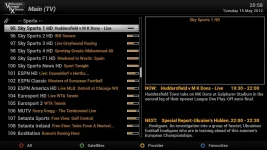
As always great work guys, fantastic new image installed with no problems at all. :thumbsup:I only have one question though, I noticed from the image posted here (attached) that there are channels numbers in front of a channel names and I like that, but unfortunately the numbers are not appearing in my screen!? Any idea why? Thanks
Nu7GU.webp
 
Channellist mode select menu/setting and enable it again.

I think default is on, probably you set it off
 
hi guys going to flash the new image .im using a really old vix image so how do i load the new bootloader first ?
 
hi guys going to flash the new image .im using a really old vix image so how do i load the new bootloader first ?

Exactly the same way you flash a new image. Copy the vuplus folder and contents to an empty fat32 formatted memory stick and then boot from it. The bootloader doesn't take long to flash. Once done go ahead and flash 2.4.
 
Guys I am having probems with CCcam ecm times from a local card using wireless networking (cc cam 2.2.1).I had the same problems with vix 2.3 on the new kernal. Funnily 2.3GM works with out any bother .Ecm times keep jumping from .190 to .350 to sometimes 2.345 with the resulting glitching ..why would ecm times jump rapidly on the new image when previous versions worked fine ..I have tried 3 dongles all with the same result (Belkin FD7050,vonets etc ).I have a nova -t dvb connected also .I am unable to wire the network so I will prob have to go back to 2.3GM to have a stable ecm time unless anybody has any solutions why the ecm times keep jumping all over the place when they should be fairly constant...(could this be related to the memory leak with some duos???)Love the new version by the way and would love to be able to use it if I got stable ecm times...:confused:
No cardsharing talk (WAN or LAN). Please read the forum rules in the menu above.
 
No cardsharing talk (WAN or LAN). Please read the forum rules in the menu above.
sorry was just using the ecm times to show that the wireless networking was not responding as quickly as in previous versions ..:confused:
 

OpenViX Feeds Status

Back
Top