Superb quality and spec AB-Com PULSe 4K SE. Crazy offer! Only £129! FREE UK DELIVERY! 4K UHD, Enigma 2, Multiboot 4 images & more!...
Superb quality and spec AB-Com PULSe 4K Rev II Twin Satellite tuner only £179! FREE UK DELIVERY! 4K UHD, Enigma 2, SATA HDD facility, Multiboot 4 images & more!...

[VU+ Duo] New VIX Image Vu+ Duo Version 2.4 15/05/2012 - DISCUSSION ONLY -

I've just installed the new VIX image, but I can't seem to download any software updates or download plugins. It says: "Sorry, feeds seem to be in an unstable state."


Is the online feeds down?

no thats rite, we marked the 2.4-112 image as unstable as it is largly untested after a major update, you can still install this update but to do this you must tell the image you wish to install potentially unstable updates.

Menu > Setup > System > Online update > Set allow unstable updates to YES. make a backup first just incase.

Now just because it is marked as unstable does not mean there is any thing wrong with the image but were just being cautioush.
 
A few remarks regarding Vix Night HD skin:

SlimChannelSelection:
The title seems doubled with a bit offset. I guess you dont need to code the Title-widget when using the panel name="MenuPanel" which include title in itselfe.

IMDB:
The starsbar is displaying wrong numbers of stars. I guess you have to change size of <widget name="starsbg" and <widget name="stars" from "240,21" to "210,21".
1. The issue with SlimChannelSelection is fixed in 2.4.112 at least partially. I think a code line is removed by a mistake as the EPG icon now is gone.
2. I cant see any changes regarding starsbar in IMDB. Not a big issue but may be possible to take a look at it?
3. The last line in the label containing ExtendedEventDescription in Vix Graphical Epg Pig is cutted off half. Not a big issue but may be possible to take a look at it when you have spare time?
 
Thank for the new image, it feels completely stable. I've not experienced a single crash / freeze since installing, where I was getting at least 4 or 5 every day with 2.3.204.

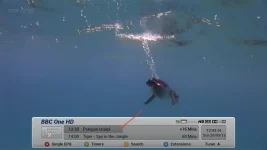
Up untill now there used to be an option for the program progress bar to be displayed in the info bar & I think you could switch it on or off.
Has this feature been removed as I can't find it anywhere?

Cheers
micscave
 
1. The issue with SlimChannelSelection is fixed in 2.4.112 at least partially. I think a code line is removed by a mistake as the EPG icon now is gone.
2. I cant see any changes regarding starsbar in IMDB. Not a big issue but may be possible to take a look at it?
3. The last line in the label containing ExtendedEventDescription in Vix Graphical Epg Pig is cutted off half. Not a big issue but may be possible to take a look at it when you have spare time?

1: i'll fix
2: i'll fix
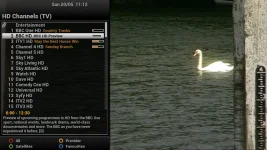
3: looks ok here see below
 

Attachments

  • slimch.webp
    slimch.webp
    94.8 KB · Views: 80
Thank for the new image, it feels completely stable. I've not experienced a single crash / freeze since installing, where I was getting at least 4 or 5 every day with 2.3.204.

Up untill now there used to be an option for the program progress bar to be displayed in the info bar & I think you could switch it on or off.
Has this feature been removed as I can't find it anywhere?

Cheers
micscave


not for infobar only in channelselection screen. infobar has never had the option.
 
not for infobar only in channelselection screen. infobar has never had the option.

Hi andy
I got this pic from the release page of 2.1 as I can't find a pic of 2.3. It clearly shows the progress bar above the signal strength. Maybe it has never been switch off and on able but was part of the info screen. No biggy but is there any way I can add it back
 

Attachments

  • infobar[1].webp
    infobar[1].webp
    27.4 KB · Views: 65
Last edited:
Slightly confused about the bootloader, as the text file says:

Rev. 3.0
- Increase the update usb file size to 128M Bytes
- Change the flash memory map(kernel size : 4M, /boot : 2M)

Is this necessary? If so, where do I do it.
 
The bootloader is required for use with all Kernel 3.1.1 based images, so if you were using any ViX 2.3 image build 153 and above you will be fine, That was just a reminder for those still using older kernel based images to update their bootloader first before loading ViX 2.4.

To flash the bootloader it's the exact same procedure as flashing a image and takes just a few seconds. You can get the bootloader in the release thread with the image.
 
It's the changelog: it tells you what it does.

Ah yes, duh. Thanks :D

The bootloader is required for use with all Kernel 3.1.1 based images, so if you were using any ViX 2.3 image build 153 and above you will be fine, That was just a reminder for those still using older kernel based images to update their bootloader first before loading ViX 2.4.

To flash the bootloader it's the exact same procedure as flashing a image and takes just a few seconds. You can get the bootloader in the release thread with the image.

I was running 2.3 so I won't need to use the bootloader, thanks for the help again.
 
Ah yes, duh. Thanks :D


I was running 2.3 so I won't need to use the bootloader, thanks for the help again.

That depends on the version your running.

2.3 GM - 2.3-133 used the older 2.6.18 linux kernel so didnt really need the bootloader unless the images were over 64MB in size.
2.3-153 - 2.3-204 Use the new 3.1.1 linux kernel so need the bootloader weather the image is over 64MB in size or not.
 
That depends on the version your running.

2.3 GM - 2.3-133 used the older 2.6.18 linux kernel so didnt really need the bootloader unless the images were over 64MB in size.
2.3-153 - 2.3-204 Use the new 3.1.1 linux kernel so need the bootloader weather the image is over 64MB in size or not.

I was using the 3.1.1 kernel, I remember that.

Finally, as the OP says you can't restore settings/plugins, do I manually have to add all my stuff again, like the tuner settings etc? :(
 
yes thats the best thing to do as there are a lot of changes in 2.4.

i find it best to keep copies of all my usual plugins in one place on a memory stick so when i do need to do a fresh reflash with no restored plugins it only takes me 10 minutes to do.
 
Thanks, well I have all my softcams already saved so that's easy to upload, I'll just redownload the plugins I use, there are only like 5. :)
 
Hi andy
I got this pic from the release page of 2.1 as I can't find a pic of 2.3. It clearly shows the progress bar above the signal strength. Maybe it has never been switch off and on able but was part of the info screen. No biggy but is there any way I can add it back

and still is see screen shot below
 

Attachments

  • infobar.webp
    infobar.webp
    37.2 KB · Views: 79
Can someone please tell me how to activate this slim channel selection? Thanks in advance

in channelselection screen press MENU, than goto settings and activate SIMPLE
 
in channelselection screen press MENU, than goto settings and activate SIMPLE

Thanks Andy, but it's still not working for me, I'm using the default ViX image...

Using an Ultimo btw, do I need to restart the box?
 

OpenViX Feeds Status

Back
Top