Superb quality and spec AB-Com PULSe 4K SE. Crazy offer! Only £129! FREE UK DELIVERY! 4K UHD, Enigma 2, Multiboot 4 images & more!...
Superb quality and spec AB-Com PULSe 4K Rev II Twin Satellite tuner only £179! FREE UK DELIVERY! 4K UHD, Enigma 2, SATA HDD facility, Multiboot 4 images & more!...

[VU+ Duo] New VIX Image Vu+ Duo Version 2.4 15/05/2012 - DISCUSSION ONLY -

Been using since upadate and love it but having problems with EPG not updating so turned off the HDMI controls (sorry cant remember its name) and it updated today! Also when watching recorded programs I could press ok to see the program info, this has gone is there any way to turn it back on? I am using the default Night skin!
Thanks :thumbsup:
 
Just a heads up, downloaded build 119 yesterday and it was constantly crashing so reverted back to stable 96 build for now.
 
Just a heads up, downloaded build 119 yesterday and it was constantly crashing so reverted back to stable 96 build for now.

you need to provide more information.

such as.

was this a online update from a previous version or a clean flash, if it was a update from which previous build ?.
what skin were you using at the time.
what plugins were you using? list all of them wether you got them from the feeds or otherwise.
exactly what was happening ?
was this on all channels of just FTA ?.
do you have crash logs or debug logs from this time and if so please upload them so we can look at them.

the more information you can provide the better chance we have of finding your problem.

dont get me wrong i appreciate your feedback but without more detailed information were just guessing as to the cause of your problem.
 
you need to provide more information.

such as.

was this a online update from a previous version or a clean flash, if it was a update from which previous build ?.
what skin were you using at the time.
what plugins were you using? list all of them wether you got them from the feeds or otherwise.
exactly what was happening ?
was this on all channels of just FTA ?.
do you have crash logs or debug logs from this time and if so please upload them so we can look at them.

the more information you can provide the better chance we have of finding your problem.

dont get me wrong i appreciate your feedback but without more detailed information were just guessing as to the cause of your problem.

I would have provided a crash log but I didn't have it enabled so can you tell me how to do so for future problems?

I upgraded via the menu in vix from the last openvix build. I was using vix day HD. The plugins installed were all the default ones in addition to mgcamd 1.38 vix version which works flawlessly on 96 build. It was just random crashing, the image would freeze but i could still hear the audio of the channel. This happened roughly 4 times in the space of 2 hours. The remote wouldn't respond so I had to restart the box from the back. I thought it was a recording problem as I was recording another programme but I cancelled the recording and the box still crashed. Back to 96 build and no issues so far.
 
Last edited:
well technically thats not a crash as a crash would have shown you a black screen with white text just before enigma rebooted it self, crash logs are enabled as default and saved to /home/root/logs/ debug logs however are set to off as default and only really need to be switched on if you need to log specific behaviour.

as to my original post

was this a online update from a previous version or a clean flash, if it was a update from which previous build ?.
what skin were you using at the time.
what plugins were you using? list all of them wether you got them from the feeds or otherwise.
 
in such cases enable the debug logging feature and upload the logs it generates for the times affected ( logs are running constantly but only write to file once the box is rebooted ).

to enable. menu> setup> system> logs> settings.

debug logs will be saved to the same location as regular crash logs or you can send them directly from the logs manager.
 
No. During the many tests we did on 2.4 before releasing it, we never experienced something like that.
Best to post your crash-logs (if any) and debug-log.
No crash log at all.
The debug log should be there despite the crash log?
 
I did an online update to 119 from 112 today and the infobar has lost all the information about channel /program now and next and snr/agc every thing in the grey overlay panels is blank using night hd skin
plugins as standard install no extra's
cross epg 28.2E
 
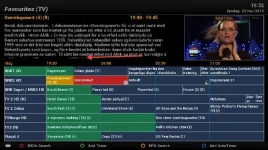
Here is the screenshot. Not a big issue though.
View attachment 17015

In your screenshot the "event" that has the timer is on red, in mine it's the same colour of the rest, and difficult to spot....
Did you change anything to have it this way?

In addition I have the same prob you have with the text cut, but the same happens in the event description, as I use 12 lines ( i like more info..) when the event is on two lines. I wish this could be disabled either from the setup or automatically when there are more that say 8 lines...

G
 
If there is a timer on an event it should be red, it certainly does on mine which is just default + a few odd plugins. The only thing I do EPG-wise is delete timeline.png, too many lines on the EPG for me.

Do you definitely have a timer for the events, or just an AutoTimer which is yet to create a Timer?
 
I am sure there is the timer as I can see the small clock face, both the full - on the right event- and the half one - on the previous and following-

As for plugins I have none (only CCcam) and I am using the default skin. Maybe the fact that I reused the "timers.xml" I saved from the old version (not by restoring the settings, but just saving it on HD and putting it back) has something to do with this? If everyone else's is working maybe I'll try a reflash or to recreate the timers.

G
 
infobar.webp

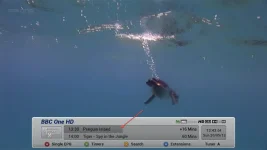
Is there anyway to turn off the darker grey progress bar and change the font back to the font that was in the same Vix 2.3 skin?

Also when changing channels using the numbers on the remote the numbers appear down off centre in the small grey box that appears in the middle of the screen.
 
ever since the 204 update the epg jumps to the next event if less than 15minutes left on the event you are watching this is annoying when browsing down the channel list because it jumps to what is going to be on in 15 minutes time not what is on now
 
ever since the 204 update the epg jumps to the next event if less than 15minutes left on the event you are watching this is annoying when browsing down the channel list because it jumps to what is going to be on in 15 minutes time not what is on now

Try adjusting the Base Time.
Press EPG then menu
 
that makes no difference to the present event only past events quote " choose the interval to which the graphics is rounded off" my problem is the colour band moves to the next event to soon
 
If all your timers are created by AutoTimer, you could always try deleting timers.xml I guess? Perhaps you'd need to use a blank file in case it wont automatically create one.

Also might be worth checking, do you have any user_skin.xml or skin_user.xml in /usr/share/enigma2?
 
maybe I'll try a reflash or to recreate the timers.
Well.. it's weird.

I tried to recreate the timers, you know, delete the old one and create another one exactly the same and this time it worked, almost....

For example I had a timer for two consecutive episodes of a series so I added a timer for the first one and extended the time to the end of the second, the first showed in red the second didn't but it had the full clock face. It seems that the little clock is properly set but the red background isn't. In a case it didn't work the first time but it did the second.

That's what I found out.

G
 

OpenViX Feeds Status

Back
Top